User´s Manual English
DTR 126 11
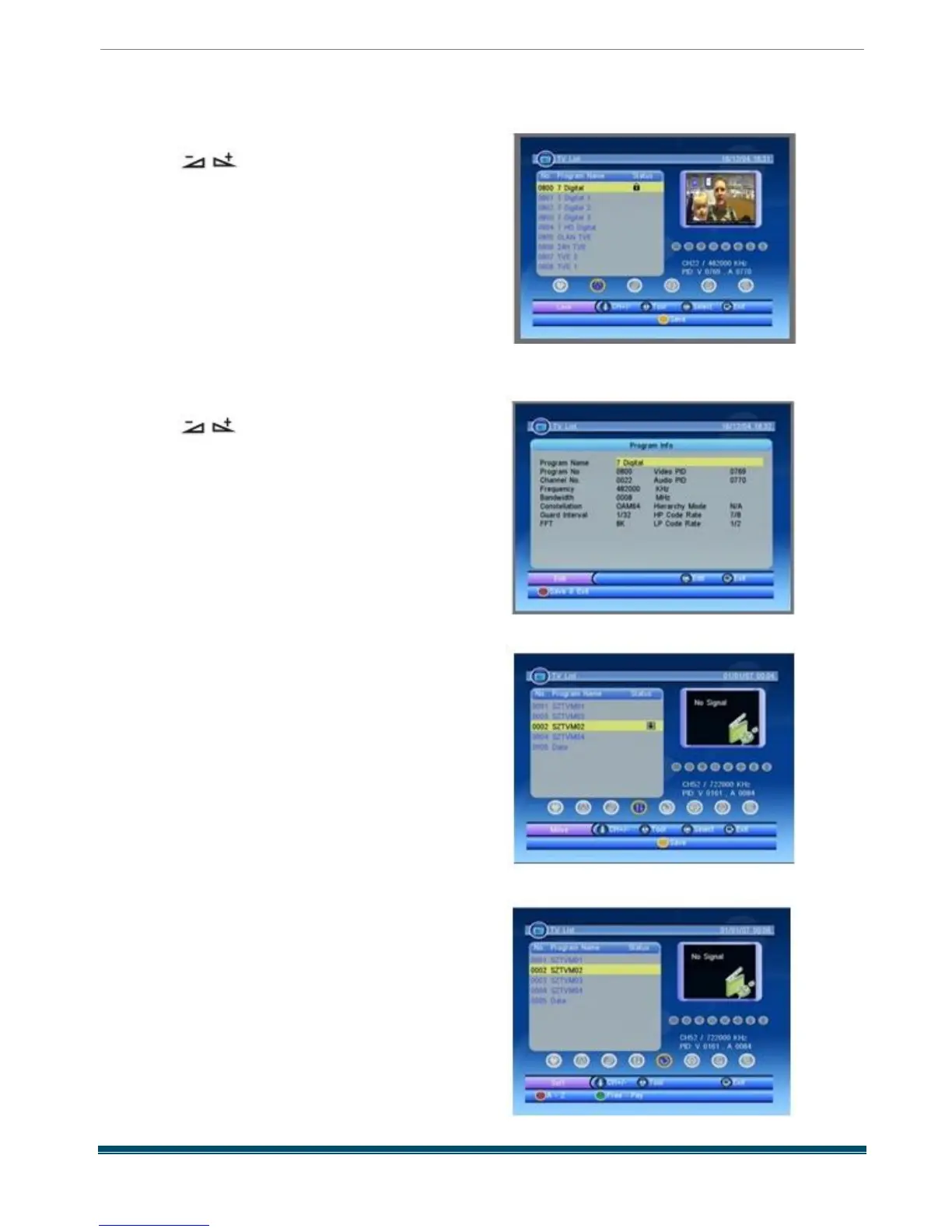
1.1.2 Lock
Pressing keys to select the Lock button ,
and then press PR + ,PR - keys to select the
program you want , press OK key on RCU to
assign the selected channel with lock mark ,
the mark will be disappeared if you press OK
key again , or press [EXIT ] key to cancel the
operation .
1.1.3 Edit
Pressing keys to select the Edit button ,
press OK key to enter the window as besides ,
press OK key to edit the program name and
press EXIT key to quit , or you can press red
key to save and exit
1.1.4 Move
Pressing OK key there will be a moving mark
on the right of the selected channel .
Then , you can move the selected channel to
the position where you want to place it by press
[Up /Down ] key . And press [OK ] key to confirm
your decision .
1.1.5 Sort
Name (A -Z ) : The ascending order , omitting the
$ character , the number is ahead , then the
capital letter , at last the lowercase .
Name (Z -A ) : The opposite order of the above
Name (A -Z ) .
Free -Pay : All FTA programs are listed ahead ,
while all scrambled programs are listed last



 To Next Page