/
6
(
"
#
&
4
5
AUTO
PJT L/F
MANU
TEMP
TEMP
Min Max
Mid
CONT
MANUAL
AUTO MANU
TEMP
MANUAL
AUTO MANU
TEMP
MANUAL
AUTO MANU
TEMP
MANUAL
/
6
(
"
#
&
4
5
AUTO
PJT L/F
MANU
TEMP
TEMP
Min Max
Mid
CONT
MANUAL
AUTO MANU
TEMP
MANUAL
AUTO MANU
TEMP
MANUAL
AUTO MANU
TEMP
MANUAL
PROJECTOR
LOW FREQ
POWER
AUTO
How to Use the Remote Controller
- How to Use the Product by Mode
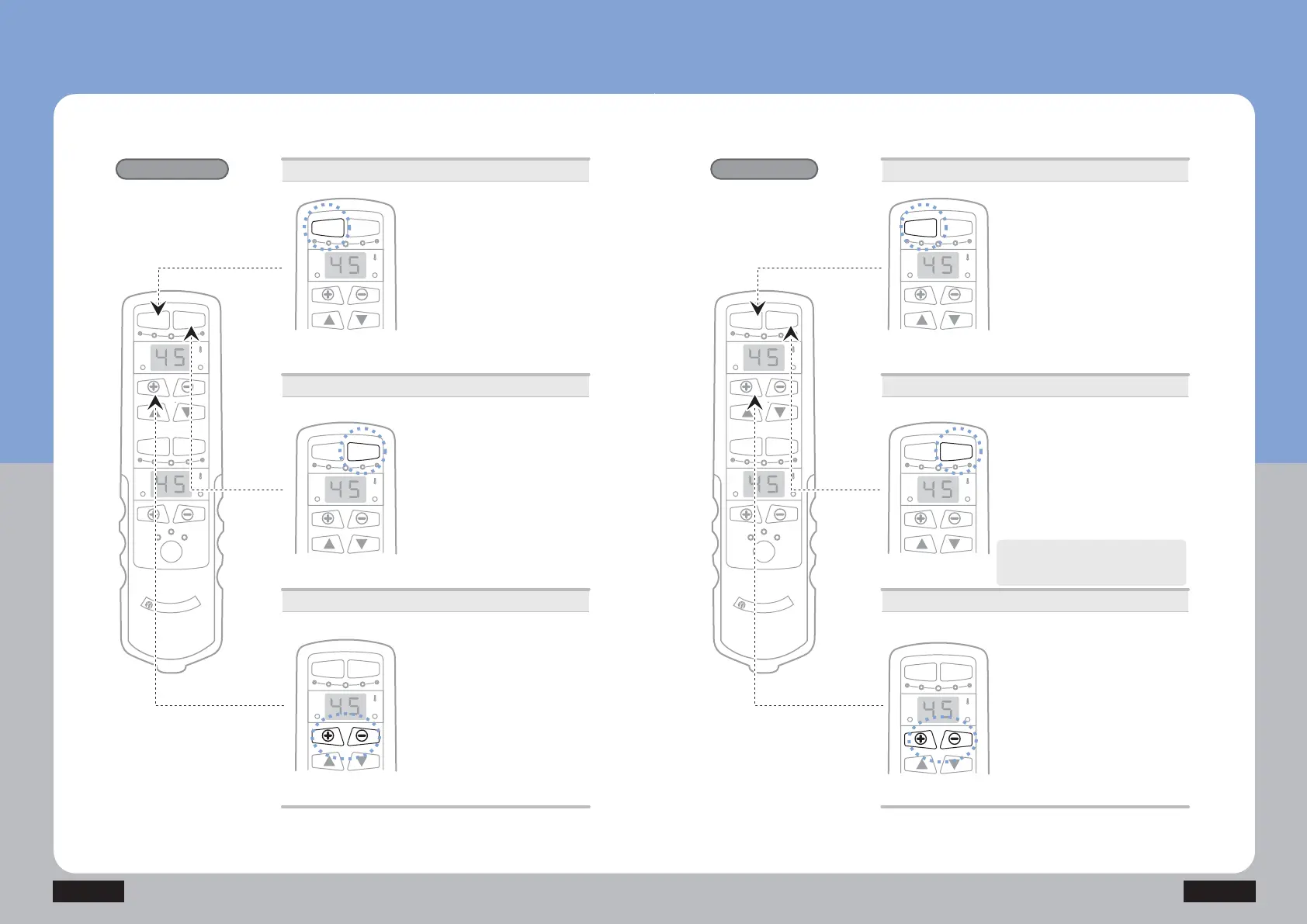
Auto ྙ Mode
Round-trip acupuncture
function
Round-trip massage
function
Power supply
Auto ⴙ Mode
Temperature control
Auto ྙ Mode
ྚ Press the Auto button to operate
the internal projector.
No separate operation is necessary
in the middle as the product stops
automatically after operations.
The product automatically stops after
round-trip acupuncture operations for
about 38 minutes.
Auto ⴙ Mode
ྚ Press the Auto button twice in a
row to operate the internal projector.
No separate operation is necessary
in the middle as the product stops
automatically after operations.
The product automatically stops after
round-trip massage operations for about
38 minutes.
Press the Auto button to operate Auto
ྚ Mode while Auto ྙ Mode is
operating.
Power supply
Temperature control
PROJECTOR
LOW FREQ
POWER
AUTO
POWER
AUTO
POWER
AUTO
POWER
AUTO
POWER
AUTO
POWER
AUTO
POWER
AUTO
NM-5000
How to Use the Product
ⴘ Press the power button.
· Check out the connecting conditions
of the remote controller.
· Press the power button once : On
Press it once again : Off
ⴘ Press the power button.
· Check out the connecting conditions
of the remote controller.
· Press the power button once : On
Press it once again : Off
ྛ Control temperature with +/- button.
(Moderate temperature: 55~60)
· Range of temperature setting for
internal projector: 40~70
· Temperature setting unit
40~55: Temperature setting per 5
55~70: Temperature setting per 1
ྛ Control temperature with +/- button.
(Moderate temperature: 55~60)
· Range of temperature setting for
internal projector: 40~70
· Temperature setting unit
40~55: Temperature setting per 5
55~70: Temperature setting per 1


 To Next Page