MEGAWATT CARBON BIKE MANUAL | 3 1
GETTING FAMILIAR WITH POWERTRAIN AUTO SHIFT, COAST SHIFTING, MANUAL SHIFTING AND PUSH MODE
Now your bike is ready to ride, you will need to familiarise yourself with shifting and Push Mode. The Megawatt Carbon
Eagle Powertrain has an Auto Shift feature. The Auto Shift setting will automatically shift the Megawatt Carbon into the
appropriate gear when pedalling and coasting. The Powertrain system uses pedal speed input and bike speed to select
the most suitable gear. Auto Shift can be overridden by making a manual shift with the Control Pods and Auto Shift will
reactive after 5 seconds.
TURNING AUTO SHIFT ON & OFF
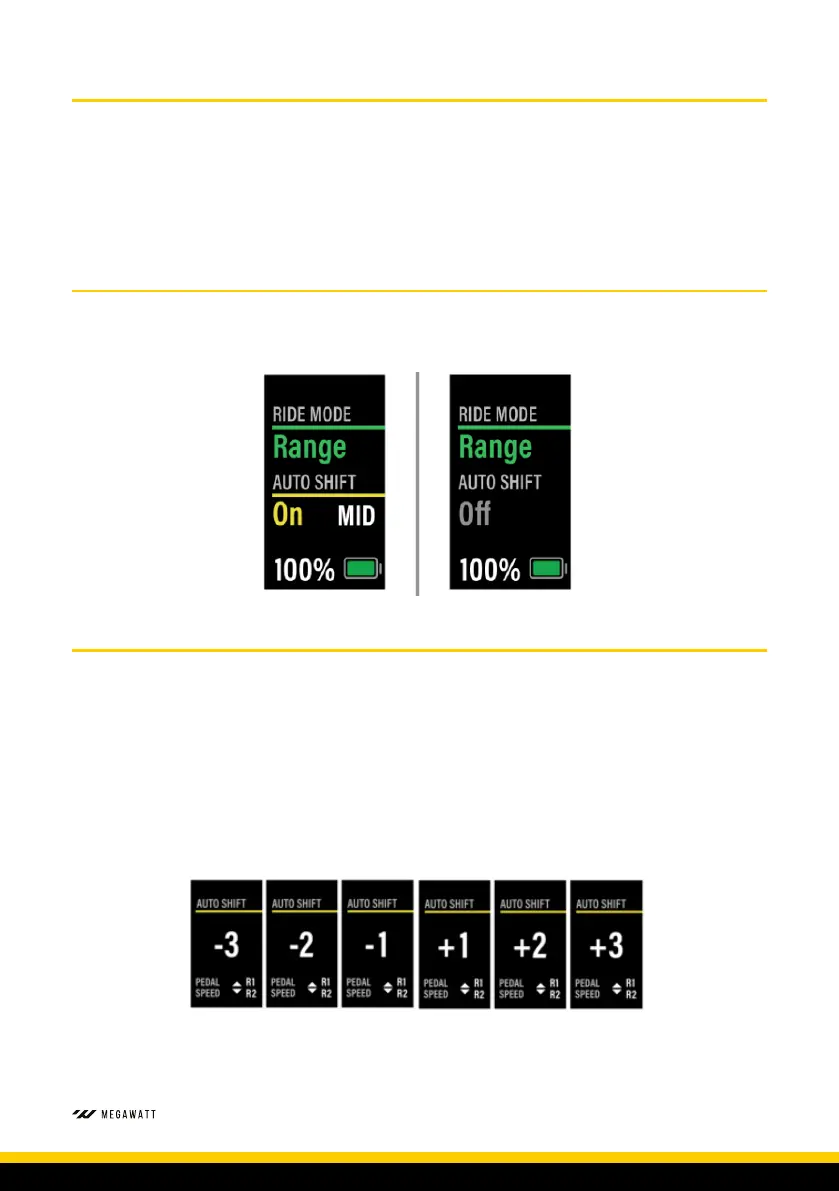
To toggle Auto Shift on & off, press and hold the top button on the right-side Pod. On/off will be shown on the Bridge
Display.
ADJUSTING AUTO SHIFT BASED ON CADENCE
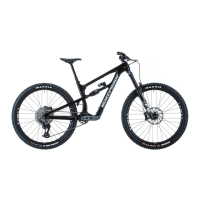
Powertrain allows for adjustment of Pedal Speed (cadence) while using Auto Shift. By default, the Pedal Speed is set to
MID, this is recommended by SRAM but can be tweaked to your preference. To increase cadence, adjust to +1, +2, +3, to
reduce cadence adjust to -1, -2, -3.
• To open the Pedal Speed menu, press and hold the right-hand POD Controller lower button. Releasing the
button will allow access to the speed settings, after 3 seconds of no input the Bridge Display will return to
the home page.
• To go down the Pedal Speed -3, -2, -1 (slower cadence) settings, use the lower Pod Control Button.
• To go up the Pedal Speed +1, +2, +3 (higher cadence) settings, use the upper Pod Control Button.


 To Next Page