MEGAWATT CARBON BIKE MANUAL | 6 3
SECTION 10 - TROUBLESHOOTING & ERROR CODES
The following will help with diagnosing any unlikely faults with the Powertrain system. If the fault cannot be resolved,
please consult with your Nukeproof Dealer.
BATTERY
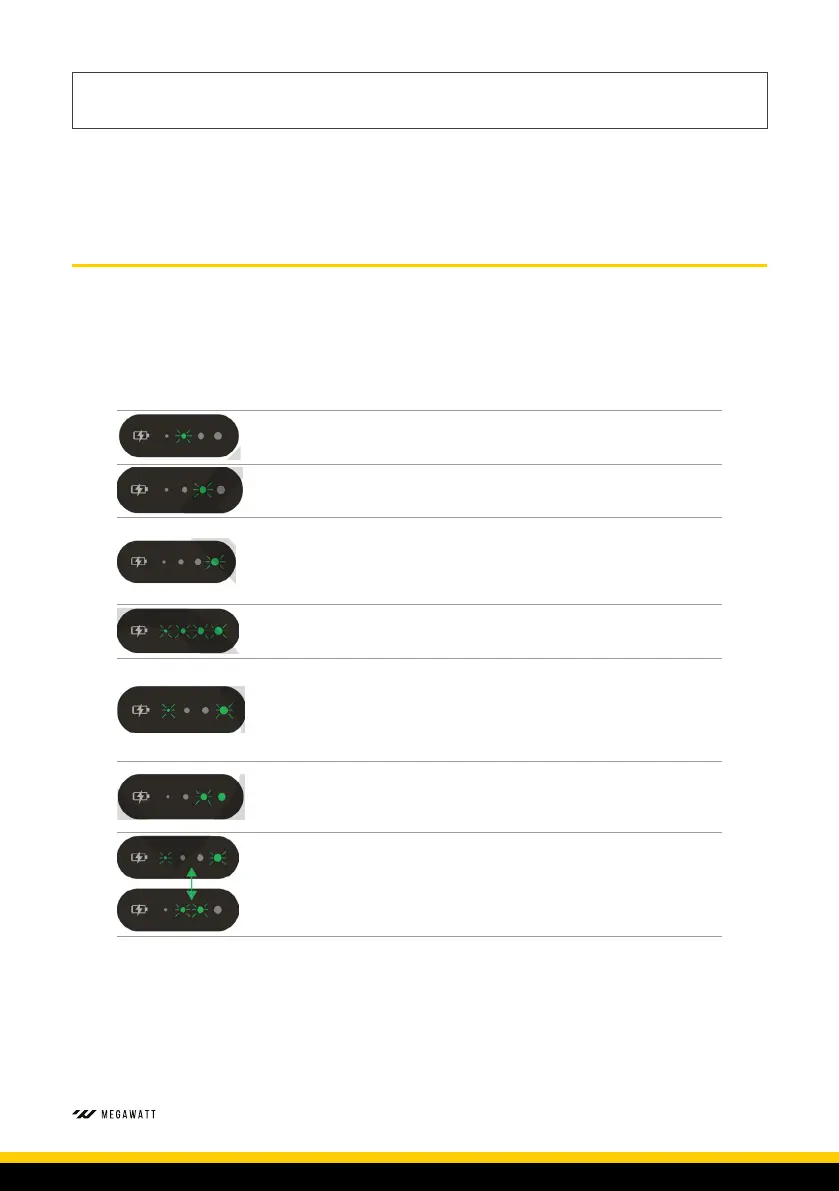
SRAM Powertrain battery fault codes are presented as a sequence of LED lights to assist diagnoses. A one second press of
the battery button could result in any of the following sequences of flashing LEDs. If any of the sequences are shown, the
battery and/or charger may have a critical fault. Reference the LED position and flashes per second to reference the fault
and solution below.
HOLD BUTTON 1 SECOND RECOMMENDED SOLUTION
LED Flash 2 Per Seconds
-
Low Voltage Protection
Using SRAM Powertrain charger, charge
the battery.
LED Flash 2 Per Second
-
High or Low Temperature Protection
Move SRAM Powertrain Battery to room
temperature location.
LED Flash 2 Per Second
-
Short Circuit Protection
Remove battery from the bike. Check battery
and cable for obstructions.
Clean and remove short circuit objects
with a non-conductive tool.
Slow flash all LEDs 1 Per Second
-
Long Term Battery Use/Battery Health Poor
Contact your Nukeproof Dealer for a
Battery Health Check.
LED Flash 2 Per Second
-
Safety Protection
Immediately stop riding or charging. For a
period of 30 minutes please let the battery
rest.
Contact your Nukeproof Dealer for a
Battery Health Check if fault returns after
rest period.
LED Flash 2 Per Second
-
Battery Protection or Safety Protection
Immediately stop charging and contact
your Nukeproof Dealer for a Battery Health
Check.
LED Alternative Flash 2 Per Second
• No communication between Powertrain
Battery and SRAM Charger - Or
• Overcurrent Protection
Remove battery from the bike. Check
battery and cable for obstructions.
Clean and remove short circuit objects
with a non-conductive tool.


 To Next Page