3736
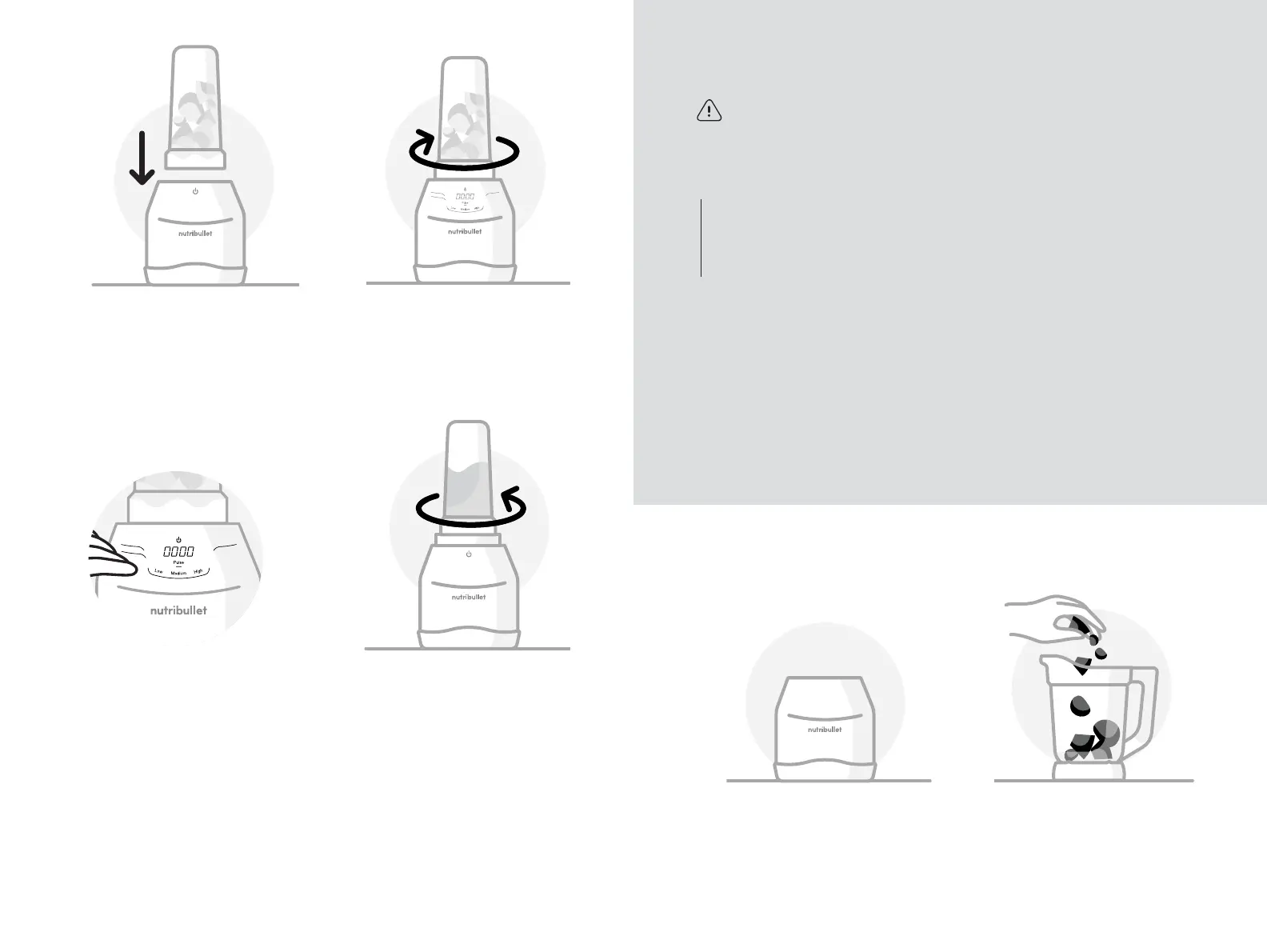
7 Select one of the programs
for blending in the
nutribullet
®
Cup: Frozen
Drinks, Smoothie, or
Dressing. Each mode will
activate a preset blending
cycle. You can also select Low,
Medium, or High speed for
your blend.
8 Once blending has stopped or
you’ve achieved your desired
consistency, twist the Cup
counter-clockwise to unlock
and remove it from the Motor
Base. You will hear a “click”
when the Cup unlocks.
NOTE: Do not use the Extractor Blade
as a storage lid. Pressurization of the
contents may occur due to the natural
fermentation of the ingredients. Use
the To-Go Lid to store.
5 Flip the Cup downward and
set onto the Motor Base.
6 Twist the Cup clockwise onto
the Motor Base to lock it into
place. (A “click” signals that
the Cup is locked.) This will
illuminate the Control Panel.
Smoothie
Dressing
Frozen Drinks
To prevent injuries while
blending hot, warm, or
carbonated ingredients, ONLY
use the Blending Pitcher
with the vented Pitcher Lid.
NEVER use the nutribullet
®
Cups to blend hot, warm, or
carbonated ingredients.
• ALWAYS ax the vented
Pitcher Lid to the Blending
Pitcher with the spout down
and closed before blending
to prevent ingredients from
splashing or hot ingredients
from splattering.
WARNING!
nutribullet
®
Blending Pitcher
• CAUTION! When opening
the Pitcher Lid, be mindful of
escaping hot steam or the
splattering of hot ingredients.
• NEVER open the Pitcher Lid
or Easy-Pour Spout while
blending. Only use the Vented
Lid Cap opening to add
additional ingredients during
blending. Always reinstall the
Vented Lid Cap when finished
adding ingredients.
• Only use the Tamper to push
ingredients closer to the blade.
Never use your hand or other
utensils.
Using the Blender Pitcher
1 Place the Motor Base on a
clean, dry, and level surface.
2 Add ingredients to the Pitcher.
Don’t exceed the MAX line.



 To Next Page