18
Owner’s Manual
CONTROL PANEL
Main Display Interface
beans
poultry
meat/
stew
soup
multi
grain
rice
canning
start/stop
bake
potatoes
steam/
veggies
sh
time
texture
delay
warm
sear
slow
cook
delay manual
less normal more
minutes
hours
on
Presets
Presets
Functions
Press once
to start
or stop.
Press twice
to clear.
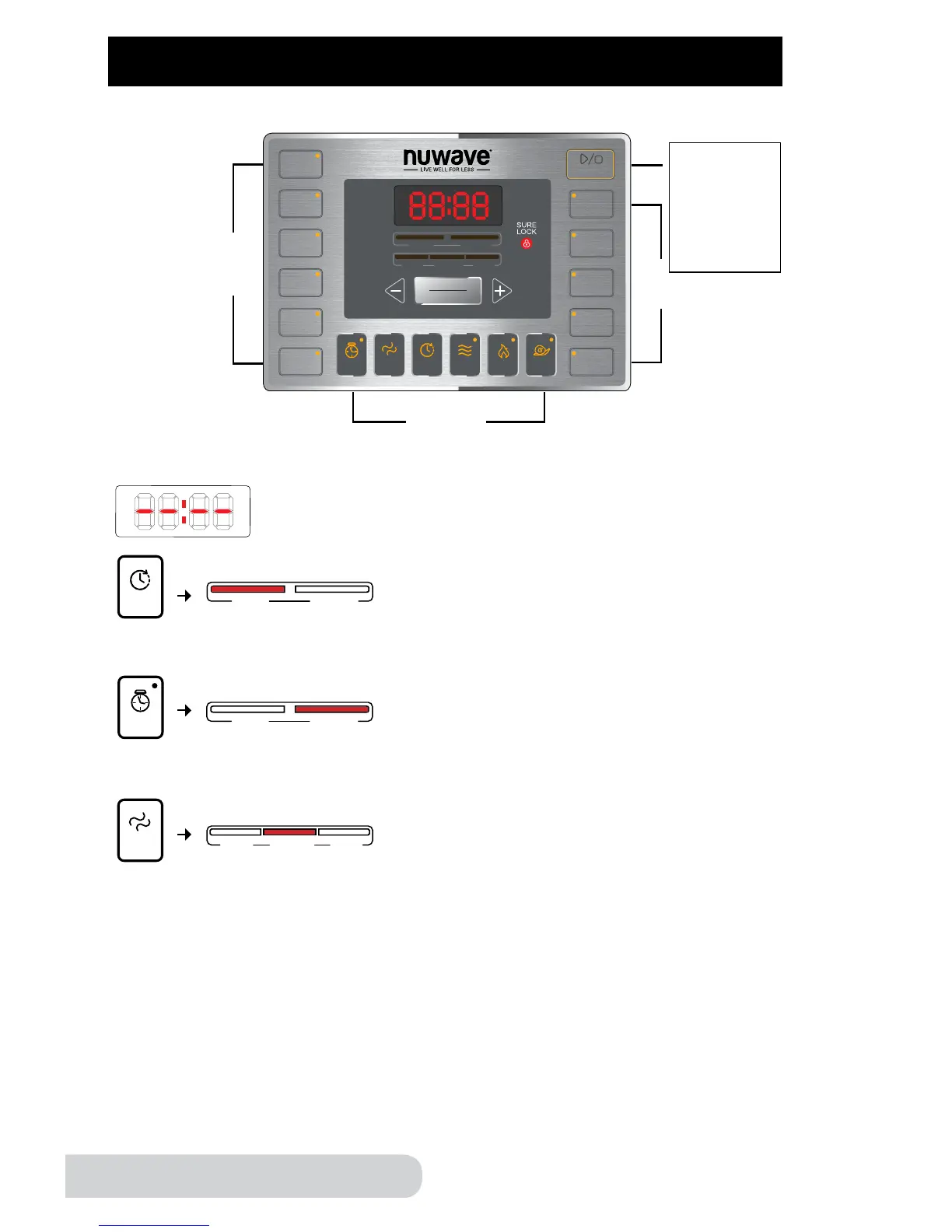
When unit is not cooking, or when no function has been
selected, the LED screen will display “--:--”, indicating that
the unit is not in operation.
beans
poultry
meat/
stew
soup
multi
grain
rice
canning
start/stop
bake
potatoes
steam/
veggies
sh
Pressure Cooker UI
time
texture
warm
sear
slow
cook
delay manual
less normal more
minutes
hours
The “delay” bar will light up once the delay button has been
pressed. This function will allow you to delay the start time of
each preset function.
beans
poultry
meat/
stew
soup
multi
grain
rice
canning
start/stop
bake
potatoes
steam/
veggies
sh
Pressure Cooker UI
time
texture
delay
warm
sear
slow
cook
delay manual
less normal more
minutes
hours
beans
poultry
meat/
stew
soup
multi
grain
rice
canning
start/stop
bake
potatoes
steam/
veggies
sh
Pressure Cooker UI
texture
delay
warm
sear
slow
cook
delay manual
less normal more
minutes
hours
The “manual” bar will light up only when the time button has been
pressed or when the cooking time has been changed manually.
This will allow you to manually set your time for each function.
beans
poultry
meat/
stew
soup
multi
grain
rice
canning
start/stop
bake
potatoes
steam/
veggies
sh
Pressure Cooker UI
time
texture
delay
warm
sear
slow
cook
delay manual
less normal more
minutes
hours
beans
poultry
meat/
stew
soup
multi
grain
rice
canning
start/stop
bake
potatoes
steam/
veggies
sh
Pressure Cooker UI
time
delay
warm
sear
slow
cook
delay manual
less normal more
minutes
hours
The “less”, “normal” and “more” bars light individually,
indicating your current setting. The “texture” function applies to
these displays with “normal” being the default setting. “texture”
is a function that has 3 times pre-programmed for select presets.
This also affects the consistency of your food. All functions
default to “normal”.
beans
poultry
meat/
stew
soup
multi
grain
rice
canning
start/stop
bake
potatoes
steam/
veggies
sh
Pressure Cooker UI
time
texture
delay
warm
sear
slow
cook
delay manual
less normal more
minutes
hours


 To Next Page