nuwavenow.com | 7
ASSEMBLY GUIDE
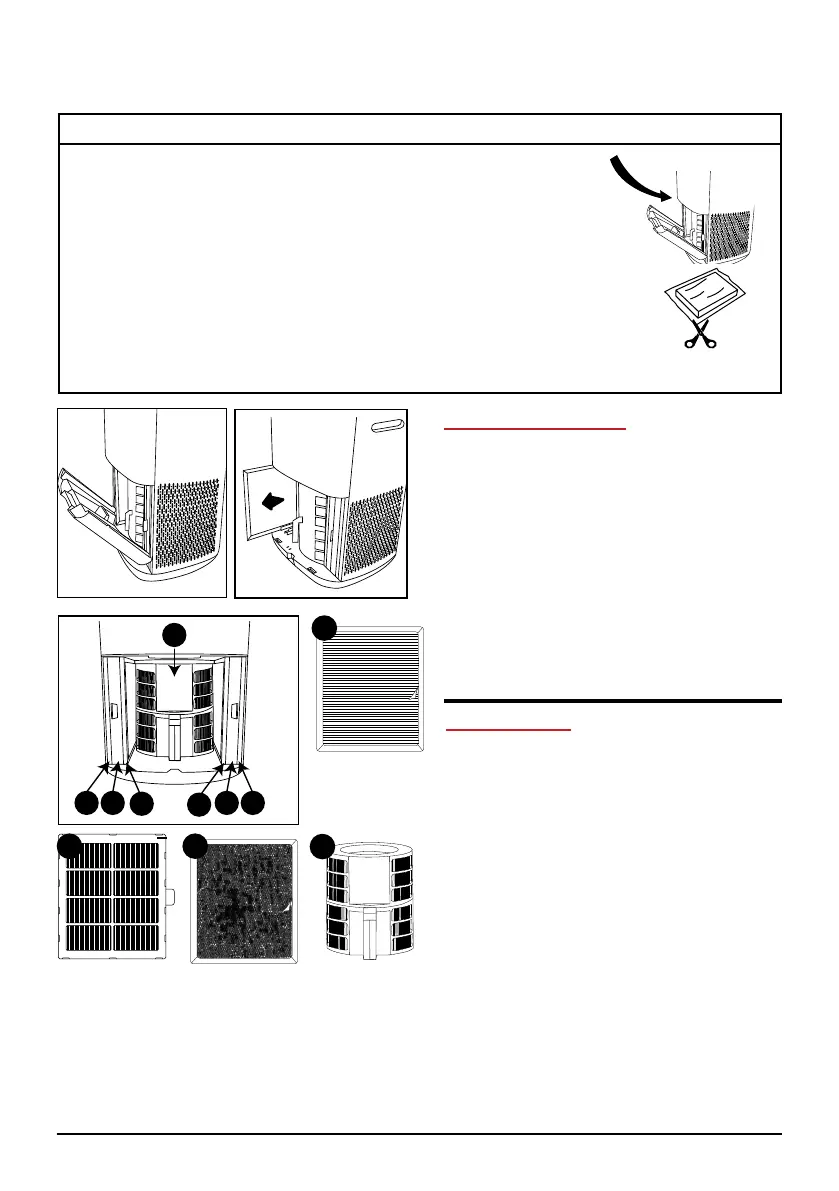
MAKE SURE ALL FILTERS ARE INSTALLED BEFORE USE
Before Use:
1. Make sure the OxyPure
®
is unplugged. Open the
panel on the back to expose the lters.
2. Pull the lters from their slots.
3. Remove the plastic wrapping from the lters.
4. Fully reinsert the lters into the Oxypure and close
the panel.
5. Remove the sticker from the control panel, making sure
to t the sensor tabs into their corresponding slots.
Bio-Guard
®
360 Filter
1 2
3
3
2 1
Ozone
Emission
Removal
Filter (2)
Bio-Guard
®
Filter (2)
Stainless Steel
Pre-Filter (2)
1
4
2
3
Air Filter Assembly
The OxyPure
®
comes with seven
different preassembled filters inside the
unit (see diagram below). Each filter
is labeled with a number and an “L” or
an “R” for Left and Right.. Match these
with the slot numbers when installing
the filters. When the filters require
cleaning, please refer to Cleaning &
Maintenance.
To install the Bio-Guard
®
360 filter,
simple slide it into place in the center.
Tabletop Use
To use the OxyPure as a tabletop unit,
simply remove the wheels to ensure that
it is stable and does not roll off the table.










 To Next Page