27°C to 32°C
(80°F to 90°F)
33°C to 40°C
(91°F to 105°F)
41°C to 54°C
(106°F to 129°F)
≥
55°C
(
≥130
°F)
Caution
Extreme Caution
Danger
Extreme Danger
Possibility of heat exhaustion
Possibility of heat dehydration
Heat exhaustion likely
Strong risk of dehydration / sun stroke
noitanalpxEgninraWegnar xednI taeH
WIND CHILL / HEAT INDEX / DEW-POINT
To view Wind Chill:
Press the [INDEX] button repeatedly until WINDCHILL displays.
Note: The wind chill factor is based on the combined effects of temperature and wind speed. The wind chill displayed is
calculated solely from temperature and humidity measured from the 5-in-1 sensor.
To view Heat Index:
Press the [INDEX] button repeatedly until HEAT INDEX displays.
Note: Heat index is only calculated when temperature is 27°C/80°F or above, and based solely from the temperature
and humidity measured from the 5-in-1 sensor.
To view Dew-Point (Indoor)
Press the [INDEX] button repeatedly until DEWPOINT displays.
Note: The dew point is the temperature below which the water vapor in air at constant barometric pressure condenses
into liquid water at the same rate at which it evaporates. The condensed water is called dew when it forms on a solid
surface.
The dewpoin
t temperature is calculated from the indoor temperature and humidity measured at the Main Unit.
HISTORY DATA (ALL RECORDS IN THE PAST 24 HOURS )
The Display main unit automatically record and display data of past 24 hours on the hour.
To check all the history data in the past 24 hours, press the [HISTORY] button.
E.g. Current time 7:25 am, Mach 28
Press [HISTORY] button repeatedly to view past readings at 7:00am, 6:00am, 5:00am, …, 5:00am (Mar 27),
6:00am (Mar 27), 7:00am (Mar 27)
The LCD will display the past indoor and outdoor temperature & humidity, value of air pressure, wind chill, wind
speed, rainfall and their time and date.
MAXIMUM / MINIMUM MEMORY FUNCTION
1.
Press [MAX/MIN] button to check the maximum/minimum records. The checking orders will be: Outdoor
max temperature Outdoor min temperature Outdoor max humidity Outdoor min humidity Indoor max
temperature Indoor min temperature Indoor max humidity Indoor min humidity Outdoor max wind chill
Outdoor min wind chill Outdoor max heat index Outdoor min heat index Indoor max dewpoint Indoor
min dewpoint Max pressure Min pressure Max average Max gust Max rainfall.
2. Press and hold [MAX/MIN] button for 2 seconds to reset the maximum and minimum records.
Note: When maximum or minimum reading is displayed, the corresponding timestamp will be shown.
13
trela OL dna IH erutarepmet roodnI
Indoor humidity HI and LO alert
trela OL dna IHerutarepmet roodtuO
Rainfall
trela IHdeeps dniW
HI alert
trela OL dna IHytidimuh roodtuO
elbaliava trelA fo epyTaerA
HI / LO ALERT
HI/LO alert are used to alert you of certain weather conditions. Once activated, the alarm will turn on and
amber LED starts flashing when a certain criterion is met. The following are areas and type of alert provided:
Note: Daily rainfall since midnight.
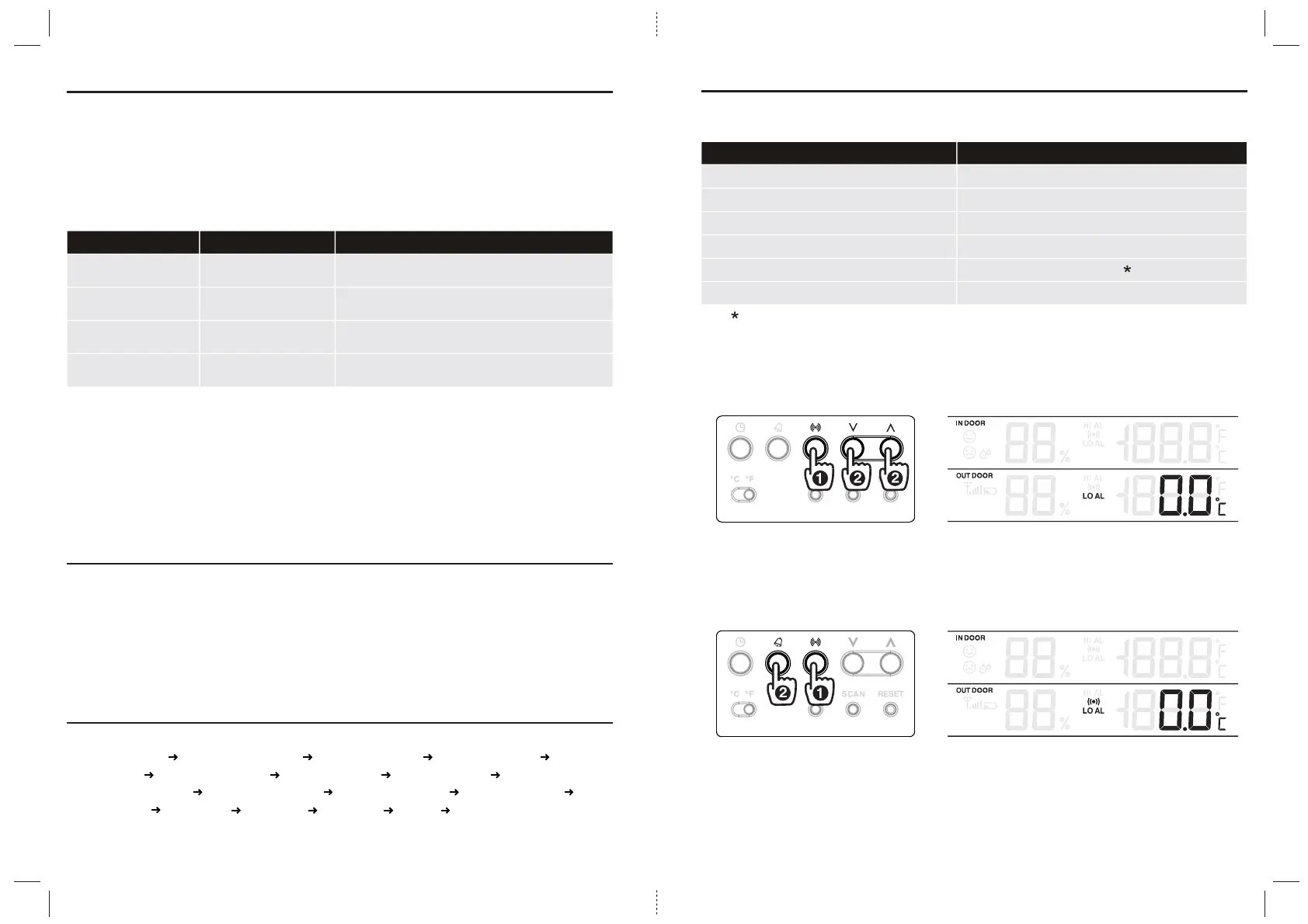
To set the HI / LO alert
1. Press the [ALERT] button until the desired area is selected.
2. Use [UP] / [DOWN] buttons to adjust the setting.
3. Press [ALERT] button to confirm and continue to next setting.
To enable/disable the HI / LO alert
1. Press [ALERT] button until the desired area is selected.
2. Press [ALARM] button to turn the alert on or off.
3. Press [ALERT] button to continue to next setting.
Note:
1. The unit will automatically exit setting mode in 5 seconds if no button is pressed.
2. When ALERT alarm is on, the area and type of alarm that triggered the alarm will be flashing and the alarm will
sound for 2 minutes.
3.
To silence the Alert alarm beeping, press the [SNOOZE / LIGHT] / [ALARM] button, or let the beeping alarm automatically
turn off after 2 minutes.
14


 To Next Page