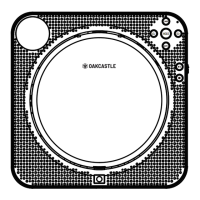
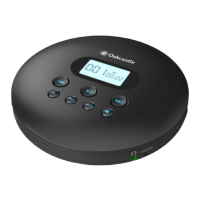
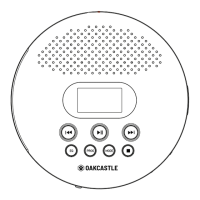
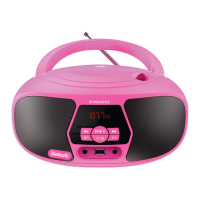
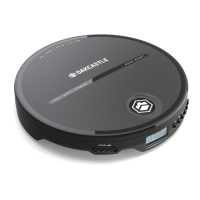
The Oakcastle CD10 is a portable CD player designed for personal audio enjoyment. It supports various disc formats including CD, CD-R, CD-RW, MP3, and WMA, offering versatility in your audio playback options. The device is compact and lightweight, making it easy to carry and use on the go.
To power on the CD10, simply press the 'Play/Pause/Power On' button (Ref.4). To turn off the player, press the 'STOP' button (Ref.5) twice. If you plan not to use the player for an extended period, ensure it is completely switched off to conserve power.
The CD10 features a 'Hold' function (Ref.11) which, when activated, makes all buttons inactive. This prevents accidental button presses while the player is in use or being carried, indicated by a lock icon on the display screen.
For power, the CD10 can operate using 2 x AA batteries (included). To install them, slide open the battery cover (Ref.10) and insert the batteries, ensuring correct polarity. New AA batteries provide approximately 7 hours of playback. Alternatively, the device can be powered via a wired connection using the included USB charging cable. Connect the USB cable from any standard USB 2.0 connection (like a laptop or a mains USB adapter) to the DC 5V power port (Ref.13) on the device.
Inserting a disc is straightforward: slide the 'OPEN' switch (Ref.2) to open the disc door (Ref.1). Place the disc label side up onto the spindle, pressing gently until it snaps into place. Close the disc door completely, as the player will not read the disc if it's not fully closed.
You can listen to your audio through headphones by plugging wired headphones (with a standard 3.5mm connector) into the headphone port (Ref.14). Ensure the connector is fully inserted. For external listening, connect a standard 3.5mm AUX cable from the CD player to your external speakers or output device. Playback can then be controlled using the buttons on the CD player.
The CD10 incorporates 'Electronic Shock Protection' (ESP), which is indicated by 'ESP' on the display screen. This feature helps prevent tracks from skipping due to shocks or bumps to the unit, ensuring uninterrupted playback.
Basic playback controls include 'Play/Pause' (Ref.4)/(Ref.17) to start or pause a track. To navigate tracks, press 'Previous' (Ref.8)/(Ref.18) to restart the current track or skip to previous ones, and 'Next' (Ref.9)/(Ref.19) to skip to the next track. Holding down 'Previous' or 'Next' allows you to rewind or fast forward through a track. To stop playback, press 'Stop' (Ref.5)/(Ref.16).
The CD10 offers various repeat modes, accessible by pressing the 'Mode' button (Ref.7). These modes include '1' (repeat current track), 'ALL' (play entire CD repeatedly), 'RND' (play tracks in a random order), and 'INTRO' (play the first 10 seconds of each track). You can also turn off repeat mode, which will show a blank display at the top of the screen.
A useful 'Auto-resume Function' is included: if the player is turned off while a track is playing or paused, it will resume playback from that exact position when switched back on. For enhanced audio, the 'BBS (Bass Boost System)' switch (Ref.15) allows you to turn bass boost on or off.
The CD10 also allows you to program tracks to play in a specific order, up to a maximum of 20 tracks. To do this, first ensure the CD is stopped. Press the 'PROG' button (Ref.6) to enter program mode. Use the 'Previous' (Ref.8)/(Ref.18) and 'Next' (Ref.9)/(Ref.19) buttons to select the desired track. The display will show P01, P02, etc., indicating the programmed track slot. Press 'PROG' (Ref.6) again to confirm each selection. Repeat these steps until all desired tracks are programmed. To start playing the programmed sequence, press 'Play' (Ref.4)/(Ref.17). Note that programmed playback is erased when playback stops. To cancel programmed playback, simply press the play button.
For maintenance and troubleshooting, if the disc cannot be read, ensure the label side is facing up, the disc is securely in place, and it's not heavily scratched or damaged. Gently wipe the disc from the center outwards with a clean, dry, soft cloth. Try a different disc to check if the original is faulty, and verify that the disc format is supported (CD, CD-R, CD-MP3, or CD-RW). If necessary, gently wipe the laser with a degreasing cotton swab, but avoid touching the laser with your hands.
If there's no sound, check that the volume is turned up and that the earphone jack is fully inserted into the headphone port. If there's no power, ensure the unit is turned on, insert new batteries, or connect it to a mains or another power source. If you hear a scratching sound from the earphones or disc, it might be due to a scratched disc. In this case, change to a new disc to prevent further damage to the unit.
The device comes with a standard 12-month warranty, which can be extended for an additional 24 months free of charge by registering the product online at www.oakcastle.co.uk.
Safety information emphasizes reading and keeping all instructions, heeding warnings, and following all guidelines. Do not clean the apparatus with water or block ventilation openings. Avoid installing near heat sources. Protect the power cord from being walked on or pinched. Use only manufacturer-specified attachments/accessories. Unplug the apparatus during light storms or when unused for long periods. Refer all servicing to qualified personnel, especially if the apparatus is damaged. Do not place naked flame sources on the apparatus. Dispose of used electrical products and batteries safely according to local regulations.
Additional warnings include not exposing the apparatus to dripping or splashing liquids, and not placing liquid-filled objects on it. The main plug is used to disconnect the device and should remain readily operable. Batteries should not be exposed to excessive heat. The recycling symbol indicates that electrical products should not be disposed of with normal household waste but taken to a suitable facility. Always read all instructions carefully before use and keep for future reference. The device carries a caution for risk of electric shock and should not be opened by unauthorized personnel.


 To Next Page
 General