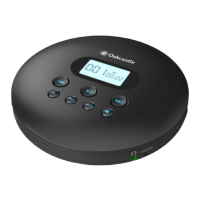
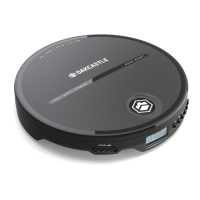
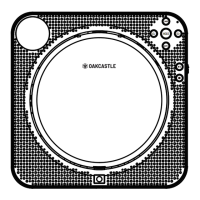
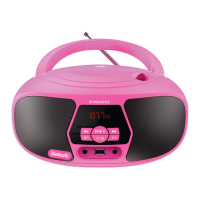
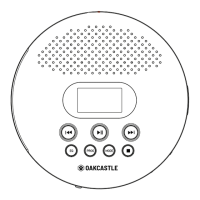
The Oakcastle CD125 is a portable CD player designed for personal audio playback, supporting various disc formats and offering several playback and sound customization features. It also includes a TF card slot for playing digital audio files and can be connected to external AUX devices.
Function Description:
The primary function of the Oakcastle CD125 is to play audio from CDs. It is compatible with CD, CD-R, CD-RW, MP3, WMA, and HDCD formats. In addition to disc playback, the device features a TF card slot, allowing users to play MP3 files from a TF card up to 32GB.
The player offers multiple playback modes, including Repeat 1 (repeats the current track), Repeat All (repeats all tracks), Random Play (shuffles tracks), and Preview Play (plays the first 10 seconds of each track). Users can also program up to 30 tracks in a specific order.
Sound customization is available through an equalizer (EQ) function, offering 5 sound effects: BBS, POP, JAZZ, ROCK, and CLASSIC. The device also includes an A-B repeat function, allowing users to repeat a specific segment of a track.
For connectivity, the CD125 has a 3.5mm earphone port for private listening and can be connected to external AUX devices such as home theatre systems, music centers, Bluetooth speakers, vehicles, and headphone amplifiers using the supplied 3.5mm to 3.5mm AUX cable.
The player is powered by a built-in lithium-ion polymer battery and is charged via a USB to Type-C USB charging cable. It features a charging LED indicator that shows red during charging and turns green when fully charged. A low battery symbol appears on the screen when charging is needed.
A "HOLD" switch is provided to lock all buttons, preventing accidental operations. The device also has a "Last Memory" function, which can be toggled on or off. When "ON," the player will return to the last stop-track on the disc; when "OFF," it will not.
Important Technical Specifications:
- Size: 141x141x29mm
- Weight: 256g
- D/C Conversion: 16Bit
- Sampling Frequency: 44.1KHz
- Frequency Response: 20-20KHz
- Power Source: DC 5V/1A, Type C Standard
- Charging Voltage: DC 5V/1A
- Operating Voltage: 3.7V
- Power Consumption: About 1.5W
- Battery: Lithium-ion polymer 3.7V/1400mAh
- Charging Time: Approximately 4 hours (with standard USB 2.0 protocol)
- Earphone Port: 3.5mm
- Power Output of Earphone: 16mW+16mW/16-32Ohm
- Impedance of Earphone: 32ohm/16mW
- Supported Disc Formats: CD, CD-R, CD-RW, MP3, WMA, HDCD
- Shockproof Time: CD 100 seconds / MP3 180 seconds or more
- TF Card Support: Max 32GB
- Speakers: 2*1.3W stereo speakers
Usage Features:
- Inserting a Disc: Push the "OPEN" button to open the door, insert the disc gently, ensuring it's properly in place, then close the door.
- Inserting TF Card: Insert the TF card and hold down the play button.
- Turning On: Slide the power switch to "ON" or, if the power switch is already "ON," press the "PLAY" button once. The player enters standby mode after 20 seconds of inactivity when a disc finishes playing; press "PLAY" to restart.
- Turning Off: Press the "STOP" button twice, or slide the power switch to "OFF."
- Adjusting Volume: Rotate the volume knob on the side of the player to increase or decrease the volume.
- Setting Up Circle Mode: Press the "MODE" button to cycle through Repeat 1, Repeat All, Random Play, and Preview Play.
- Programming Tracks: When playback stops, press "PROG," use "PREVIOUS" or "NEXT" to select a track, then press "PROG" again to confirm. Up to 30 tracks can be programmed. Press "PLAY" to enter programming play mode or "STOP" to cancel/reprogram.
- Playing MP3 Disc: Ensure the player is on, insert the MP3 disc, and close the door. Use the "DIR" button to select playlists.
- Setting Up EQ Effect: Press the "EQ" button to change between BBS, POP, JAZZ, ROCK, and CLASSIC sound effects.
- A-B Repeat: Press the A-B button once to show "A ON," press again to show "AB ON" (repeats by A-B), and press a third time to show "AB OFF" (cancels).
- Screen Sleep: The screen turns off after 10 seconds of inactivity and turns on when any button is pressed.
- Key Lock: After setting playback mode and sound effects, slide the power switch to the "HOLD" position to lock buttons.
- Last Memory Function: Press and hold the "PROG" button to toggle the last memory function "ON" or "OFF."
- Connecting to AUX Devices: Use the 3.5mm AUX cable to connect the player to external audio devices.
Maintenance Features:
- Charging: Charge the player when the low battery symbol appears on the screen. The charging LED is red during charging and green when full. Use a charger that supports USB 2.0 protocol or a standard Android/iOS USB charger (DC5V/1A).
- Cleaning Discs: If discs cannot be read or skip, ensure they are not heavily scratched or damaged. Wipe discs gently from the center towards the edge with a clean, soft cloth.
- Cleaning Loader: If the loader is dirty, wipe the lens gently with a degreasing cotton swab.
- Troubleshooting: The manual provides a troubleshooting guide for common issues like the player not turning on, discs not reading, charging problems, skipping, and noisy playback.
- Safety Information: Emphasizes reading and keeping instructions, heeding warnings, following all instructions, avoiding cleaning with water, ensuring proper ventilation, keeping away from heat sources, protecting power cords, using manufacturer-specified attachments, unplugging during storms or long periods of disuse, referring servicing to qualified personnel, avoiding naked flame sources, and safely disposing of electrical products and batteries.
- Warranty: All products come with a standard 12-month warranty. Users can register their product online at www.oakcastle.co.uk for a FREE 3-year extended warranty.


 To Next Page
 General