5
EN
USER GUIDE
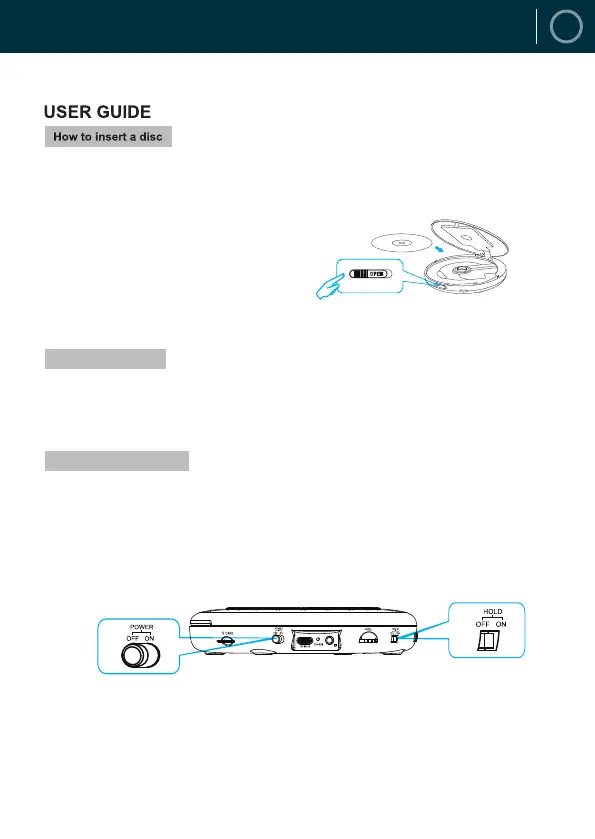
Push the OPEN button on the right-hand side to open the door. Insert your index finger into the centre hole
of the disc and take the edge of the disc with your thumb. Press the disc gently to make it steady, and make
sure the disc is properly in place. Close the disc door gently.
NOTE: The player is only compatible with CD, CD-R, CD-RW, MP3, WMA, HDCD formats.
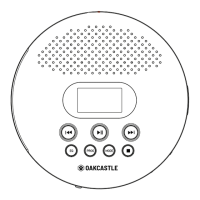
1. The power switch is located on the side. Slide it to ON position to turn on the player.
2. When the power switch is in ON position, only press PLAY button once to turn on the player.
NOTE 1: When a disc is played to the end and there is no activity after 20 seconds, the player will enter a
standby mode. Please press the PLAY button to restart the player.
NOTE 2: A HOLD switch is on the side to lock the operations of all buttons to avoid mistouch.
When the HOLD switch is in ON position, all buttons will be locked; toggled it to OFF position to release all
buttons.
There are two ways to turn on the player:
After inserting the TF card, hold down the play button on the player.
NOTE: The TF card supports up to 32GB.
How to Turn the Player on
Insert TF Card


 To Next Page