Instruction Manual CON 6/TDS 6
32
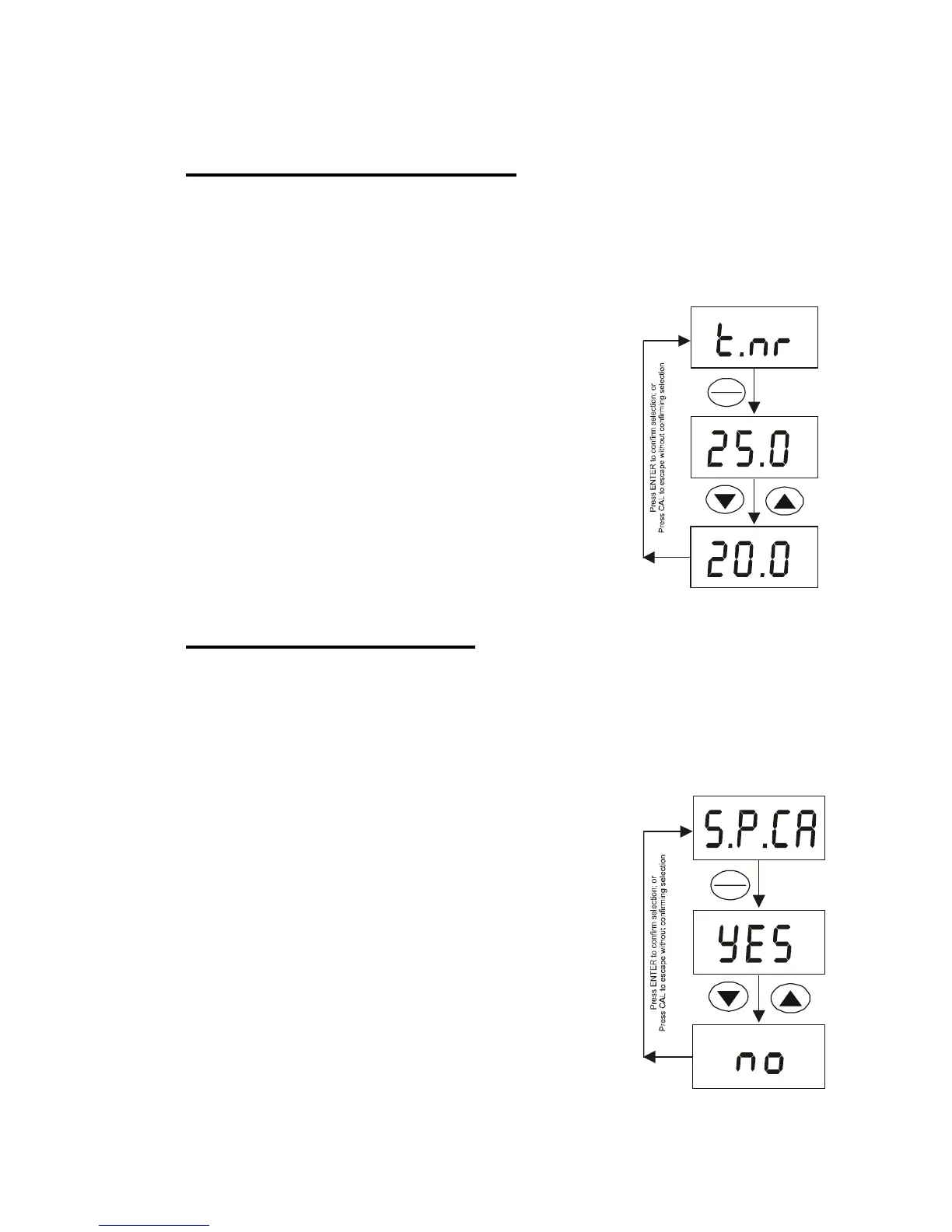
6.6 Normalization Temperature
You can set the meter to normalize its conductivity measurements to a standard
temperature of either 25 °C or 20 °C.
The default value is 25 °C.
1) Enter the advanced setup as described in
Section 6.1.
2) Press ▲ or ▼ key until [t.nr °C] appears on the
LCD. Press ENTER key.
3) Press ▲ or ▼ key to select either [25.0 °C] or
[20.0 °C].
4) Press ENTER key to select. The meter will take
you back to the menu, [t.nr °C].
5) Press ▲ or ▼ key to move to the next menu or
press CAL to exit to measurement mode.
6.7 Single-Point Calibration
Single-point calibration refers to calibrating one conductivity value and uses it
for the entire 5 conductivity ranges.
By selecting [no] to single-point calibration, you can perform calibration for each
conductivity range.
1) Enter the advanced setup as described in
Section 6.1.
2) Press ▲ or ▼ key until [S.P.CA] appears on the
LCD. Press ENTER key.
3) Press ▲ or ▼ key to select either [Yes] or no].
4) Press ENTER key to select. The meter will take
you back to the menu, [S.P.CA].
5) Press ▲ or ▼ key to move to the next menu or
press CAL to exit to measurement mode.
C°
C°
C°
HOLD
ENTER
HOLD
ENTER



 To Next Page