Front
Back
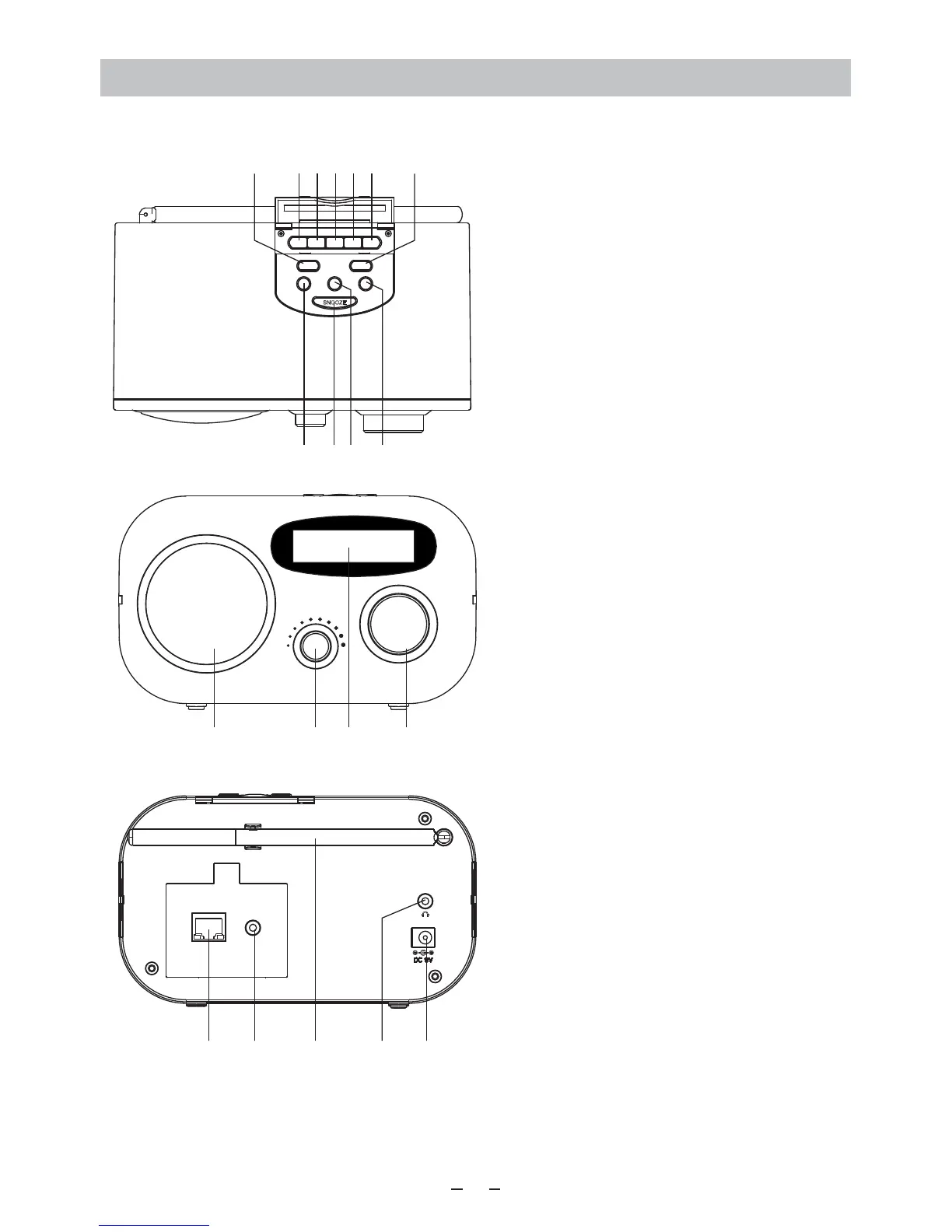
Location of Controls
1
Tune / Select
Volume
12
13 14 15
Ethernet
Line Out
16 1817 19 20
Top
3214
Local Right
FAV.+
Standby Menu
Left
Alarm / Sleep Timer
234561 7
8910
11
1. Standby
- Press to turn on the radio/standby
2-5. Individual favourite keys no. 1-4
Long press to preset; short
press to recall
6. FAV
- Recall list of favorite stations
7. Menu – Press to enter menu
8. Left
- Back to previous menu
- Left cursor
9. Alarm / Sleep Timer / Snooze
- Press briefly to set the Sleep Timer
- Long pressing to set Alarm
- When alarm sounds, press to stop
the alarm for 9 minutes
10. Local
- Quick access the local station in
your country
11. Right
- Right cursor
- Under Favorite list, press to enter
the edit menu
12. Speaker
13. Volume control
14. LCD display
- On Standby mode, rotate the
Tune/Select knob to adjust the
brightness level
15. Tune/ Select control
- Rotate to tune and push to select
16. Ethernet port
- plug in the LAN cable and the radio
will switch to Ethernet from Wi-Fi in
seconds
17. 3.5 mm Line out jack
18. Telescopic antenna for FM
19. 3.5 mm Earphone jack
20. DC jack 5V IN













 To Next Page