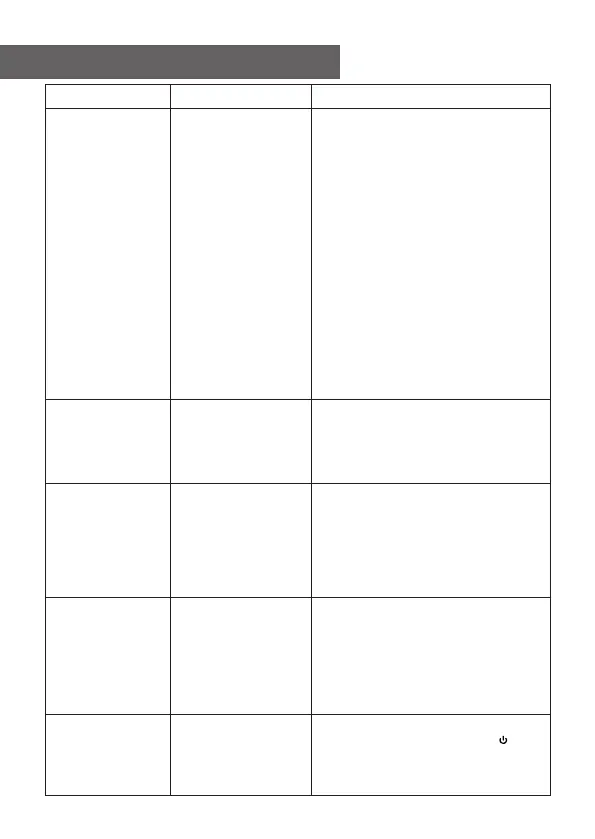
13. Trouble Shooting
Problem
Cause
Solutions
If your radio
can connect to
the network
successfully,
but is unable
to play
particular
stations
• The station is not broadcasting at
this time of the day (remember it
may be located in a different time
zone).
• The station has too many people
trying to attach to the radio
station server and the server
capacity is not large enough.
• The station has reached the
maximum allowed number of
simultaneous listeners.
• The link on the radio is out of date.
The update of the link is done
regularly. To get the updated list
of stations, please access from
Internet radio > Skytune. In case
a particular stream is still not
working, please contact us or
report the case to Skytune.
No sound
• Please check whether the
playback is stopped. Press the
OK button to resume playback.
• Adjust the volume
• Check if other radio stations have
the same problem or just
happened on a particular station.
Radio got
freeze
or no
response
Carry out a reset as follow:
On the radio unit, press the and
OK buttons together until the radio
is off (screen is blank), then
release both buttons.
No
DAB/FM
reception
• Please carry out "Reset to
default" on the radio and extend
the antenna.
• Move the radio closer to the
window.
• Please check that the aerial is
extended for the maximum signal
strength and adjust the direction
to improve reception.
• Check that you do not have other
electrical equipment too close to
your radio, causing interference.
DAB/FM
Radio
reception
is poor
31















 To Next Page