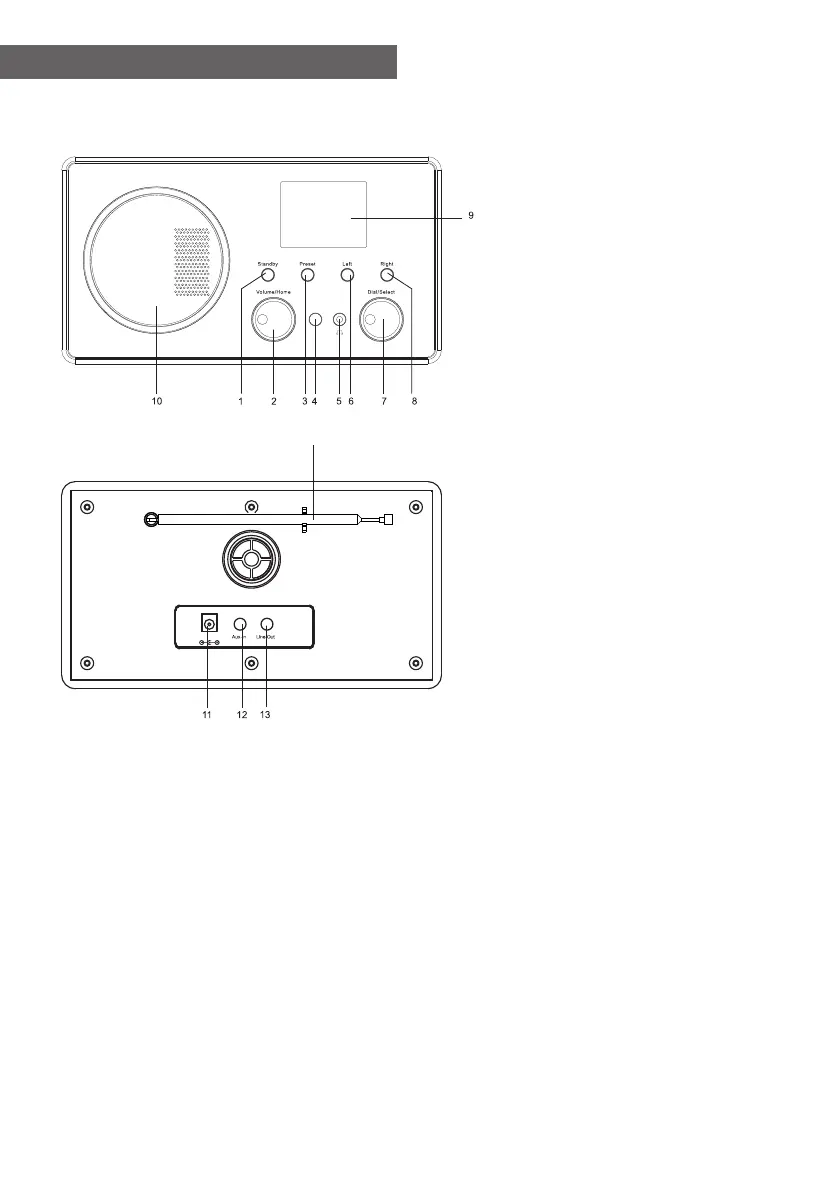
1. Standby button
2. Volume/Home
Rotate to adjust the volume
level/Press the knob to
return Home (main menu).
3. Preset
Long press to enter the "Add
to favourite" list. Press it
briefly to recall the preset
list.
4. Infrared remote sensor
5. 3.5 mm earphone jack
6. Left
Left cursor/Press to return to
previous menu.
7. Dial/Select
Rotate to browse the
menu/Press to confirm a
selection or stop the
playback.
8. Right
Right cursor/View radio info
9. 2.4” color display
10. Speaker
11. DC IN Socket
12. Aux-In Jack
13. Line out Jack
14. Telescopic antenna
14
DC IN
Location of Controls
- 01 -















 To Next Page