10
OCL OPERATING MANUAL
© 2002 Design, 2014 Doc. No. 12-5378-r01 (4/9/15)
WATCH MENU
A (< 2 sec) - to step forward through selections one at a time.
S (< 2 sec) - to access the selection displayed.
M (< 2 sec) - to step back through selections one at a time.
M (2 sec, any time) - to revert to the Watch Main.
No button action (2 min) - revert to the Watch Main.
L (press) - to activate the Backlight.
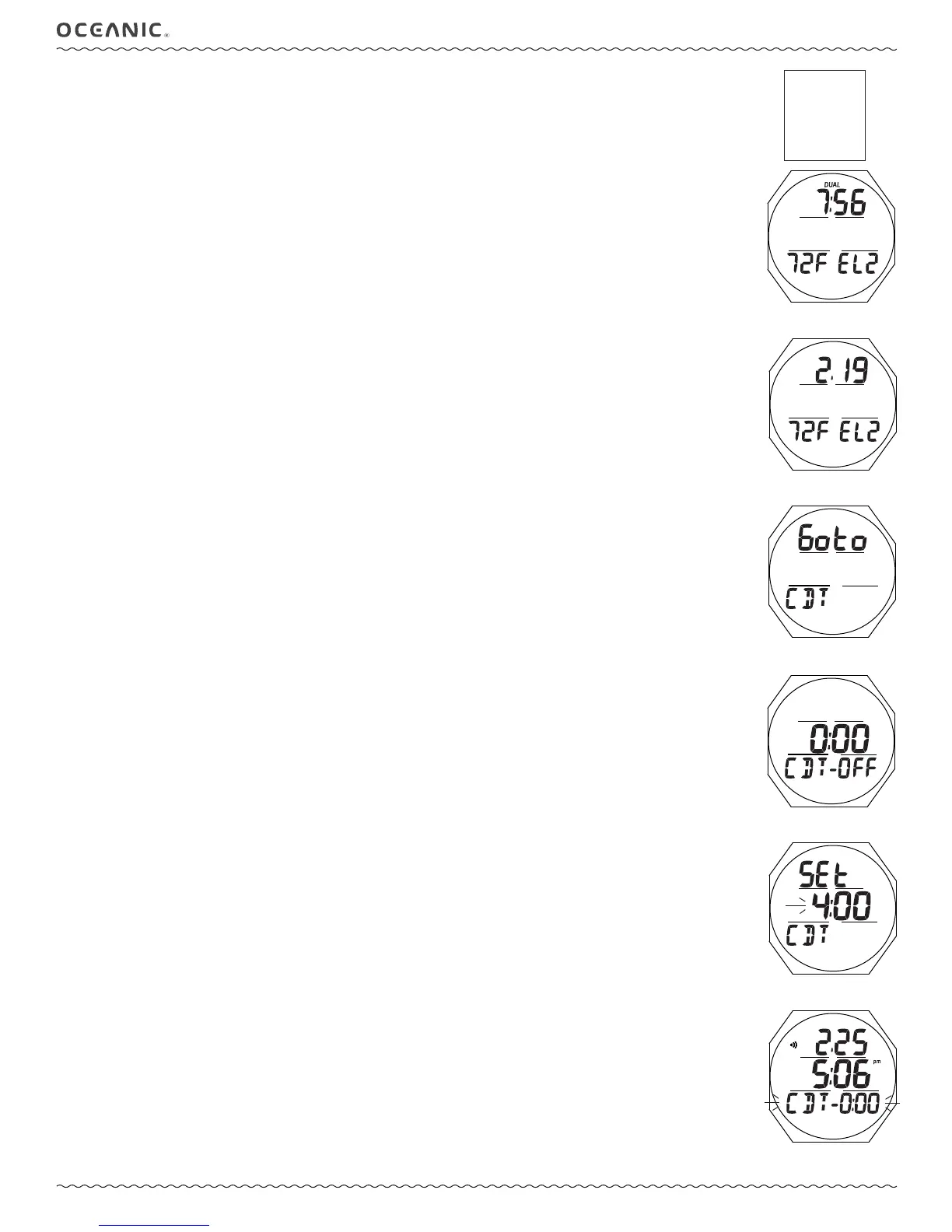
WATCH ALT, information includes (Fig. 5A/B):
> Dual Time (hr:min) with DUAL icon, if Show is set for No, or Date as month.day (or day.month)
> Temperature with graphic F (or C)
> Altitude graphic EL2 (to EL 7), blank if Sea level
• A < 2 sec - to step forward to the CDT Lead-in.
• M (< 2 sec) - to step back to the Watch Main.
CDT (COUNTDOWN TIMER)
This selection provides access to a CDT for use in Watch mode.
Upon accessing a dive computer mode, Watch CDT operation will be terminated and the time reset to the previous setting.
> Free Mode has a separate (min:sec) CDT.
CDT Lead-in, information includes (Fig. 6):
> Graphics Goto and CDT.
• S (< 2 sec) - to access CDT Status.
• A (< 2 sec) - to step forward to the Chrono Lead-in.
• M (< 2 sec) - to step back to the ALT.
CDT Status, information includes (Fig. 7):
> Remaining CDT (hr:min) with ON, if in progress; or
0:00 with OFF if the CD is complete or hasn't been set; or
CDT previously set with OFF
> Graphic CDT - OFF (or ON)
• A (< 2 sec) - to step forward through selections of OFF, ON, and SET.
• M (< 2 sec) - to step back through selections.
• S (< 2 sec) - to save the selection.
>> If OFF or ON is selected, revert to the Lead-in screen.
>> If SET is selected, access the Set CDT screen.
Set CDT, information includes (Fig. 8):
> Graphics SEt and CDT
> CDT (hr:min) with Hour digits ashing
• A (hold) - to scroll upward through Hour Set Points at a rate of 8 per second from 0: to 23: in increments of 1: (hr).
• A (< 2 sec) - to step upward through Set Points one at a time.
• M (< 2 sec) - to step back through Set Points one at a time.
• S (< 2 sec) - to save the Hour Set Point and ash the Minute digits.
• A (hold) - to scroll upward through Minute Set Points at a rate of 8 per second from :00 to :59 in increments of :01
(min).
• A (< 2 sec) - to step upward through Set Points one at a time.
• M (< 2 sec) - to step back through Set Points one at a time.
• S (< 2 sec) - to save the CDT setting and revert to the CDT Status screen with the graphic SEt ashing.
> Selecting ON will then start the countdown and revert to the Lead-in screen.
> Selecting OFF will save the setting and revert to the Lead-in screen.
The CDT will run in the background, while in Watch mode, until it counts down to 0:00, or it is set OFF, or DC Mode is ac-
cessed or a Dive is started in which case the countdown will terminate and revert to OFF.
When a set Countdown Time reaches 0:00, the Audible Alarm will sound during which time the graphic CDT and 0:00 will
ash on the Watch Main Time screen (Fig. 9).
WATCH MENU
ALT
CDT
CHRONO
DAILY ALARM
SET T
Fig. 5A - WATCH ALT
(differential set)
Fig. 6 - CDT LEAD-IN
Fig. 7 - CDT STATUS
Fig. 8 - SET CDT
Fig. 5B - WATCH ALT
(Dual Time on Main)
Fig. 9 - WATCH MAIN
(when CDT alarm strikes)



 To Next Page