21
OCL OPERATING MANUAL
© 2002 Design, 2014 Doc. No. 12-5378-r01 (4/9/15)
SET U MENU (UTILITIES)
Sequence >> Lead-in >> Wet >> Units >> DS* >> SS* >> Algo* >> CF* >> Glo >> SR
*Items apply to NORM only.
Set Points remain as set until changed.
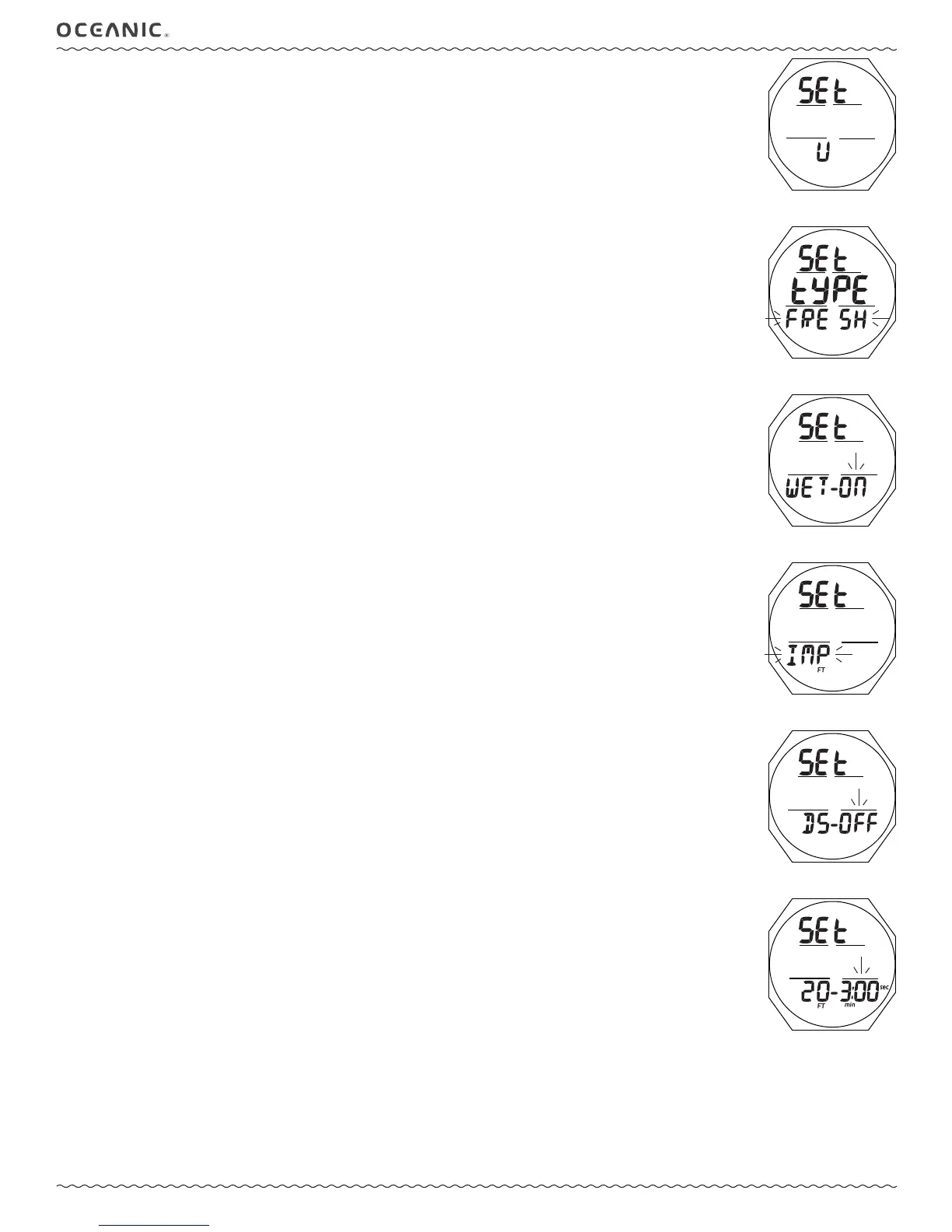
Set U (Utilities) Lead-in, information includes (Fig. 45):
> Graphics SEt and U
• A (< 2 sec) - to step forward to Select Op Mode Lead-in.
• M (< 2 sec) - to step back to Set A Lead-in.
• S (< 2 sec) - to access Set Water Type.
Set Water Type, information includes (Fig. 46):
> Graphics SEt and tYPE
> Graphic FRESH (or SEA) ashing
• A or M (< 2 sec) - to toggle between FRESH and SEA.
• S (< 2 sec) - to save the setting and access Set Wet Activation.
• S (2 sec) - to step back to the Set U Lead-in without changing the Water Type setting.
Set Wet Activation, information includes (Fig. 47):
> Graphics SEt and WET -
> Graphic ON (or OFF) ashing
• A or M (< 2 sec) - to toggle between ON and OFF.
• S (< 2 sec) - to save the setting and access Set Units.
• S (2 sec) - to step back to Set Water Type without changing the Wet Activation setting.
Set Units, information includes (Fig. 48):
> Graphic Set
> Graphic IMP (or MET) ashing with FT (or M) icon
• A or M (< 2 sec) - to toggle between IMP and MET.
• S (< 2 sec) - to save the setting and access Set Deep Stop.
• S (2 sec) - to step back to Set Wet Activation without changing the Units setting.
Set Deep Stop (DS), information includes (Fig. 49):
> Graphics SEt and DS -
> Graphic ON (or OFF) ashing
• A or M (< 2 sec) - to toggle between ON and OFF.
• S (< 2 sec) - to save the setting and access Set Safety Stop.
• S (2 sec) - to step back to Set Units without changing the Deep Stop setting.
Set Safety Stop (SS), information includes (Fig. 50):
> Graphic SEt
> Graphic SS - with OFF ashing; or Stop Depth with FT (or M) icon, and Stop Time (min:sec) ashing with icons
• A (< 2 sec) - to step forward through the Time Set Points of OFF, 3:00, and 5:00.
• M (< 2 sec) - to step back through the Time Set Points one at a time
• S (< 2 sec) - to save the Time setting and .
• S (2 sec) - to step back to the Set Deep Stop without changing the Safety Stop setting.
>> If SS OFF is saved, operation shall access Set Algorithm.
>> If 3:00 or 5:00 is saved, the Stop Depth digits will ash.
• A (< 2 sec) - to step up through Depth Set Points of 10, 15, and 20 FT (or 3, 4, 5, and 6 M) one at a time.
• M (< 2 sec) - to step back through Depth Set Points one at a time.
• S (< 2 sec) - to save the Stop Depth setting and access Set Algorithm.
• S (2 sec) - to step back to the Stop Time value ashing without changing the Stop Depth.
Fig. 45 - SET U LEAD-IN
Fig. 46 - SET WATER TYPE
Fig. 48 - SET UNITS
Fig. 49 - SET DEEP STOP
Fig. 50 - SET SAFETY STOP
(Time then Depth)
Fig. 47 - SET WET
ACTIVATION


 To Next Page