39
OCL OPERATING MANUAL
© 2002 Design, 2014 Doc. No. 12-5378-r01 (4/9/15)
>> If On is saved and a CDT was set, the CDT will start counting down and operation will revert to the Lead-in.
>> If Off is saved, the Timer will stop counting down and operation will revert to the Lead-in.
>> If Set is saved, the Set CDT screen will be displayed.
• S (2 sec) - to revert to CDT Lead-in.
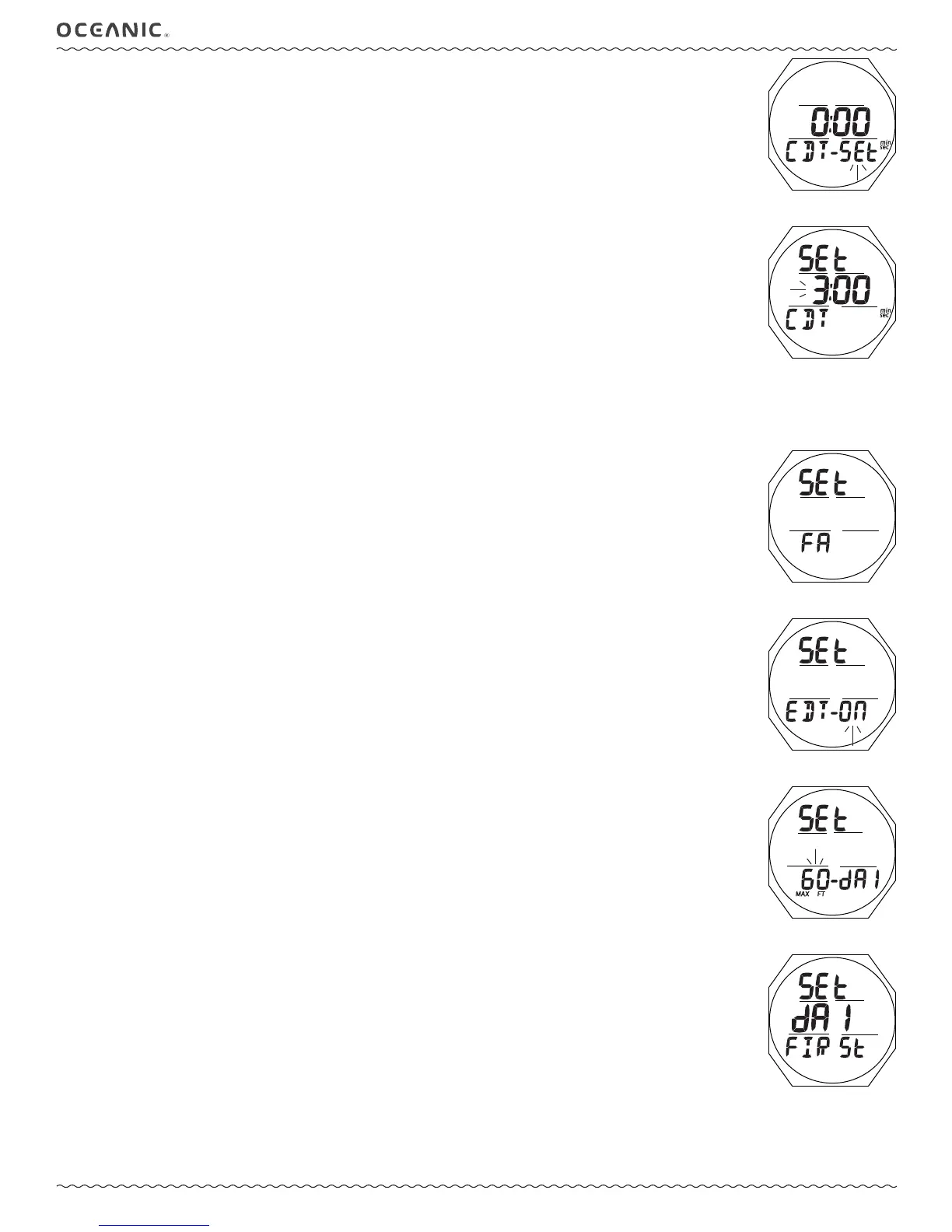
Set CDT, information includes (Fig. 107):
> Graphics SEt and CDT
> CDT (min:sec) with Minute digits ashing
> min and sec icons
• A (hold) - to scroll upward through Minute Set Points at a rate of 8 per second from 0: to 59: in increments of 1: (min).
• A (< 2 sec) - to step upward through Set Points one at a time.
• M (< 2 sec) - to step back through Set Points one at a time.
• S (< 2 sec) - to save the Minute Set Point and ash the Seconds digits.
• A (hold) - to scroll upward through Seconds Set Points at a rate of 8 per second from :00 to :59 in increments of :01
(sec).
• A (< 2 sec) - to step upward through Set Points one at a time.
• M (< 2 sec) - to step back through Set Points one at a time.
• S (< 2 sec) - to save the CDT min:sec setting and revert to the CDT Status screen with OFF ashing.
--------------------------------------------------------------------------------------------------------------
SET FA (FREE ALARMS) MENU
Sequence >> Lead-in >> EDT >> DA1 >> DA2 >> DA3
Set Points remain as set until changed.
Set FA Lead-in, information includes (Fig. 108):
> Graphics SEt and FA
• A (< 2 sec) - to step forward to Set M Lead-in.
• M (< 2 sec) - to step back to CDT Lead-in.
• S (< 2 sec) - to access Set EDT Alarm.
EDT (ELAPSED DIVE TIME) ALARM
Factory set for a xed 30 seconds, the EDT alarm sounds the audible every 30 seconds during FREE dives.
Set EDT Alarm, information includes (Fig. 109):
> Graphics SEt and EDT -
> OFF (or ON) ashing
• A or M (< 2 sec) - to toggle between ON and OFF.
• S (< 2 sec) - to save the setting and access Set DA1.
• S (2 sec) - to step back to Set FA Lead-in.
DA (DEPTH ALARMS)
There are 3 Free Depth Alarms (DAs) that can be set at progressively deeper depths*.
*The DA2 setting must be deeper than DA1 and DA3 must be deeper than DA2.
Set DA1 Alarm, information includes (Fig. 110A):
> Graphics SEt and - dA1
> Graphic OFF, or Depth value with MAX and FT (or M) icons, ashing
• A (hold) - to scroll upward through settings at a rate of 8 per second from OFF to 30 to 330 FT (10 to 100 M) in
increments of 10 FT (1 M).
• A (< 2 sec) - to step upward through settings one at a time.
• M (< 2 sec) - to step back through settings one at a time.
• S (< 2 sec) - to save the setting.
> If OFF is saved, operation reverts to Set FA Lead-in.
> If a Depth value is saved, Set DA 2 is accessed.
• S (2 sec) - to step back to Set EDT Alarm.
Set DA 2 and DA 3 are similar with Depth values beginning 1 increment higher (deeper) than the previous
selection set. Example: If DA 1 is set for 100 FT, DA 2 settings start at 110 FT.
If DA 1 (or DA 2) is set OFF, a Set DA 1 (or 2) First message will be displayed (Fig. 110B) when attempt is made to access Set
DA 2 (or 3).
Fig. 107 - SET CDT
Fig. 106B - CDT STATUS
(to access Set)
Fig. 108 - SET FA LEAD-IN
Fig. 109 - SET EDT ALARM
Fig. 110A - SET DA1
Fig. 110B - SET DA1
FIRST MESSAGE



 To Next Page