20
OCL OPERATING MANUAL
© 2002 Design, 2014 Doc. No. 12-5378-r01 (4/9/15)
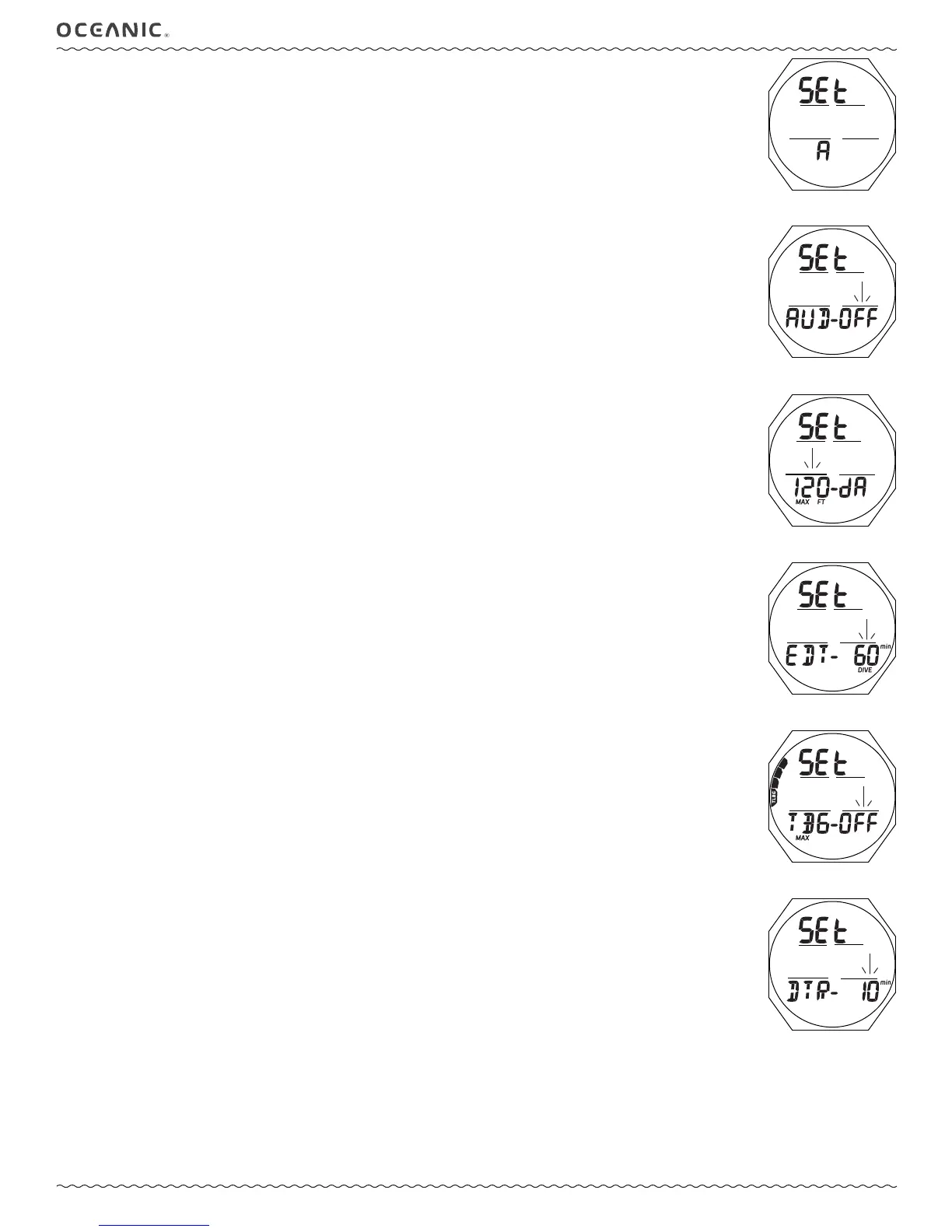
Fig. 39 - SET A LEAD-IN
(Alarms)
SET A MENU (NORM/GAUG ALARMS)
Sequence >> Lead-in >> Aud >> Depth >> EDT >> TBG (= TLBG)* >> DTR*
*Items apply to NORM only.
Set Points remain as set until changed.
Set A (Alarms) Lead-in, information includes (Fig. 39):
> Graphics SEt and A
• A (< 2 sec) - to step forward to Set U Lead-in.
• M (< 2 sec) - to step back to Set Gas Lead-in.
• S (< 2 sec) - to access Set Audible Alarm.
Set Audible Alarm, information includes (Fig. 40):
> Graphics SEt and AUD -
> Graphic OFF, or ON, ashing
• A (< 2 sec) - to toggle between OFF and ON.
• S (< 2 sec) - to save the setting and access Set Depth Alarm.
• S (2 sec) - to step back to Set A Lead-in without changing the Audible Alarm setting.
• M (2 sec), or if no button is pressed during a 2 minute period - to revert to the Surface Main.
Set Depth Alarm (DA), information includes (Fig. 41):
> Graphics SEt and - dA
> Graphic OFF, or Depth value, ashing with MAX and FT (or M) icons
• A (hold) to scroll upward through Set Points 8 per second from 30 to 330 FT (10 to 100 M) in increments of 10 FT (1
M).
• A (< 2 sec) - to step upward through Set Points one at a time.
• M (< 2 sec) - to step back through Set Points one at a time.
• S (< 2 sec) - to save the setting and access Set EDT Alarm.
• S (2 sec) - to revert to Set Audible Alarm without changing the Depth Alarm setting.
Set EDT (Elapsed Dive Time) Alarm, information includes (Fig. 42):
> Graphics SEt and EDT -
> Time value ashing with DIVE and min icons
• A (hold) - to scroll upward through Set Points 8 per second from OFF to 10 through 180 (min) in increments of 5 min.
• A (< 2 sec) - to step upward through Set Points one at a time.
• M (< 2 sec) - to step back through Set Points one at a time.
• S (< 2 sec) - to save the setting and access Set TLBG Alarm.
• S (2 sec) - to revert to Set Depth Alarm without changing the EDT Alarm setting.
Set TLBG Alarm, information includes (Fig. 43):
> Graphics SEt and TBG (= TLBG, Tissue Loading Bar Graph)
> Graphic OFF, or TLBG segments with icon, ashing
• A (< 2 sec) - to step upward through Set Points from OFF to 1 through 4 segments one at a time.
• M (< 2 sec) - to step back through Set Points one at a time.
• S (< 2 sec) - to save the setting and access Set DTR Alarm.
• S (2 sec) - to revert to Set EDT Alarm without changing the TLBG Alarm setting.
Set DTR (Dive Time Remaining) Alarm, information includes (Fig. 44):
> Graphics SEt and DTR -
> Time Value (min) ashing with min icon
• A (hold) - to scroll upward through Set Points 8 per second from OFF to 5 through 20 (min) in increments of 1 min.
• A (< 2 sec) - to step upward through Set Points one at a time.
• M (< 2 sec) - to step back through Set Points one at a time.
• S (< 2 sec) - to save the setting and revert to Set A Lead-in.
• S (2 sec) - to revert to Set TLBG Alarm without changing the DTR Alarm setting.
Fig. 40 - SET AUDIBLE
ALARM
Fig. 41 - SET DEPTH ALARM
Fig. 42 - SET EDT ALARM
Fig. 43 - SET TLBG ALARM
Fig. 44 - SET DTR ALARM



 To Next Page