88
Moisture in the Battery Compartment
If moisture is found, it is best to have the unit inspected
and cleaned by an Authorized Oceanic Dealer.
If it is necessary to clean the Battery Compartment, flush
the it and all components with a solution of 50% white
vinegar and 50% fresh water. Rinse with fresh water, and
allow to dry overnight, or blow dry with a hair dryer (set
at 'no heat').
Closely check all of the sealing surfaces for any signs of
damage that might impair proper sealing.
Inspect the Buttons, Lens, and Housing to ensure they are
not cracked or damaged.
Battery Installation
Replace the Hatch O-ring with a new one. This O-ring
must be a genuine Oceanic part that can be purchased
from an Authorized Oceanic Dealer. Use of any other O-
ring will void the warranty.
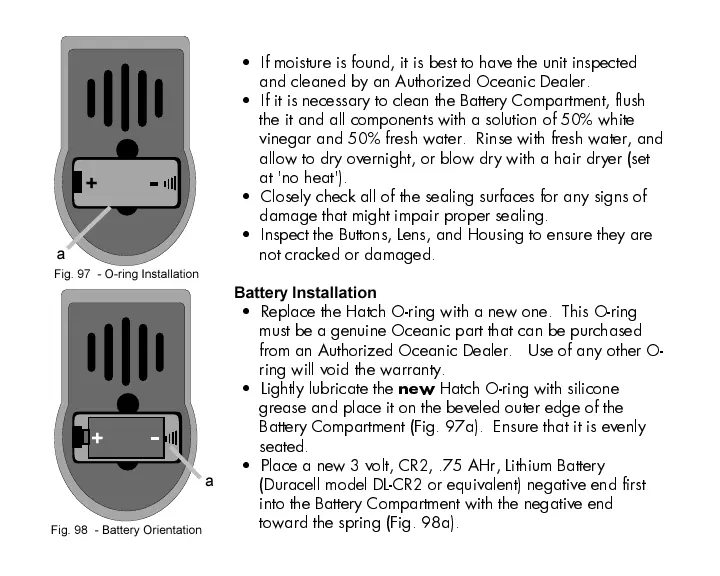
Lightly lubricate the
new
Hatch O-ring with silicone
grease and place it on the beveled outer edge of the
Battery Compartment (Fig. 97a). Ensure that it is evenly
seated.
Place a new 3 volt, CR2, .75 AHr, Lithium Battery
(Duracell model DL-CR2 or equivalent) negative end first
into the Battery Compartment with the negative end
toward the spring (Fig. 98a).
Fig. 97 - O-ring Installation
+
a
Fig. 98 - Battery Orientation
+
a













 To Next Page