18
Low Battery Condition
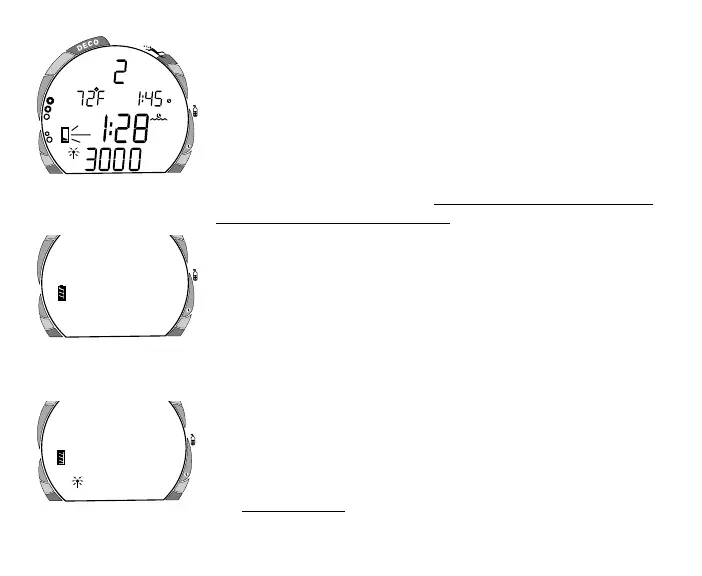
Voltage level is checked upon activation and every 10 minutes
during operation. When a Low Battery Condition occurs (either
the Display Module or Transmitter), the Battery icon appears on
the display flashing during Surface Mode (Fig. 8) and Fly/Desat
Mode (after 2 hours on the surface following a dive).
To determine whether the Low Battery Condition involves the
Transmitter or Display Module - press the Side (Select) button for
2 seconds while in Surface Mode.
• The Battery icon will be displayed for 3 seconds indicating
the condition of the Display Module's Battery (Fig. 9A).
• If the Transmitter is active and linked to the Display Module,
the Battery icon and the Transmitter icon will then be dis-
played for 3 seconds indicating the condition of the
Transmitter's Battery (Fig. 9B).
• The display will then revert to Surface Mode.
• If 75 % of the Rated Power has been consumed (Low Battery
Condition), the Battery icon will only display 1 bar inside the
shell and it will flash as a warning that the Battery is to be
replaced prior to conducting any further dives.
• Battery condition cannot be checked during Dive Modes.
• If the unit did not display a Low Battery Condition prior to
entering the Dive Mode, and a Low Battery Condition occurs
during the dive, there will be sufficient Battery power to
maintain unit operation for the remainder of that dive.
Fig. 9B - Battery Indicator
Transmitter
ATR
O
2
ATR
O
2
Fig. 9A - Battery Indicator
Display Module
Fig. 8 - Low Battery
(Surface Mode)
ATR
PSI
O
2



 To Next Page