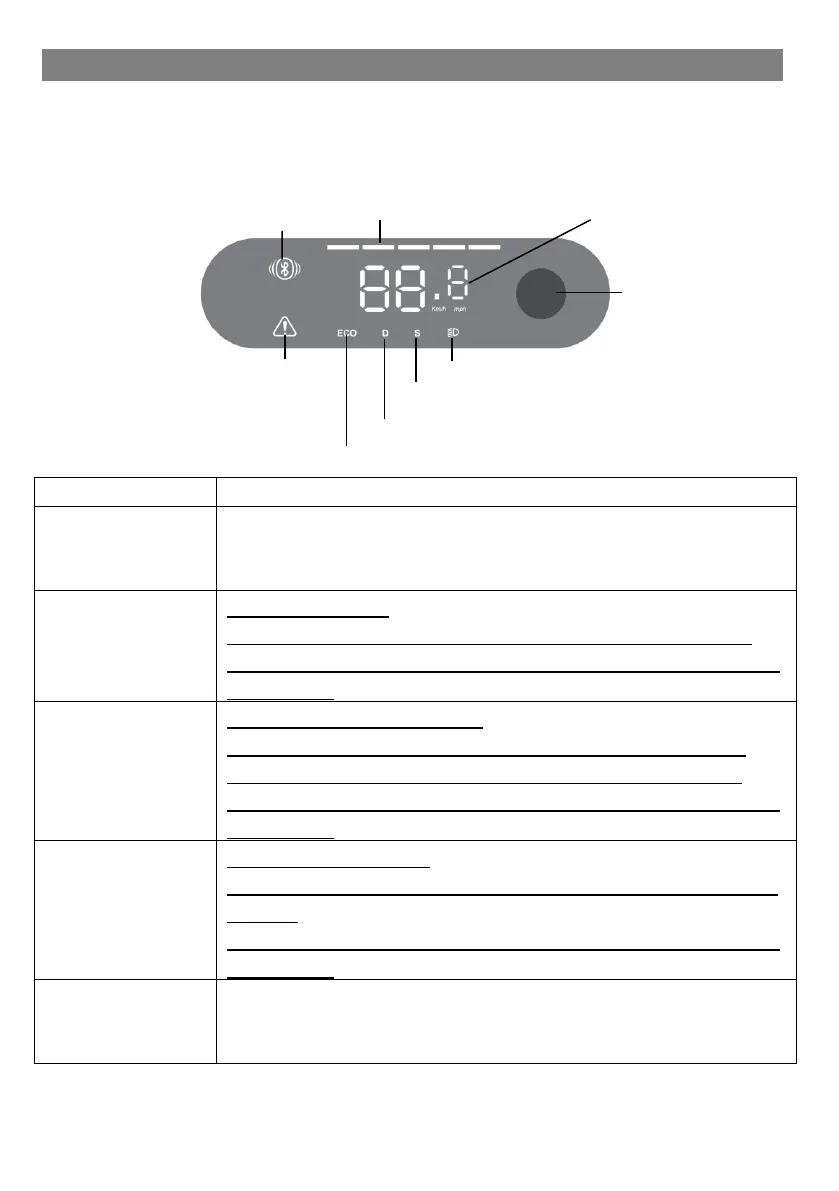
Display & Power / Control button
You will find the following information on the display on the
handlebars:
Press the button for 3 seconds to switch the
appliance on. Press the button again for 3 seconds
to switch the appliance off again.
Sport mode “S”
Sport mode allows a maximum speed of 20 km/h.
Press the button twice quickly and briefly to change
the mode.
Pedestrian mode “ECO”
Pedestrian mode is limited to a speed of 5 km/h,
which is suitable for pushing on the sidewalk.
Press the button twice quickly and briefly to change
the mode.
Standard mode “D”
The standard mode allows a maximum speed of 15
km/h.
Press the button twice quickly and briefly to change
the mode.
Press the button once briefly to switch the light on.
Pressing the light button once again briefly switches
the light off again.



 To Next Page