EN
Search for Tracks
You can search for tracks in the internal memory or memory card by inputting a few
key words.
(1) Tap the Search icon
, and then input a few key words of the track.
(2) The track should be listed if found.
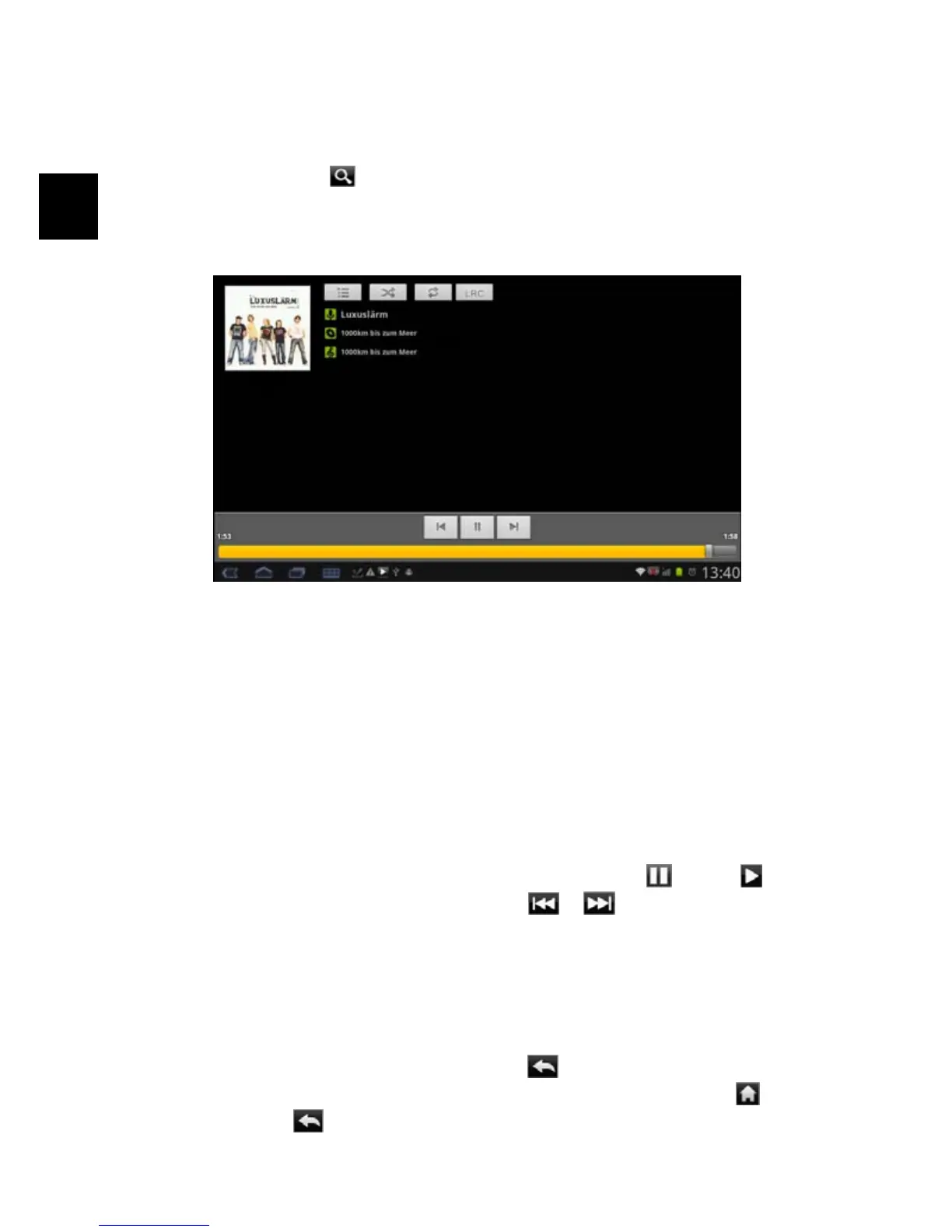
Playback Screen
a. CD Cover (If existing)
b. Show current playlist.
c. Random playback on / off.
d. change replay mode
e. ID3-Information’s (Artist, Album etc.)
f. Short press – Previous track
Long press – Fast Rewind
g. Play/Pause
h. Short press – Next track
Long press – Fast forward
i. Progress bar
j. Shows that the player app is running, if running in background.
y To pause or resume the playback, tap on the Pause / Play icon.
y To play the previous/next song, tap on
/ .
y You can tap on the progression bar to go directly to a different location in
the song. You can also drag the cursor in the progression bar to another
location in the song.
y Tapping continuously on the ID3 information tag will search for the
information about the track from the Internet.
y To go back to the music library, tap on
.
y To go back directly to the Home screen, tap on the Home icon
or
Return icon
.
a
b
e



 To Next Page