EN
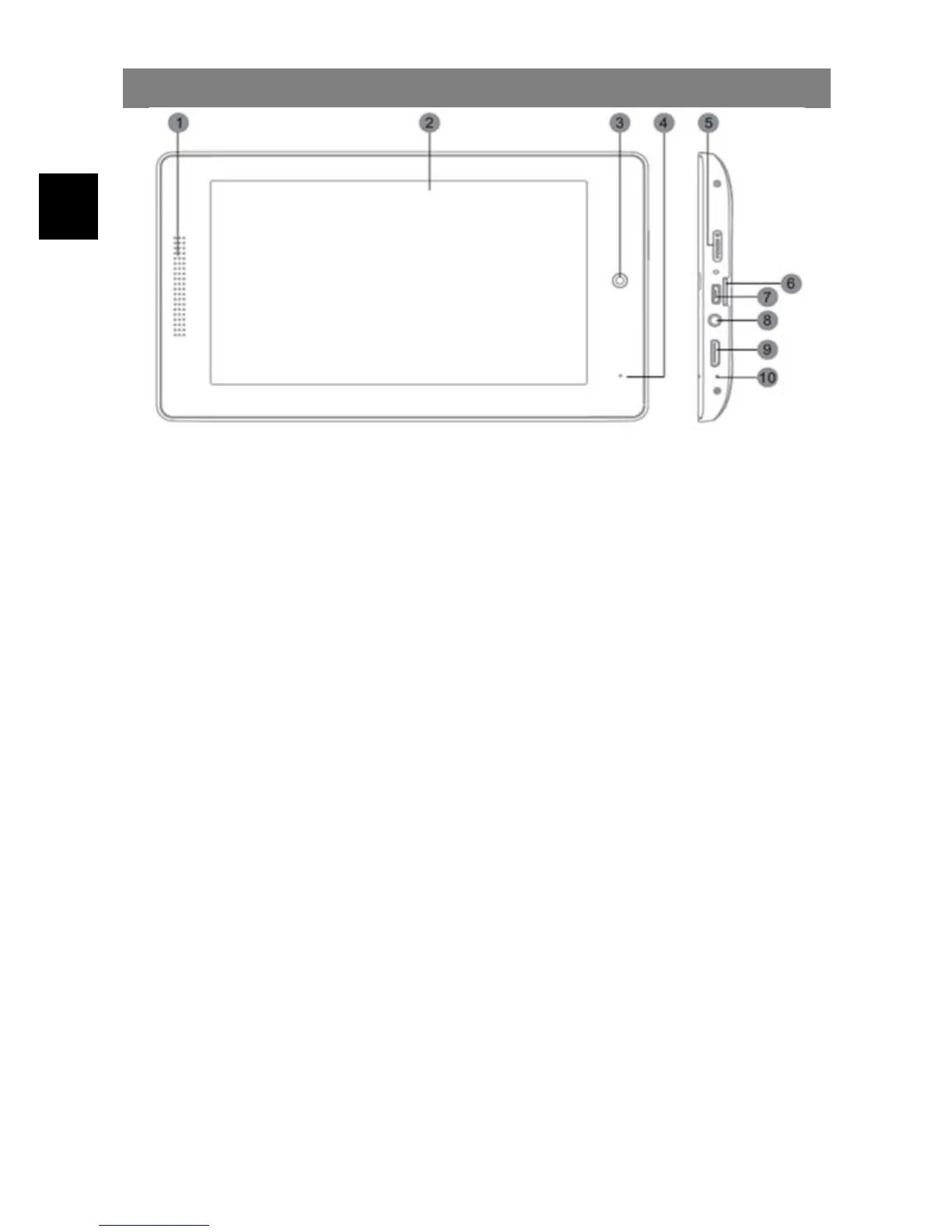
Buttons & Ports
1. Power
Button
Press and hold the power switch to turn on or off the device;
Briefly press the switch to turn the screen on or off.
2. Reset pin hole Press to reset the tablet if it freezes or otherwise behaves
abnormal. (Use a paperclip or other small object to gently
press this key.)
3. Mini HDMI Connect to a TV or other display.
Note: Sound over HDMI must be enabled separately using the
system settings.
4. Volume +/- key Shortly press to increase / decrease the volume level.
Volume + /
Return
Hold pressed for 3 seconds to return to the previous screen.
Volume - / Menu Hold pressed for 3 seconds to open the current apps menu.
5. USB 2.0
Hi-speed
/ USB Host
Connect to a computer to transfer data
(e.g., music, videos, photos, files).
Support USB stick, Surf stick, KeyBoard and Mouse.
6. Headphone jack Audio output connection for head-phones
Note: Speaker output is automatically disabled when
headphones are connected to the player.
7. Power jack (DC
in)
Charge and power the tablet with the included power adapter.
8. Micro SD Card
Slot
Accommodates any standard SD/SDHC memory card.
9. Status LED Red while charging. Turns green when battery is fully charged.
10. Camera Front-facing camera for taking avatar pictures



 To Next Page