EN
ODYS Shark
- 6 -
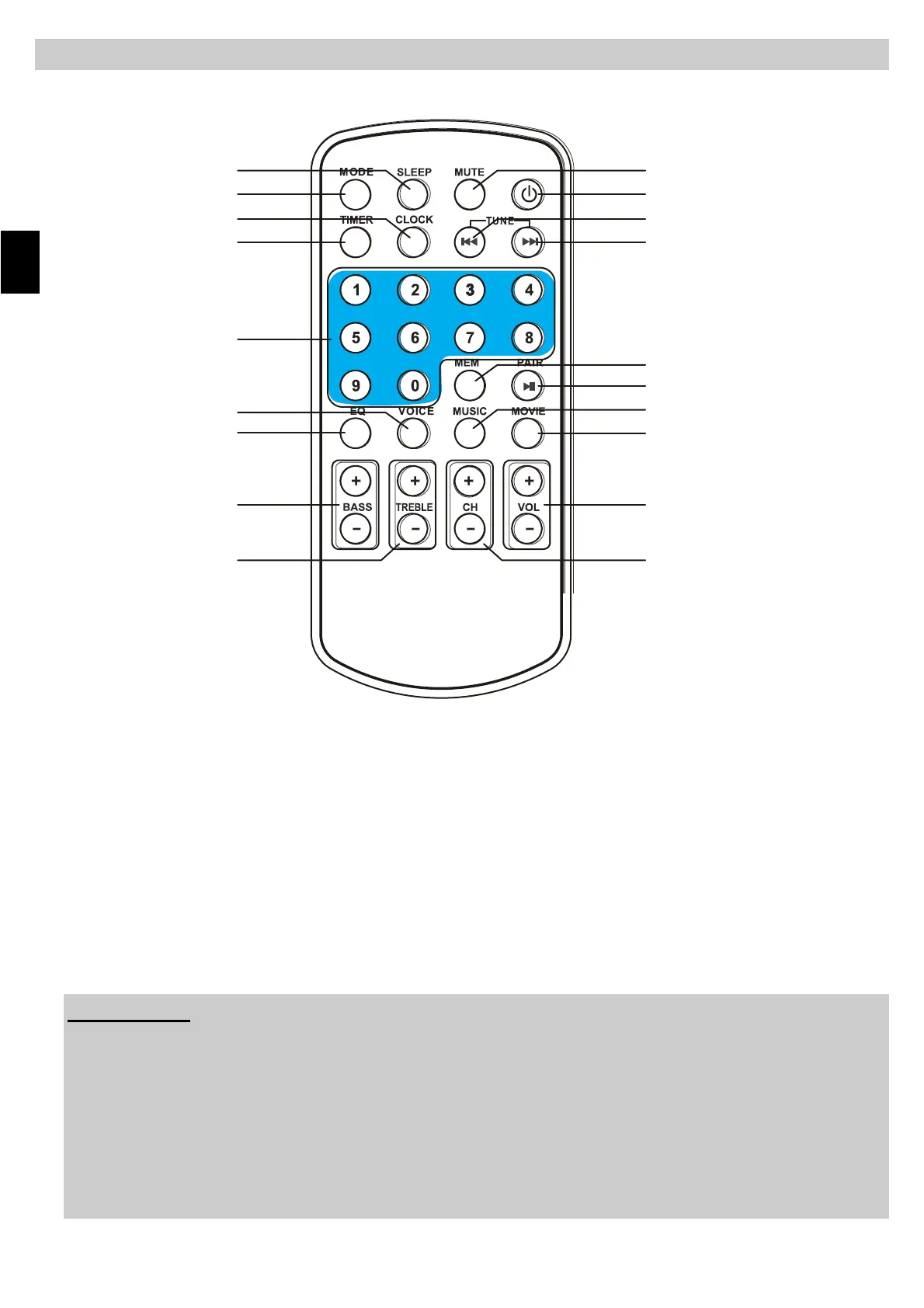
4 REMOTE CONTROL
Attention:
Connecting the device to the main power source while in operation may
cause damage to the amplifier and or DVD player.
We recommend connecting all components, which includes the
SOUNDBAR to the main power supply before attempting to operate this
device.
Damage resulting from improper power use is not covered within the
guarantee guidelines.
1. SLEEP BUTTON
2. MODE BUTTON
3. CLOCK BUTTON
4. TIMER BUTTON
5. NUMERIC BUTTONS
6. VOICE BUTTON
7. EQ BUTTON
8. BASS +/- BUTTONS
9. TREBLE +/- BUTTONS
10. MUTE BUTTON
11. POWER BUTTON
12. TUNING/SKIP/SEARCH BACKWARD
13. TUNING/SKIP/SEARCH FORWARD
14. MEM BUTTON
15. PAIR/PLAY/PAUSE BUTTON
16. MUSIC BUTTON
17. MOVIE BUTTON
18. VOL +/- BUTTONS
19. CH+/- BUTTONS
1
2
3
4
5
6
7
8
9
10
11
12
13
14
15
16
17
18
19



 To Next Page