Fig. 9 Fig. 10
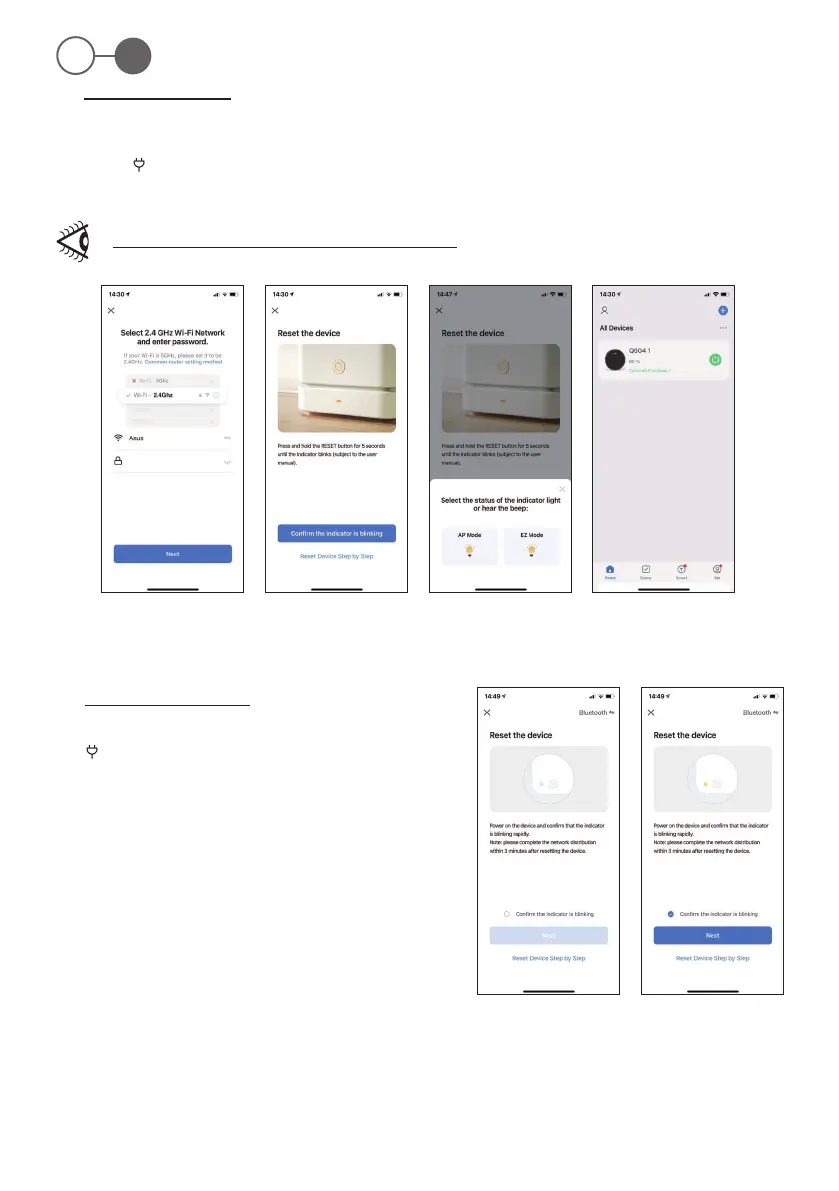
Fig. 5 Fig. 6 Fig. 7 Fig. 8
ROB 4600
56
EN
3.a - General connection mode
1. Click on “SMALL HOME APPLIANCE“. Then click on “ROBOT VACUUM”.
2. Enter the Wi- password of the connection and click “Next” to reset the device.
3. Hold the “ ” (2) button down for 3-5 seconds until the device emits two “beeps”, then release the button, the relative LED on the robot
ashes quickly.
4. Click “Next” to nish the reset. Select “Wi-Fi Quick Connection” on your mobile phone and click “Next” to enter the waiting state.
If interfacing is not successful, repeat the steps described above.
3.b - Bluetooth connection modes
1. Turn on the Bluetooth function of the mobile phone, and then hold the
“ ” (2) button down for 3 until the device emits two “beeps”, then release
the button, the relative LED on the robot ashes quickly (Fig. 9).
2. Check the “Conm the indicator is blinking”on the phone and click
“Next” (Fig. 10).
> > > >


 To Next Page