Fig. 13
Fig. 14 Fig. 15
Fig. 11 Fig. 12
ROB 4600
57
EN
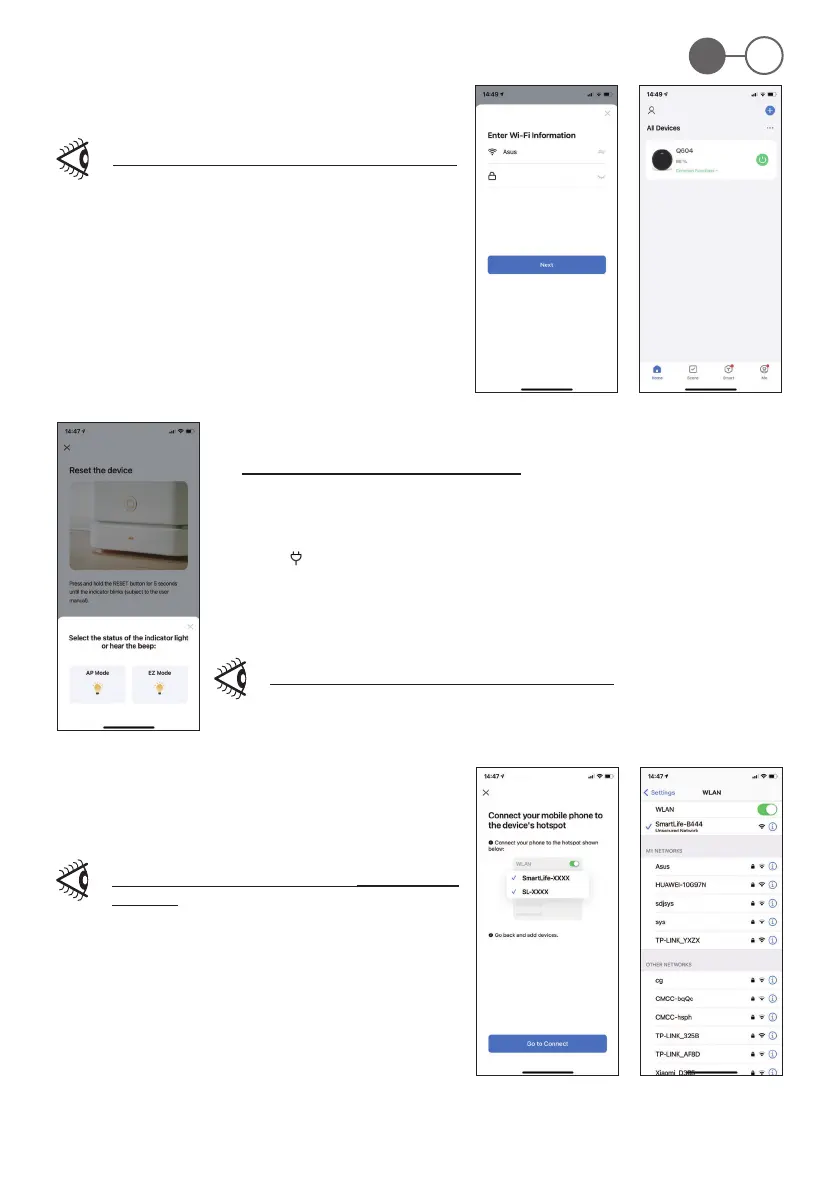
3.c - Compatible connection mode (AP mode - Fig. 13)
This mode can be used if the device does not connect in “General connection mode”
1. Click on “SMALL HOME APPLIANCE“. Then click on “ROBOT VACUUM”.
2. Enter the Wi- password of the connection and click “Next” to reset the device.
3. Hold the “ ” (2) button down for 3-5 seconds until the device emits two “beeps”, then release the button,
the relative LED on the robot rst ashes quickly and then slowly.
4. Click “Next” to nish the reset. Select “Hotspot Network” on your mobile phone, enter the network
setting interface, click “Connect” to enter the wi- setting of your mobile phone.
If interfacing is not successful, repeat the steps described above.
5. Select “SmartLift-XXXX” to return to the “Smart Life” APP (Fig. 14).
Enter the network waiting state (Fig. 15).
Once connected to the device, go back to the “Smart Life - Smart
Living“ app.
3. Enter the Wi- password on the connection and click “Next” (click to
connect after searching for the device) (Fig. 11-12).
If interfacing is not successful, repeat the steps described above.


 To Next Page