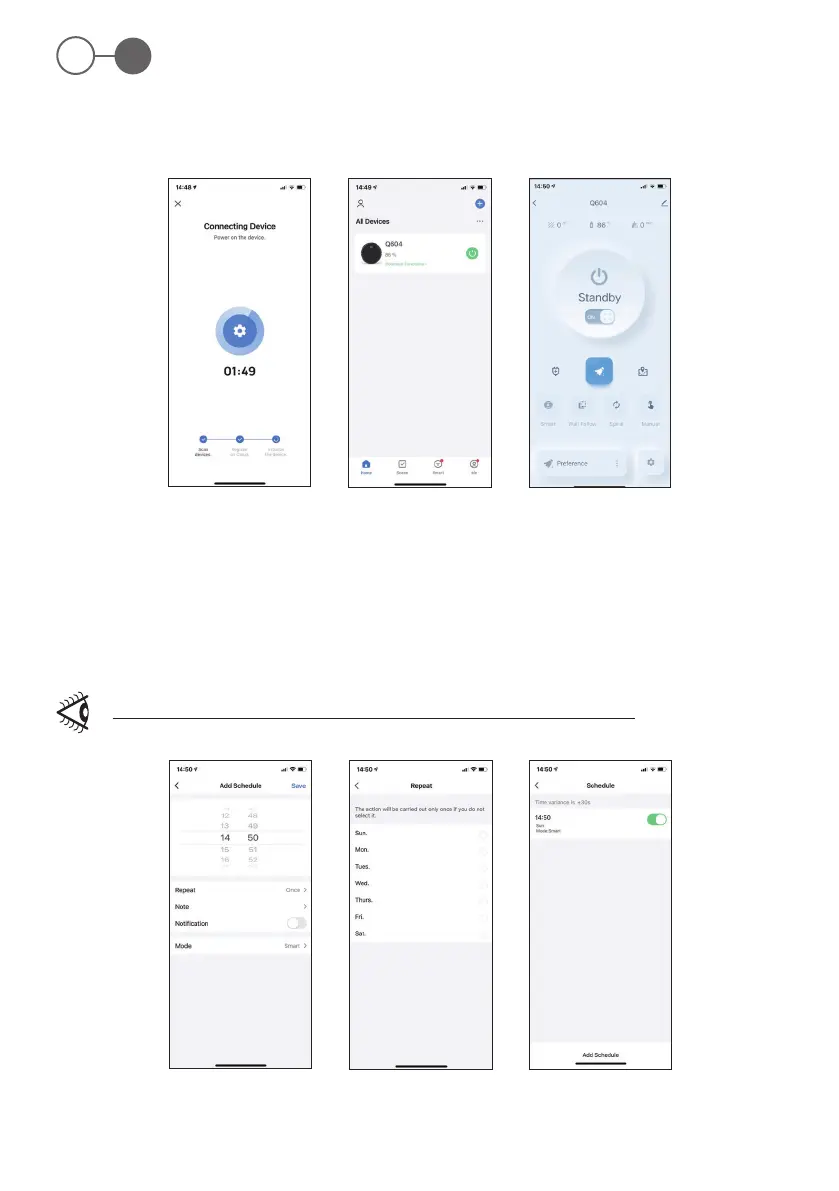
Fig. 16
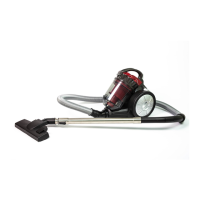
Fig. 19
Fig. 17
Fig. 20
Fig. 18
Fig. 21
ROB 4600
58
EN
4. The counting starts and will be interrupted as soon as the smartphone has connected to the device (Fig. 16).
5. Once connected, fclick “Finish” to enter the device list. Click the added cleaning robot to enter the operation interface. (Fig. 17).
6. After the device is connected successfully, the “Home” key white light o. (Fig. 18).
Planned cleaning
1. Once in the connected device screen, click on “Schedule”.
2. Then press “Add” and select the start time of the appliance and its repetitions during the week (Fig. 19-20).
3. Once the programming is conrmed, the robot starts cleaning.
To delete one or more operating days, deactivate them from the weekly programming list (Fig. 21).


 To Next Page