Page 32
DIFFERENTIAL PRESSURE TRANSMITTER - USER GUIDE
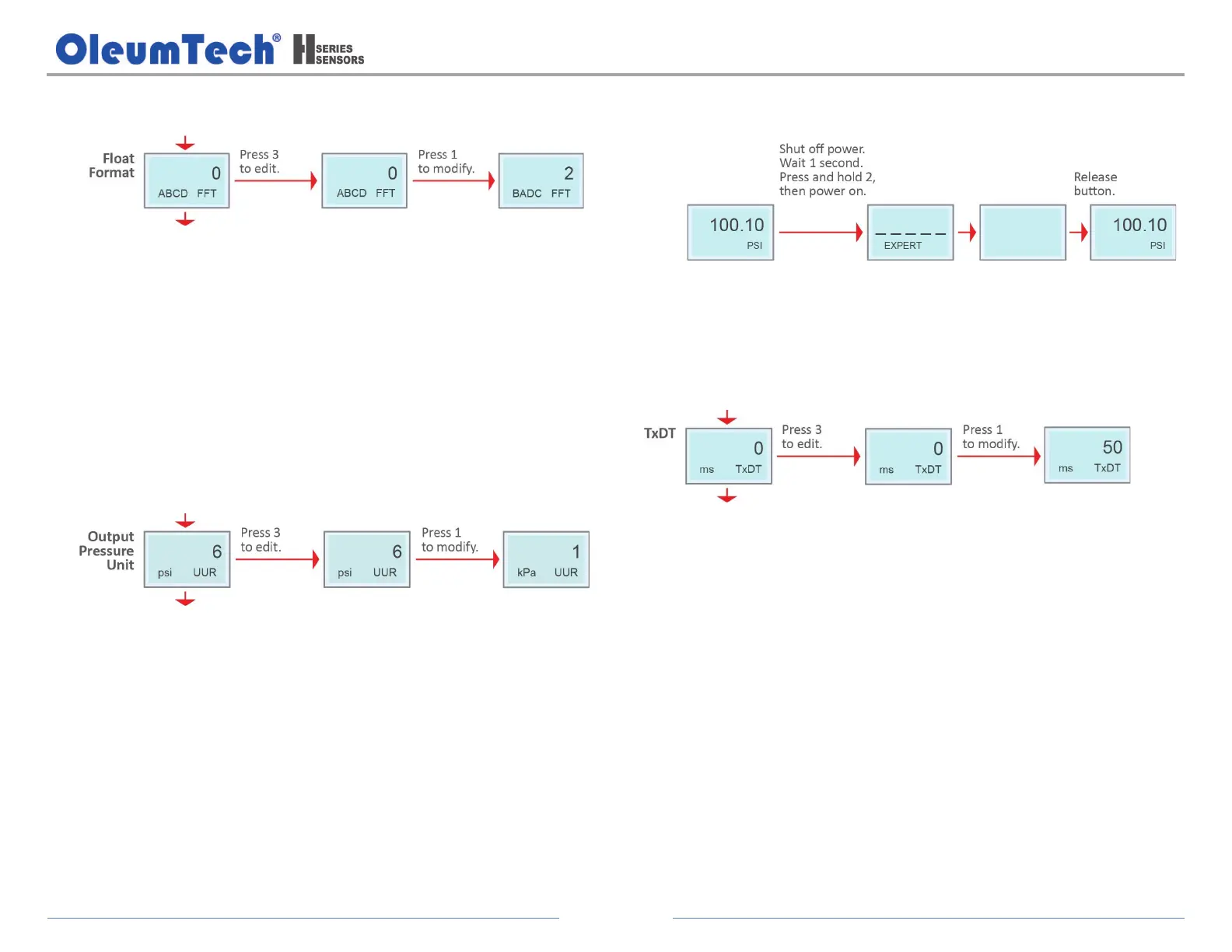
g. Configure the Float Format*.
Options:
0 = ABCD (Default)
1 = CDAB
2 = BADC
3 = DCBA
*The float format parameter is used for the device output
pressure/temperature float data format, the factory default is ABCD.
h. Configure the Output Pressure Unit.
Options:
0 = None 1 = kPa 2 = Mpa
3 = Pa 4 = bar 5 = mbar
6 = psi (Default) 7 = mH2o@4C 8 = mmH2o@4C
9 = cmH2o@4C 10 = inH2o@4C 11 = ftH2o@4C
12 = cmHg@0C 13 = mmHg@0C 14 = inHg@0C
15 = kg/cm
2
16 = g/cm
2
17 = Torr
18 = Atm 19 = m 20 = mm
21 = osi 22 = psf
4. Display Advanced Menu System
Use button 2 to scroll through the menu system.
a. Configure the TxDT (Transmit Delay Time).
Range: 0 to 600
Transmit delay time is used to allow the communication line to
stabilize before sending data.
b. Exit the Advanced Menu System by power cycling the device without
pressing any buttons.


 To Next Page