Page 43
DIFFERENTIAL PRESSURE TRANSMITTER - USER GUIDE
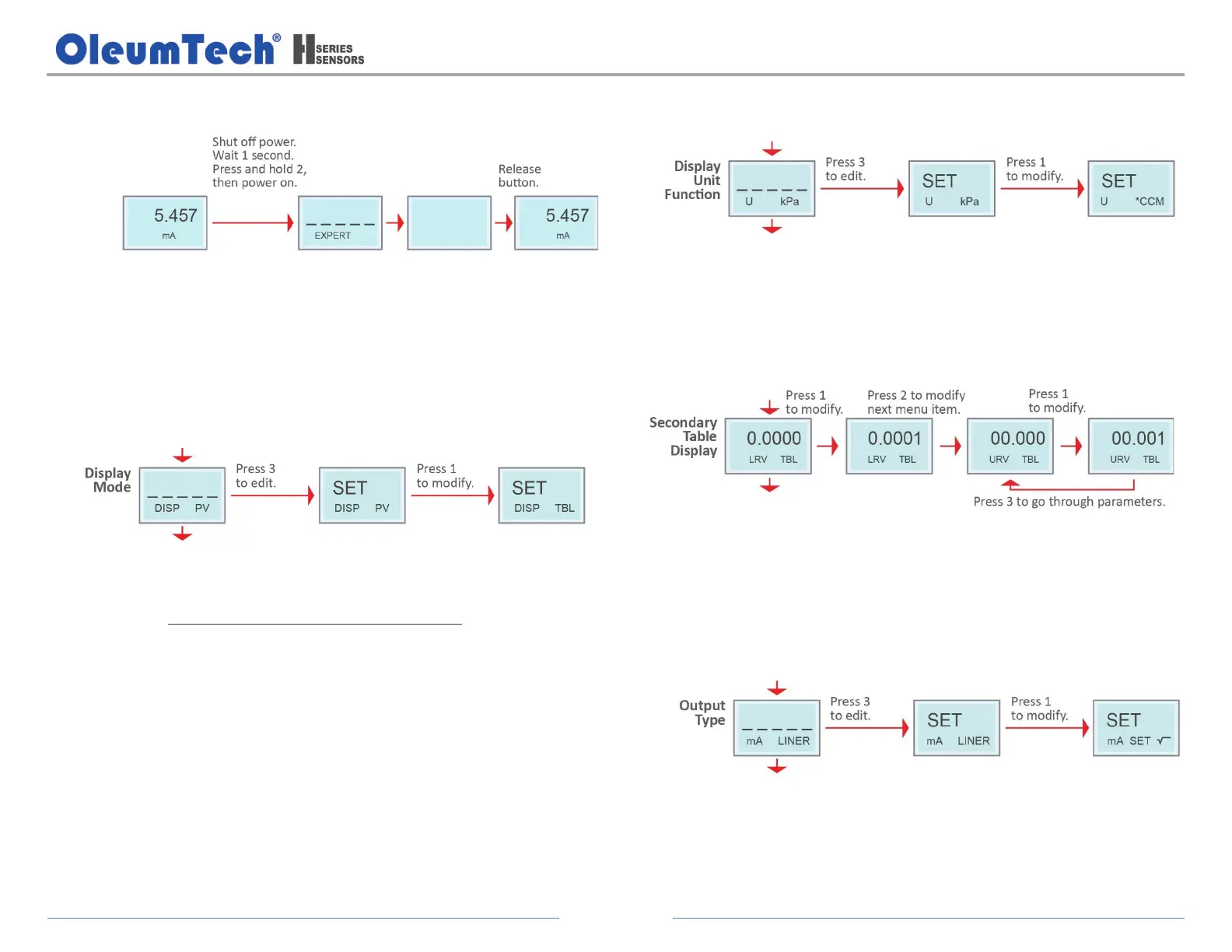
4. Display Advanced Menu System
Use button 2 to scroll through the menu system.
The advanced menu items are visible along with the normal operations
menu items.
a. Configure the Display Mode.
Options:
% = Percentage, PV = Pressure Value (Default), mA = Current,
TBL = Secondary display table is not supported
b. Configure the Display Unit Function.
Options:
CMM, CMH, CFM, CCM, LPM, m3/h min/h
c. Set the Secondary Table Display (TBL).
LRV TBL: Set 4 mA corresponding value
URV: Set 20 mA corresponding value
d. Configure the Output Type (Square root output initial value
configurable).
Options:
√, Square root
LINER, Linear (Default)
Set √, Set initial value of square root output


 To Next Page