Page 45
DIFFERENTIAL PRESSURE TRANSMITTER - USER GUIDE
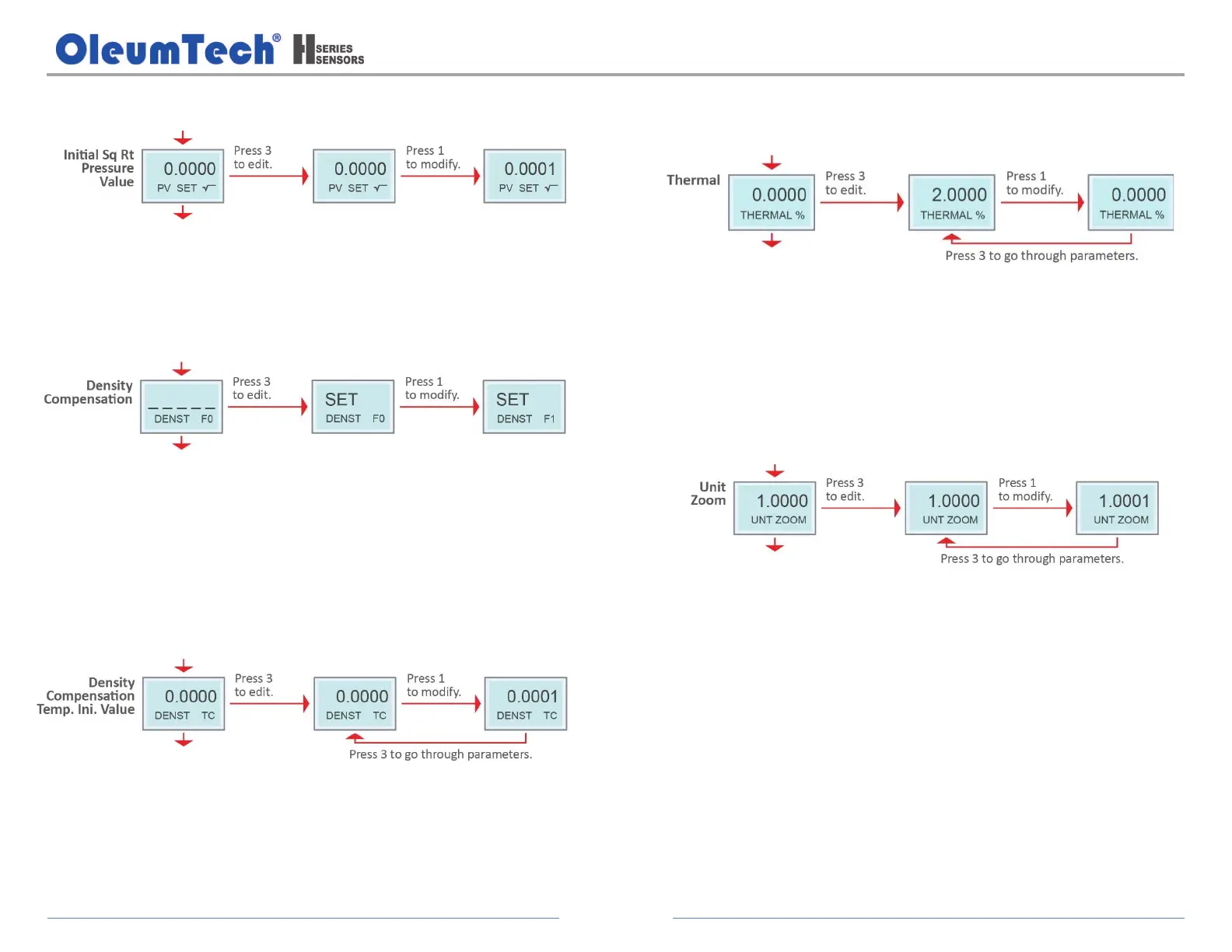
k. Configure the Initial Square Root Pressure Value.
Range: 0 to 0.008
Default: Initial Square Root Value: 0.002
l. Configure the Density Compensation.
Options:
F0 = None
F1 = 1
st
coefficient
F2 = 2
nd
coefficient (Default)
m. Configure the Density Compensation Temperature Initial Value.
Temperature Compensation unit: °C
Compensation starts when the value is over the set value
Range: 0 to 100
Default: 85 °C
n. Set the Initial Value of the Secondary Thermal Effect Correction
Function.
Range: -50 to 50
Default: 0 %
Directly subtract the percentage of the set value full scale output (16
mA from the original output, subject to the initial temperature value.
o. Configure the Unit Zoom.
Range: 0.1000 to 9.8999
Default: 1
In some multi-device occasions, the instrument display needs to be
consistent, and this setting value can be used to make the LCD display
value consistent, but does not change the loop output value.
p. Exit the Advanced Menu System by power cycling the device without
pressing any buttons.


 To Next Page