MENU
ADVANCED
OLI eBike Systems | High Vision
USE
DESCRIPTION
INSTALLATION
TROUBLESHOOTING
MAINTENANCE AND
ASSISTANCE
GENERAL
INFORMATION
studioimmagina.com 00_102020
15
HOME
HOME
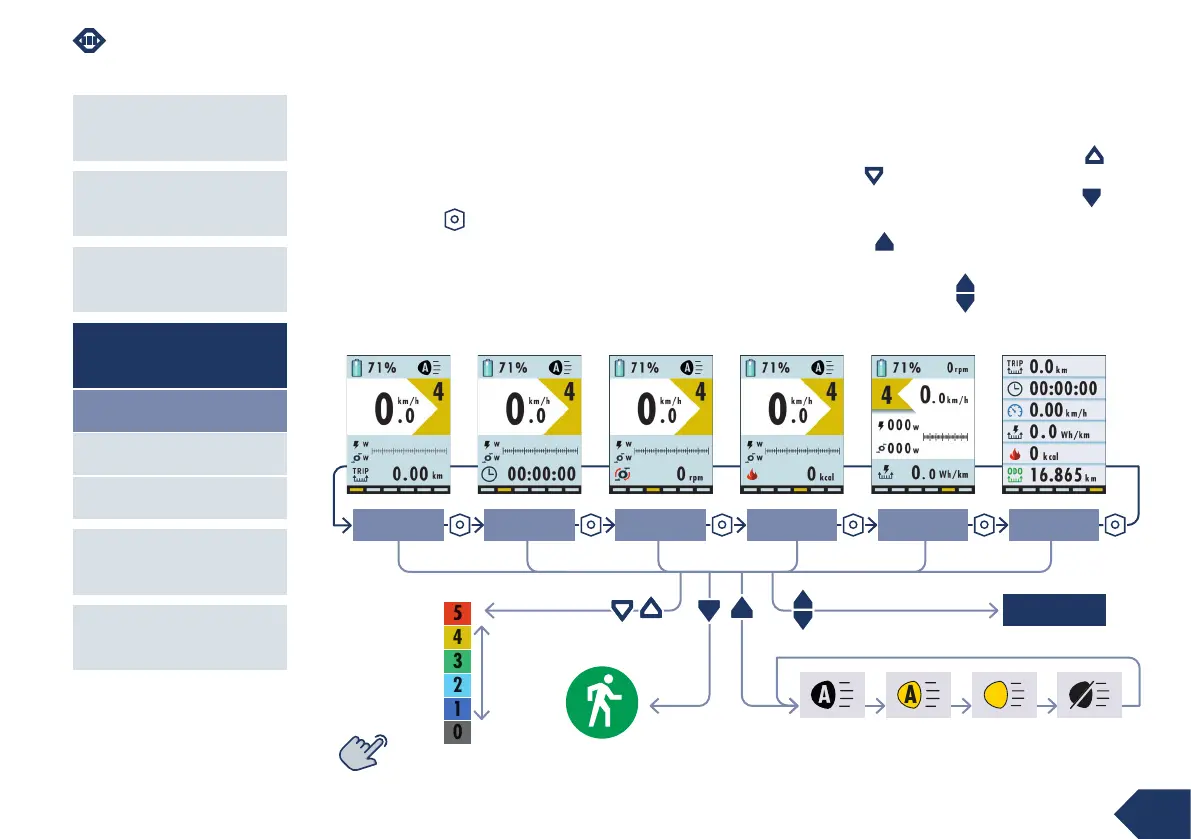
After powering on, the first Distance screen of the
Home section is displayed.
The Home section consists of 6 screens.
To scroll through the screens you need to press the
power-on key .
From any screen in the Home section, you can:
› adjust the assistance level by pressing the up
and down keys ;
› enter Walk mode by holding down the down key ;
› adjust the brightness of the eBike lights by holding
down the up key for 2";
› enter the Menu section by holding down the up +
down keys at the same time for 2".
Walk mode
MENU
Distance Time
Pace
Power
Race
Summary
assistance
level
eBike light adjustment
auto off auto on offon



 To Next Page