HOME
ADVANCED
OLI eBike Systems | High Vision
USE
DESCRIPTION
INSTALLATION
TROUBLESHOOTING
MAINTENANCE AND
ASSISTANCE
GENERAL
INFORMATION
studioimmagina.com 00_102020
23
MENU
MENU
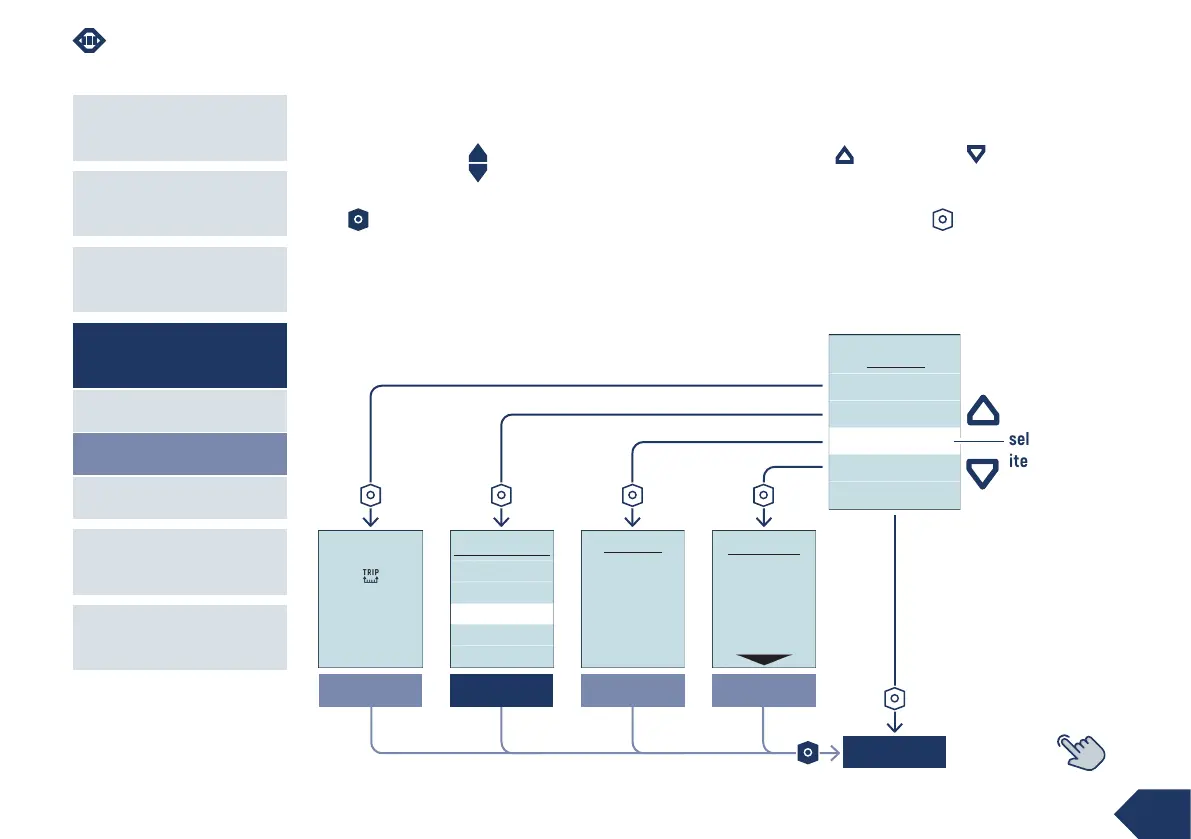
From the Home section, hold down the up + down keys
at the same time for 2 ”to enter the Menu section.
From any screen, by holding down the power-on key
for 2 ”, you can return to the last viewed Home
screen.
From the Menu page:
› use the up and down keys to scroll through
the items present, the selected item is highlighted
in the centre in the white line,
› press the power-on key to confirm and open
the page of the selected item, the Back item takes
you to the first screen of the Home section.
Reset trip
Reset
trip…
System info
SYSTEM INFO
Firmware version
HMI: 3.00.000
Motor: 2.00.000
System info
Advanced
Trip reset
Battery info
Back
MENU
Battery info
BATTERY INFO
Voltage: 39,00V
Charge cycles: 13
Last charge: 48h
Battery temp.: 21.0C
HOME
ADVANCED MENU
Brightness
Language
Weight
Gender
Measure unit
ADVANCED
selected
item



 To Next Page