HOME
ADVANCED
OLI eBike Systems | High Vision
USE
DESCRIPTION
INSTALLATION
TROUBLESHOOTING
MAINTENANCE AND
ASSISTANCE
GENERAL
INFORMATION
studioimmagina.com 00_102020
24
MENU
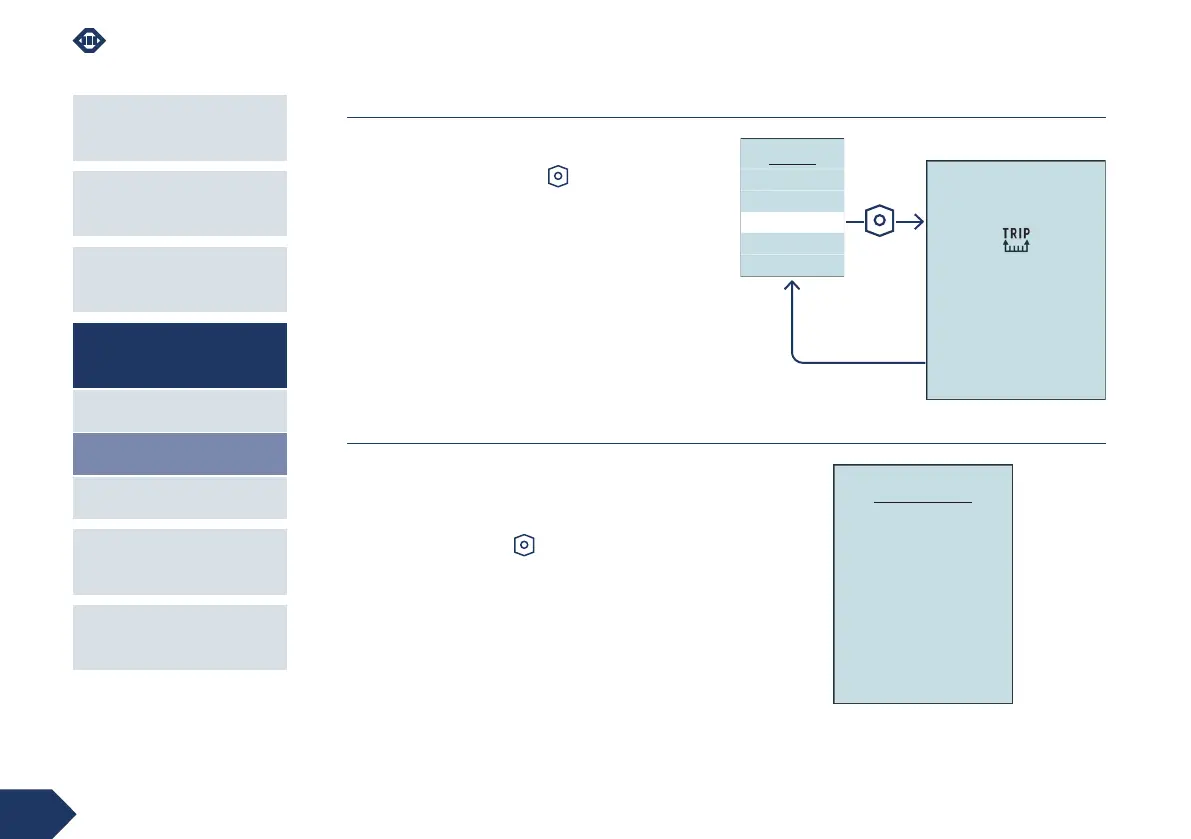
Reset trip
The Reset trip item allows you to reset all the recorded
lap data by returning the counters to zero ().
By pressing the power-on key it starts immediately
upon reset.
The message “Trip reset ...” appears on the display for
a few seconds, when the reset is complete, the Menu
page is displayed again.
System info
In this screen you can view the firmware versions:
› of the installed HMI,
› of the associated motor.
Press the power-on key to return to the Menu.
Advanced
System info
Trip reset
MENU
Reset
trip…
SYSTEM INFO
Firmware version
HMI: 3.00.000
Motor: 2.00.000



 To Next Page