
EasyManua.ls Logo

Olimpus CKX41 - User Manual

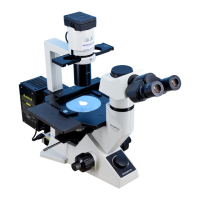
Olimpus CKX41
40 pages
Print Icon
To Next Page IconTo Next Page
Loading...
INSTRUCTIONS
CKX41/CKX31
CULTURE MICROSCOPES
This instruction manual is for the Olympus Culture Microscopes Models CKX41 and CKX31. To
ensure the safety, obtain optimum performance and to familiarize yourself fully with the use of this
microscope, we recommend that you study this manual thoroughly before operating the microscope.
Retain this instruction manual in an easily accessible place near the work desk for future reference.
A X 7 3 5 1
Ryf AG
Bettlachstrasse 2
2540 Grenchen
tel 032 654 21 00
fax 032 654 21 09
www.ryfag.ch

Questions and Answers

  • J
    John HayesAug 16, 2025
    How to remove dust from the field of view in Olimpus Microscope?
    • F
      flopezAug 16, 2025
      If you see dirt or dust in the field of view of your Olimpus Microscope, it's likely due to dirt or dust on the eyepieces. Clean them thoroughly.
  • V
    Valerie RobinsonAug 20, 2025
    Why is the field of view dark on my Olimpus Microscope?
    • R
      Rachel JamesAug 20, 2025
      If the field of view is dark on your Olimpus Microscope even though the illumination is on, several factors could be responsible: * The socket pin might not be securely connected to the illumination column; ensure it's properly connected. * The bulb may have burned out, requiring replacement with a new one. * The light intensity control could be set too low; adjust it to an appropriate level. * Too many filters might be stacked; reduce the number to the minimum necessary. * The mounted bulb might not be the designated type; use a 6 V, 30 W halogen bulb.
  • S
    stephanie32Aug 25, 2025
    What to do if the bulb flickers on my Olimpus Microscope?
    • J
      john04Aug 25, 2025
      If the bulb flickers and the brightness is unstable on your Olimpus Microscope, it could be due to: * Fluctuations in the line voltage. Try using a voltage stabilizer. * The bulb is nearing the end of its life. Consider replacing the bulb. * The power cord is not securely connected. Ensure it is correctly and securely connected.
  • H
    haasbrandonAug 27, 2025
    Why is the edge of the field of view obscured on my Olimpus Microscope?
    • B
      Barry HamiltonAug 27, 2025
      If the edge of the field of view is obscured or not evenly illuminated on your Olimpus Microscope, check the following: * Ensure the revolving nosepiece is correctly engaged and clicks properly into place. * Make sure the filter is pushed in all the way and not stopped halfway. * Verify the phase slider is engaged properly by moving it until it clicks into place.
  • K
    karenchapmanAug 31, 2025
    Why is one side of the image blurred on my Olimpus CKX41?
    • A
      Antonio JonesAug 31, 2025
      If one side of the image appears blurred on your Olimpus Microscope, consider these possible causes: * The revolving nosepiece may not be correctly engaged. Ensure it clicks properly into place. * The specimen may not be correctly mounted on the stage. Place it correctly. * The optical performances of the culture vessel bottom plate may be poor. Use a vessel with a good profile irregularity characteristic.
  • J
    jonathan86Sep 3, 2025
    Why is the coarse adjustment knob hard to turn on my Olimpus CKX41 Microscope?
    • L
      Laura WadeSep 3, 2025
      If the coarse adjustment knob is too difficult to rotate on your Olimpus Microscope, the tension adjustment ring may be tightened too much. Loosen it appropriately.
  • E
    Edward MannSep 7, 2025
    Why is the field of view different for each eye on my Olimpus Microscope?
    • B
      Bethany WilsonSep 7, 2025
      If the field of view of one eye does not match that of the other on your Olimpus Microscope, it could be due to: * Incorrect interpupillary distance adjustment. Adjust the interpupillary distance. * Incorrect diopter adjustment. Adjust the diopter.
  • C
    clarkedwardNov 11, 2025
    How to improve image sharpness and contrast on Olimpus CKX41?
    • J
      johnmillerNov 11, 2025
      If you're experiencing poor visibility, lack of sharpness, poor contrast, indistinct details, or an inability to achieve a phase contrast effect with your Olimpus Microscope, consider the following potential causes and solutions: 1. Ensure the objective is correctly engaged in the light path by turning the revolving nosepiece until it clicks into place. 2. Adjust the aperture iris diaphragm properly, as it may be opened or stopped down too far during brightfield observation. 3. If your objective has a correction collar, adjust it while focusing to find the best position. 4. Check and clean any dirty lenses, including the condenser, objective, eyepiece, or culture vessel. 5. For phase contrast observation, ensure the bottom of the culture vessel does not exceed 2.5 mm in thickness; us...

Summary

Important Information and Safety Precautions

CKX31 vs CKX41 Model Differences

Key differences between the CKX31 and CKX41 microscope models.

General Safety Precautions for Microscope Use

Essential safety guidelines to prevent injury and equipment damage during microscope operation.

Safety Symbols and Getting Ready

Understanding Safety Symbols and Warnings

Explanation of safety symbols and warning engravings on the microscope for safe usage.

Initial Setup Procedures

Initial steps and handling advice before operating the microscope.

Maintenance, Cautions, and Intended Use

Maintenance, Storage, and Cautions

Procedures for cleaning, storing, and cautionary advice for microscope use.

Intended Use of the Microscope

Definition of the microscope's intended purpose and applications.

CKX31 Microscope Nomenclature

CKX31 Key Components Identification

Diagram illustrating and identifying the main parts of the CKX31 microscope model.

CKX41 Microscope Nomenclature

CKX41 Key Components Identification

Diagram illustrating and identifying the main parts of the CKX41 microscope model.

CKX31 Microscope Controls

CKX31 Control Panel Overview

Visual guide to the control panel of the CKX31 microscope, detailing each control element.

CKX41 Microscope Controls

CKX41 Control Panel Overview

Visual guide to the control panel of the CKX41 microscope, detailing each control element.

Observation Procedure Summary

Step-by-Step Observation Guide

A concise, step-by-step guide for performing standard observation procedures with the microscope.

Using Microscope Frame Controls

Powering On and Adjusting Brightness

Instructions for turning on the microscope's light source and adjusting its intensity.

Adjusting Coarse Adjustment Knob Tension

Guide on adjusting the rotation tension of the coarse adjustment knob for optimal focus control.

Using Stage Controls

Placing and Moving Specimens on the Stage

Procedures for correctly placing specimens and manipulating them on the microscope stage.

Observation Tube Adjustments

Adjusting Interpupillary Distance

Instructions for adjusting the interpupillary distance for comfortable binocular viewing.

Observation Tube Adjustments and Eye Shades

Adjusting Diopter and Using Eye Shades

Guidance on setting the diopter adjustment and properly using the eye shades.

Using Eyepiece Accessories

Using the Eyepiece Micrometer Disk

Detailed steps for inserting and using an eyepiece micrometer disk for measurement.

Observation Tube Features

Selecting Light Path and Adjusting Tilt

Information on selecting light paths and adjusting the observation tube's tilt for optimal viewing.

Illumination Column Functions

Using Filters and Diaphragm

Guidance on using filters and adjusting the aperture iris diaphragm for illumination.

Removing the Condenser Lens

Instructions for removing the condenser lens to increase working distance.

Objective Correction Collar Usage

Adjusting Collar for Vessel Thickness

How to adjust the objective correction collar based on vessel bottom thickness for optimal image resolution.

Phase Contrast Observation Setup

Phase Contrast Sliders and Compatibility

Overview of available phase contrast slider units and their compatible objectives.

Phase Slider Parts Identification

Identification of the components of the phase contrast sliders.

Phase Contrast Observation Procedures

Mounting Optical Elements and Phase Slider

Detailed steps for mounting the optical element and the phase slider onto the microscope.

Phase Contrast Alignment

Centering the Light Annulus

Procedure for accurately centering the light annulus with the phase annulus for best contrast.

Photomicrography and TV Observation

System Setup and Notes

Guidance on setting up photomicrography/TV systems and important considerations for use.

Troubleshooting: Optical System Issues

Illumination and Field of View Problems

Solutions for issues related to illumination, dark fields, and uneven illumination.

Image Clarity and Contrast Problems

Troubleshooting steps for dirt, dust, glare, and poor image sharpness or contrast.

Phase Contrast Effect Issues

Diagnosing and resolving problems where the phase contrast effect is not achieved.

Troubleshooting: System, Focusing, and Imaging Issues

Image Blur, Electrical, and Focusing Problems

Resolving common issues like image blur, electrical instability, and focusing difficulties.

Observation Tube and Photomicrography Issues

Addressing problems with the observation tube and image quality in photomicrography.

Microscope Specifications Overview

Optical, Illumination, and Focusing Specs

Key specifications for the microscope's optical system, illumination, and focusing mechanisms.

Nosepiece, Observation Tube, and Eyepiece Specs

Specifications related to the revolving nosepiece, observation tubes, and eyepieces.

Detailed Microscope Specifications

Objective, Stage, and Condenser Specs

Detailed specifications for objectives, stage, mechanical stage, and condenser.

Dimensions, Weight, and Operating Environment

Information on the microscope's physical dimensions, weight, and recommended operating environment.

Microscope Assembly Instructions

Assembly Diagram and Tools

Visual diagram showing the assembly sequence and listing necessary tools for microscope setup.

Detailed Assembly Procedures: Core Components

Installing Bulb, Illuminator, and Lamp Socket

Step-by-step guide for installing the halogen bulb, transmitted light illuminator, and lamp socket.

Detailed Assembly Procedures: Mounting Components

Mounting Objectives and Stage Components

Instructions for mounting the objectives onto the nosepiece and attaching stage extension/mechanical plates.

Detailed Assembly Procedures: Final Installation

Mounting Stage Plate, Observation Tube, and Eyepieces

Steps for installing the stage center plate, observation tube, and eyepieces.

Assembly: Filters and Connections

Mounting Filters and Connecting Cables

Guidance on mounting filters into the holder and connecting the power cord and cables.

Power Supply Cord Selection and Certification

Specifications for Approved Power Supply Cords

Details on voltage, current, and fittings required for selecting an appropriate power supply cord.

Certified Cord Agencies and Markings (Table 1)

List of agencies that certify power supply cords and their corresponding certification marks.

Power Cord Harmonization Standards

HAR Flexible Cord Marking Methods (Table 2)

Details on HAR flexible cord approval organizations and cordage marking methods.

Lamp Socket Maintenance and Inspection

Periodic Inspection Checklist for Lamp Socket Safety

A checklist for performing periodic inspections of the lamp socket to ensure safety and proper function.

Olimpus CKX41 Specifications

General IconGeneral
TypeInverted Microscope
Optical SystemUIS2 Optical System
CondenserLong Working Distance Condenser
Power SupplyAC 100-240V, 50/60Hz
Objective Lenses10x, 20x, 40x
StageFixed stage
Illumination30W Halogen Lamp
Camera CompatibilityCompatible with Olympus digital cameras
Observation MethodsBrightfield, Phase Contrast
Magnification40x to 400x
Eyepiece10x
FocusingCoarse and fine focusing knobs