28
After the speed dial keys have been programmed, if the
speed dial key (for example, the number 2 key) is pressed
and held for three seconds, a call will initiate to the phone
number programmed to the number 2 key.
Dial using dedicated speed dial (M1, M2, M3)
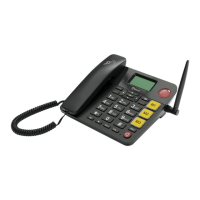
The EasyTel 4G has three dedicated speed dial keys (M1,
M2, M3). After phone numbers have been saved to the
dedicated speed dial keys, these keys can be used to call
the numbers programmed to them. To do so, press a speed
dial key eg: M1, and a call will initiate to the phone number
programmed to M1.
Speed Dial
The EasyTel 4G has both speed dial (linked to number keys
2-9) and dedicated speed dial keys (M1, M2, M3).
Programming the speed dial keys (2-9)
1. Press the top right key to select Contacts.
2. Press the top left key to select Options.
3. Scroll to and select Speed dial.
4. Select Speed dial.
5. Select the number you would like to program.
6. Select Edit.
7. Input number or select from Contacts.



 To Next Page