User Guide
| 03
1. ASSEMBLING
1.1 Unpack
Check your product box for the following items:
• Tablet
• Battery
• Charger
• Micro USB cable
• Quick guide
Caution: The supplied accessories perform best for your device. Accessories other than the supplied ones may not be compatible with your
device.
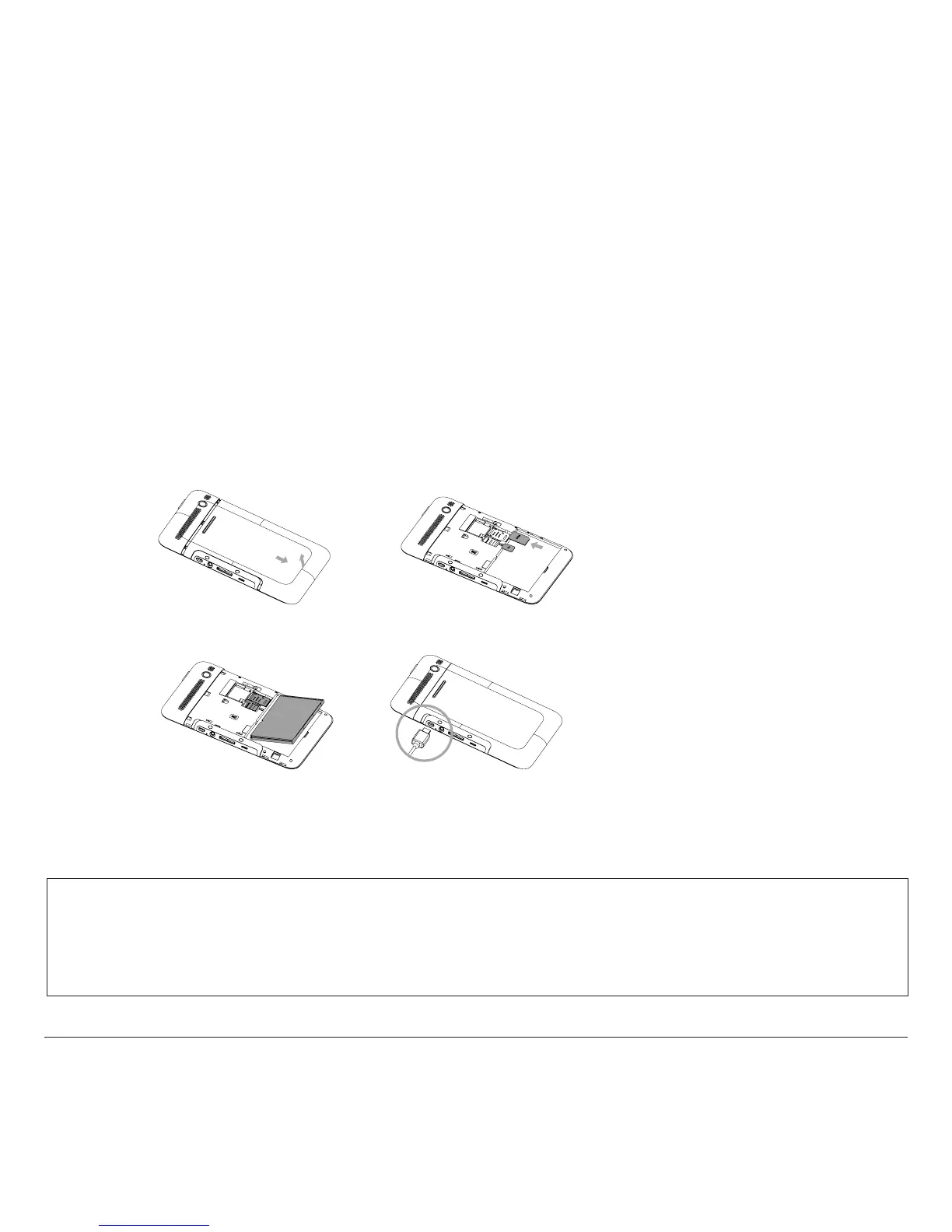
1.2 Assemble & Charge
1. Remove the back cover
3. Install the battery
2. Insert the SIM & MicroSD card
4. Charge your device
Caution:
1. Please read “Safety & Use” rst.
2. Use only Olivetti-approved chargers.
Unauthorised chargers can cause batteries
to explode or damage your device.
3. Please plug or unplug SIM card or SD card
when the device power o. It is forbidden to
remove SD card or SIM card when the device
is running. Any data loss or damage resulting
from the faulty operations is attributed to
users.
Olivetti shall not be held responsible for
losses or damage of any type caused by
incorrect operations ascribable to users.
Make sure the battery is charged
Warning : Olipad Smart won't turn on if the battery is completely empty To charge your Olipad , connect it to the AC adapter ( it provides a much
faster charge compared to the USB port ) and plug the adapter into an electrical outlet.
Check the LED light close to the USB port : a red light means the charging is in process.
If the battery is completely discharged, you may need to wait up to 30-minutes before Olipad can be powered up.



 To Next Page