PUTTING THE MOBILE PHONE INTO OPERATION
INSERTING SIM CARDS
Inserting SIM Cards
Before you can use your mobile phone, you
must insert your SIM card (not included)�
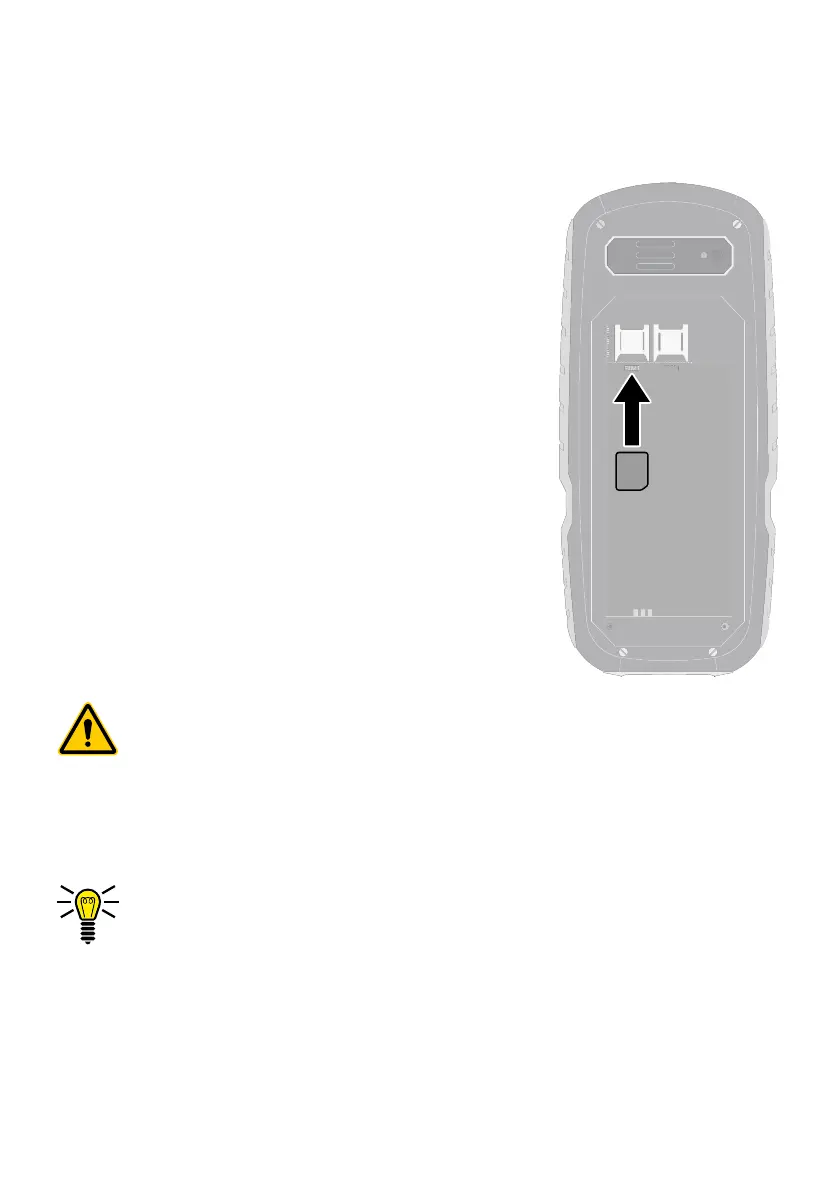
Only use SIM cards of the size illustrated
(nano SIM)� Nano SIM cards which have
already been broken out can cause contact
problems or malfunctions�
The battery compartment contains a shaped
mould which indicates how to position and
align the SIM card correctly in the compart-
ment�
1 Remove the battery compartment cover�
To do this, loosen the four Torx screws in
the battery compartment cover using the
screwdriver supplied�
Caution! When loosening the screws, pay attention to
loosen the screws with a Torx prole. Opening the hous-
ing by loosening the screws with slots could cause the
device to be damaged.
2 Insert the SIM card as shown�
The compartment shape makes it impossible to insert the
card incorrectly�
SIM2
SIM1



 To Next Page