22
Varying the Image Brightness (Exposure Compensation)
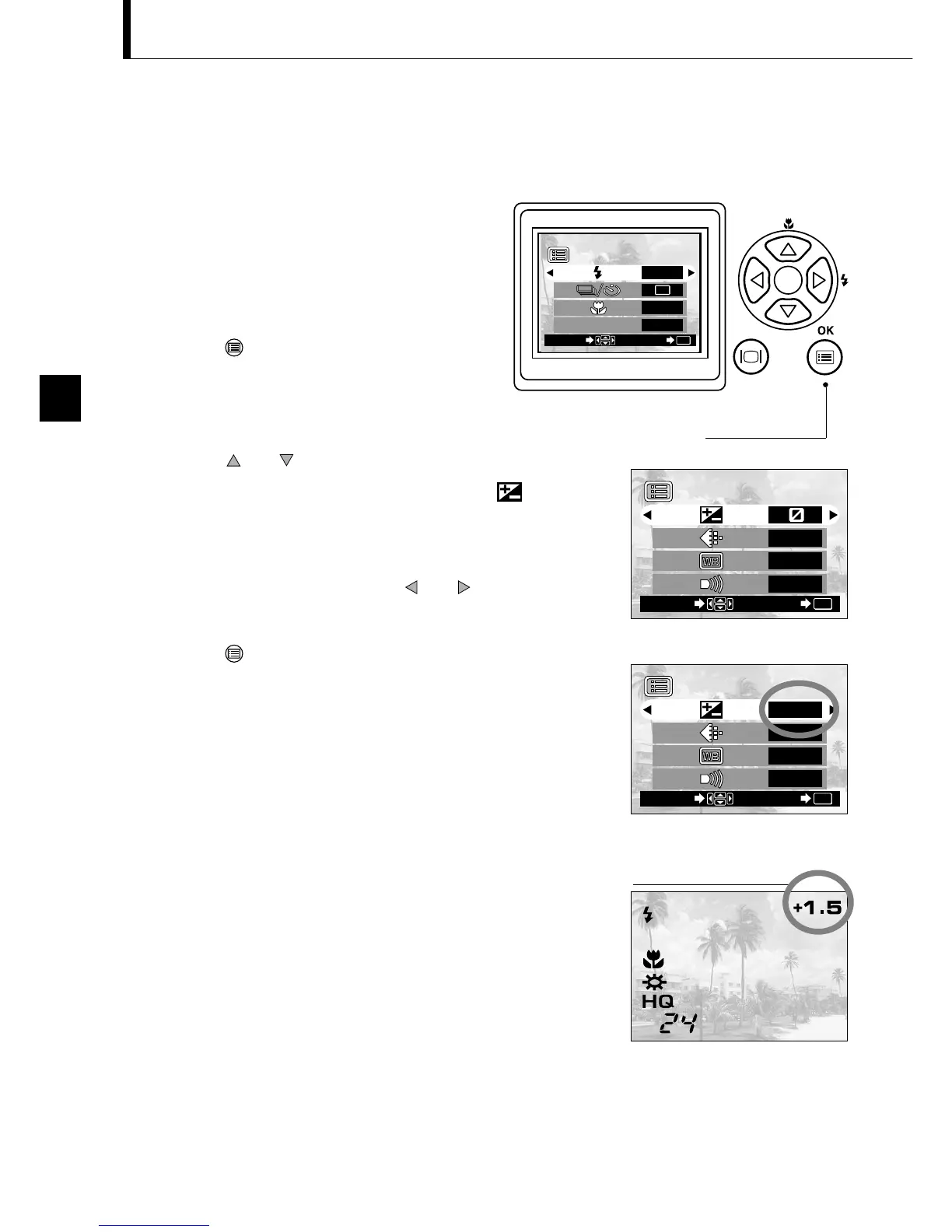
Operating Procedure
1. Check that the lens barrier is open.
2. Press the OK/menu button.
The monitor shows the Shooting mode
menu 1/3.
3. Press the or arrow pad key to display the
Shooting mode menu 2/3, and then select .
4. Select a + value (to brighten image) or – value (to
darken image) by pressing the or arrow pad key.
5. Press the OK/menu button.
The camera returns to the Shooting mode and the
monitor shows the corrected exposure value.
6. Press the shutter button.
Images can be shot successively while maintaining the
corrected exposure value.
7. Close the lens barrier to turn the camera off.
The exposure value is reset to ±0 (no correction).
The exposure compensation value on the monitor goes
out.
Although the camera’s exposure is set automatically, you can vary it to change the
image brightness in the range of ±2 stops in 0.5-stop steps.






 To Next Page