EasyManua.ls Logo

Olympus CAMEDIA C480 Zoom - User Manual

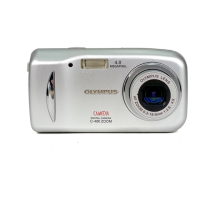
Olympus CAMEDIA C480 Zoom
138 pages
Print Icon
To Next Page IconTo Next Page
Loading...
Thank you for purchasing an Olympus digital camera. Before you start to use your
new camera, please read these instructions carefully to enjoy optimum performance
and a longer service life. Keep this manual in a safe place for future reference.
We recommend that you take test shots to get accustomed to your camera before
taking important photographs.
In the interest of continually improving products, Olympus reserves the right to update
or modify information contained in this manual.
DIGITAL CAMERA
Advanced
Manual
X-550
D-545 ZOOM
C-480 ZOOM
Detailed explanations of all the
functions for getting the most out
of your camera.
Camera Settings
Basic Operation
Shooting
Playing Back
Printing
Online Pictures
Troubleshooting

Table of Contents

Questions and Answers

  • J
    Jamie BurnsAug 18, 2025
    Why my Olympus CAMEDIA C480 Zoom does not turn on?
    • C
      chambersdominiqueAug 18, 2025
      If your Olympus Digital Camera does not turn on or the function buttons are unresponsive, try the following: * Ensure the power is on by pressing the POWER switch. * Check and correctly reload the batteries. * Replace or charge the batteries if they are exhausted. * Warm the batteries if cold is affecting their performance by placing them in your pocket. * Operate the camera using the shutter button or # if it's in sleep mode. * Note that the camera will not operate while connected to a computer.
  • K
    Katherine MartinezAug 20, 2025
    Why is the monitor hard to see on my Olympus CAMEDIA C480 Zoom?
    • K
      Karen CarrAug 20, 2025
      If your Olympus Digital Camera's monitor is hard to see: * Turn the camera off and wait until it dries before turning it on again, if there is condensation inside the camera. * Adjust monitor brightness using [s]. * Block the sunlight with your hand while taking pictures if the monitor is exposed to direct sunlight.
  • A
    andrew11Aug 23, 2025
    Why Olympus CAMEDIA C480 Zoom Digital Camera pictures are too dark?
    • T
      Todd PaceAug 23, 2025
      If your Olympus Digital Camera is producing pictures that are too dark, consider these solutions: * Hold the camera correctly, keeping your fingers away from the flash. * Ensure you are shooting within the flash working range. * If the subject is too small and backlit, set the flash mode to [#] before taking the picture. * If using sequential shooting mode, be aware that higher shutter speeds may result in darker pictures; set [j] in the top menu to [OFF].
  • S
    Sara PetersenAug 26, 2025
    How to fix too bright picture on Olympus CAMEDIA C480 Zoom Digital Camera?
    • J
      Jessica RobertsAug 26, 2025
      If your Olympus Digital Camera is producing pictures that are too bright: * Select a flash mode other than [#], if the flash was set to [#]. * Adjust the exposure compensation toward minus (–) if the center of the subject is too dark, as this can cause the surrounding area to appear too bright.
  • J
    Jasmine MclaughlinAug 28, 2025
    How to fix out of focus picture on Olympus CAMEDIA C480 Zoom Digital Camera?
    • K
      Kathleen UnderwoodAug 28, 2025
      If your Olympus Digital Camera's picture is out of focus: * Move further away from the subject. For shots closer than 20 cm (7.9") with maximum zoom wide, use super macro mode. * Use the focus lock to focus on your subject, if auto focus is not possible. * Turn the camera off and wait until it dries before turning it on again, if there is condensation on the lens.
  • M
    martin06Aug 30, 2025
    How to stop my Olympus CAMEDIA C480 Zoom Digital Camera from resetting settings?
    • T
      Timothy GallegosAug 30, 2025
      If your Olympus Digital Camera settings revert to factory defaults when turned off, set [ALL RESET] to [OFF].
  • P
    pamela62Sep 2, 2025
    Why Olympus CAMEDIA C480 Zoom Digital Camera battery drains so fast?
    • R
      Robert Romero Jr.Sep 2, 2025
      If the battery run time of your Olympus Digital Camera is brief: * Keep the camera warm by putting it inside your coat or clothing, as battery performance deteriorates in low temperatures. * Replace or charge the batteries when battery consumption fluctuates considerably, as the camera may turn off without displaying the battery warning indicator.
  • S
    Samuel EllisSep 4, 2025
    How to fix single-frame erase on Olympus CAMEDIA C480 Zoom Digital Camera?
    • I
      icruzSep 5, 2025
      If single-frame erase and all-frame erase cannot be performed on your Olympus Digital Camera, cancel the protection of the pictures.
  • T
    Tony ValentineSep 7, 2025
    What to do if my Olympus CAMEDIA C480 Zoom Digital Camera doesn't take a picture when I press the shutter button?
    • B
      brian09Sep 7, 2025
      If your Olympus Digital Camera isn't taking pictures when you press the shutter button, consider these possibilities: * Replace or charge the batteries if they are exhausted. * Ensure the camera is in shooting mode by pressing #. * Wait for the flash to finish charging (the # indication stops blinking). * Make sure the power is on by pressing the POWER switch. * Erase unwanted pictures or insert a new card if the memory is full. Download important images to a computer before erasing. * If the battery power was exhausted during shooting, replace or charge the batteries and wait until the card access lamp stops blinking. * Wait until there is space in the memory gauge.
  • R
    Ryan ChoiSep 9, 2025
    Why pictures do not appear on the monitor of my Olympus CAMEDIA C480 Zoom?
    • V
      vobrienSep 9, 2025
      If pictures you've taken aren't showing up on the monitor of your Olympus Digital Camera: * Ensure the power is on in playback mode by pressing $. * Switch to playback mode by pressing $ if the camera is in shooting mode. * Record pictures if [NO PICTURE] is displayed, indicating there are no pictures in the internal memory or card. * If there is a problem with the card, see “Error codes”.

Summary

Basic Operation Guide

Using Shooting and Playback Buttons

Learn how to use the shooting and playback buttons to switch modes and control camera functions.

Using the Mode Dial

Understand the function of the mode dial for switching between still picture and movie shooting modes.

Using Direct Buttons for Settings

Explore how direct buttons offer quick access to camera functions like zoom, macro, and flash.

Navigating Camera Menus

Learn to access and use the camera's menu system for various settings and configurations.

Tips Before Taking Pictures

Achieving Correct Focus

Techniques for focusing on subjects and using focus lock when auto-focus struggles.

Understanding Record Modes

Select the best record mode based on image size and compression for your needs.

Basic Shooting Functions

Selecting Shooting Modes for Situations

Choose the optimal shooting mode based on various conditions like portraits, landscapes, and night scenes.

Zooming and Close-up Photography

Learn to use optical and digital zoom for distant subjects and macro mode for close-ups.

Flash Shooting Options

Understand different flash modes like auto-flash, red-eye reduction, fill-in flash, and flash off.

Adjusting Picture Brightness (Exposure)

Fine-tune exposure settings using compensation to achieve the desired brightness in your photos.

Additional Shooting Functions

Recording Movies

Instructions on how to record movies, including composition and stopping the recording.

Playback Functions

Camera Settings

Printing Pictures

Connecting Camera to Computer

Appendix: Troubleshooting and Care

Troubleshooting Common Issues

Find solutions for error codes, camera malfunctions, and operational problems.

Olympus CAMEDIA C480 Zoom Specifications

General IconGeneral
BrandOlympus
ModelCAMEDIA C480 Zoom
CategoryDigital Camera
LanguageEnglish

Related product manuals