83
3
EN
Menu setting method
Menu setting method
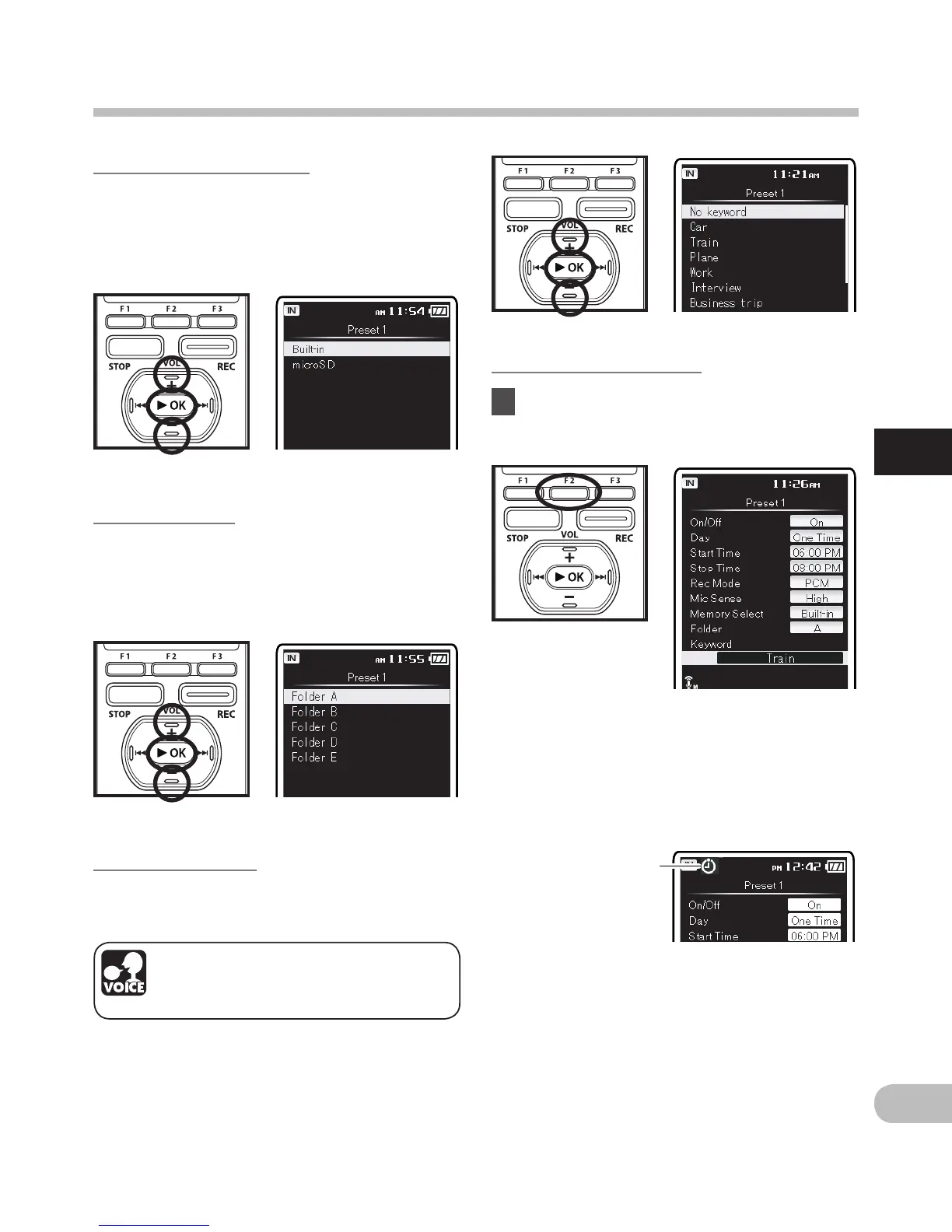
[Memory Select] setting:
1Press the + or
–
button to select the
destination to save to (Memory).
2Press the `OK button to exit [Memory
Select] setting selection.
[Folder] setting:
1Press the + or – button to select the
destination to save to (Folder).
2Press the `OK button to exit [Folder]
setting selection.
[Keyword] setting:
Tag a keyword to file to be recorded using
the timer.
1Press the + or – button to select the
desired keyword, and then press the
`OK button.
Completing the setting:
4 Press the
F2 (GO)
button to
complete the setting.
The voice control function can
be used with this setting
(☞ P.107) (For DM-5).
Programmed settings will be applied and
the display will return to the preset number
selection menu. If the [On/Off] setting is
set to [On], [j] will appear on the display.
a When setting to [On]
To set other preset numbers, repeat the
abovementioned procedure.
When the 9 button is pressed in the
Select in Advance Menu, the settings
selected can be confirmed.


 To Next Page