EasyManua.ls Logo

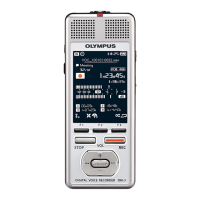
Olympus DM-7 - User Manual

Olympus DM-7
149 pages
Print Icon
To Next Page IconTo Next Page
Loading...
DIGITAL VOICE
RECORDER
USER MANUAL
Thank you for purchasing an Olympus digital voice recorder.
Please read these instructions for information about using the product
correctly and safely.
Keep the instructions handy for future reference.
To ensure successful recording, we recommend that you test the record
function and volume before use.
Getting started
Recording
Playback
Schedule
Menu
Wi-Fi Function
Use with a PC
Other information
EN
7
1
2
3
4
5
6
DM-7
8

Table of Contents

Questions and Answers

  • J
    jonestheresaAug 19, 2025
    What to do if PC doesn't recognize Olympus DM-7?
    • L
      Luis HernandezAug 19, 2025
      If your PC is unable to recognize the Olympus voice recorder, make sure that when connecting to the PC, [PC] was selected. Also, ensure that the Wi-Fi ON/OFF switch of the voice recorder is set to OFF.
  • J
    Jennifer BurgessAug 21, 2025
    How to fix a blank display on Olympus DM-7?
    • R
      Ryan SmithAug 21, 2025
      If the Olympus Voice Recorder display is blank, it might be due to several reasons. First, ensure the battery is correctly inserted. Second, the remaining battery power may be low, so try charging it. Finally, check if the power is turned off and, if so, turn it on.
  • D
    Dr. Katherine LewisAug 23, 2025
    What to do if Olympus DM-7 is not working?
    • M
      Michael BlevinsAug 23, 2025
      If you're unable to operate your Olympus Voice Recorder, there are a few potential causes. The battery might be low, so try charging it. Also, ensure the power is turned on. Finally, check if the voice recorder is in HOLD mode and, if so, release it.
  • L
    Linda DavisAug 26, 2025
    How to troubleshoot inaudible playback on Olympus DM-7 Voice Recorder?
    • T
      twatkinsAug 26, 2025
      If the playback on your Olympus Voice Recorder is inaudible, check these things: Make sure the earphones are not connected to the EAR jack if you want to use the built-in speaker. Ensure that the [Speaker] setting is set to [On]. Finally, verify that the volume isn't set to [00] and adjust it accordingly.
  • A
    Anthony RodriguezAug 28, 2025
    Why is my Olympus DM-7 not recording?
    • C
      christopher74Aug 28, 2025
      If you're unable to record with your Olympus Voice Recorder, it could be due to a couple of reasons. First, check if there is remaining memory; if not, erase unneeded files. Second, the maximum number of recordable files may have been reached, so try selecting another folder.
  • G
    Gregory LopezAug 30, 2025
    Why won't my Olympus DM-7 battery charge?
    • B
      Brian WoodAug 30, 2025
      If you're unable to charge the battery of your Olympus Voice Recorder, first, ensure you are using the specified battery (LI-50B). Second, check that the [USB Settings] is set to [Storage Class].
  • E
    ericgraySep 1, 2025
    How to increase recording volume on Olympus DM-7 Voice Recorder?
    • O
      omitchellSep 1, 2025
      If your Olympus Voice Recorder recordings are too quiet, it could be due to the recording level not being adjusted properly. Redo the recording after adjusting the recording level. Also, a low recording level might have been set; redo the recording after setting the recording level to [High] or [Middle].
  • J
    james01Sep 4, 2025
    Why does my Olympus DM-7 Voice Recorder audio sound distorted?
    • T
      Tony GravesSep 4, 2025
      If the audio file sound is distorted on your Olympus Voice Recorder, it might be because the recording level hasn’t been adjusted properly. Redo the recording after adjusting the recording level. If the problem continues, adjust the output level of the connected external device.
  • M
    Melissa StephensonSep 6, 2025
    Why is my Olympus DM-7 Voice Recorder not recording in stereo?
    • A
      Amber RiveraSep 6, 2025
      If an audio file is not recorded in stereo on your Olympus Voice Recorder, it could be due to several reasons. The connected external microphone might be a mono microphone, in which case sound is recorded on the left channel only. Also, check if [Rec Mode] is set to a mono recording format and, if so, set it to a stereo recording format. Finally, ensure that [Off] is selected for [Zoom Mic].
  • C
    Cassandra ChristensenSep 8, 2025
    How to enable voice skip on Olympus DM-7 Voice Recorder?
    • R
      robert41Sep 8, 2025
      If non-voice portions are not being skipped during playback on your Olympus Voice Recorder, it could be because the [Voice Detect ] process has not been performed. Use the [Voice Detect] function to extract the speech portions. Also, ensure that [On] is selected for [Voice Playback].

Summary

Getting Started

Recording

Basic Recording Procedure

Step-by-step guide to start recording audio.

Playback

Basic Playback Procedure

Step-by-step guide to play recorded audio files.

Erasing Files and Folders

Deleting unwanted audio files or folders.

Schedule Function

Registering a Voice Memo

Recording a short memo for a specific date.

Playing Voice as Alarm

Using a voice memo as an alarm.

Erasing Voice Memos

Deleting registered voice memos.

Wi-Fi Function

Before Using Wi-Fi

Overview of Wi-Fi capabilities and requirements.

Using with a PC

Troubleshooting

Common Issues and Solutions

Guide to resolving common problems.

Specifications

Safety Precautions

Important Safety Precautions

General guidelines for safe operation.

Voice Recorder Safety Precautions

Warnings for hazardous environments and misuse.

Battery Handling Precautions

Warnings about battery use, charging, and disposal.

AC Adapter Precautions

Warnings about AC adapter use and handling.

Olympus DM-7 Specifications

General IconGeneral
BrandOlympus
ModelDM-7
CategoryVoice Recorder
LanguageEnglish

Related product manuals