EasyManua.ls Logo

Olympus DM-7 - User Manual

Olympus DM-7
149 pages
Print Icon
To Next Page IconTo Next Page
Loading...
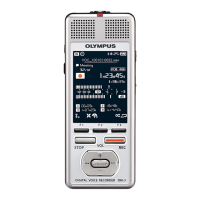
DIGITAL VOICE
RECORDER
USER MANUAL
Thank you for purchasing an Olympus digital voice recorder.
Please read these instructions for information about using the product
correctly and safely.
Keep the instructions handy for future reference.
To ensure successful recording, we recommend that you test the record
function and volume before use.
Getting started
Recording
Playback
Schedule
Menu
Wi-Fi Function
Use with a PC
Other information
EN
7
1
2
3
4
5
6
DM-7
8

Table of Contents

Questions and Answers

  • D
    davidhughesSep 12, 2025
    Why are the buttons on my Olympus DM-7 not working correctly?
    • J
      Jonathan JensenSep 12, 2025
      If button operations are abnormal on your Olympus Voice Recorder, the [Transcription Mode] setting might be [On]. Set the [Transcription Mode] setting to [Off].
  • E
    ejohnsonSep 13, 2025
    Why can't I delete files on my Olympus DM-7?
    • M
      Marilyn ChavezSep 13, 2025
      If you're unable to erase a file on your Olympus Voice Recorder, it could be because the file is locked. You must unlock the file before you can erase it. Alternatively, the file might be a read-only file; unlock the file, or undo the read-only setting on a PC.
  • J
    Jennifer SmithSep 15, 2025
    How to reduce noise during playback on Olympus Voice Recorder?
    • D
      Dale BerrySep 15, 2025
      Noise during playback on your Olympus Voice Recorder can occur if objects brushed against the voice recorder while recording. Additionally, the voice recorder was placed near a mobile phone or fluorescent light during recording or playback. Redo the operation with the voice recorder in a different location.

Summary

Getting Started

Recording

Basic Recording Procedure

Step-by-step guide to start recording audio.

Playback

Basic Playback Procedure

Step-by-step guide to play recorded audio files.

Erasing Files and Folders

Deleting unwanted audio files or folders.

Schedule Function

Registering a Voice Memo

Recording a short memo for a specific date.

Playing Voice as Alarm

Using a voice memo as an alarm.

Erasing Voice Memos

Deleting registered voice memos.

Wi-Fi Function

Before Using Wi-Fi

Overview of Wi-Fi capabilities and requirements.

Using with a PC

Troubleshooting

Common Issues and Solutions

Guide to resolving common problems.

Specifications

Safety Precautions

Important Safety Precautions

General guidelines for safe operation.

Voice Recorder Safety Precautions

Warnings for hazardous environments and misuse.

Battery Handling Precautions

Warnings about battery use, charging, and disposal.

AC Adapter Precautions

Warnings about AC adapter use and handling.

Olympus DM-7 Specifications

General IconGeneral
BrandOlympus
ModelDM-7
CategoryVoice Recorder
LanguageEnglish

Related product manuals