EasyManua.ls Logo

Olympus DP74 - User Manual

Olympus DP74
60 pages
Print Icon
To Next Page IconTo Next Page
Loading...
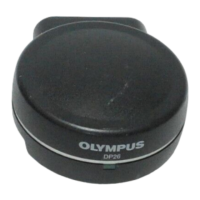
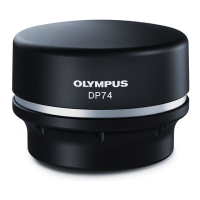
This instruction manual is for the Olympus microscope digital camera DP74.
To obtain optimum performance of this product and to ensure the safety, study this manual
thoroughly before operating this product and keep it on hand during operation of this product.
Retain this instruction manual in an easily accessible place near the work desk for future
reference.
For products included in the configuration of this system, see page 18 of this instruction
manual.
INSTRUCTIONS
Microscope Digital Camera
DP74
A X 8 9 0 0
Optical Microscope Accessory

Questions and Answers

  • C
    Christine BaileyAug 10, 2025
    What to do if the live image is not displayed on Olympus DP74?
    • R
      Robert HowardAug 10, 2025
      If the live image is not displayed on your Olympus Microscope, ensure the camera and PC are properly connected by turning OFF the PC and reconnecting the camera to the PCIe interface board using the camera interface cable. Also, verify that the microscope's illumination is turned ON, the light path selector is set to the camera side, and both the illumination light intensity and focusing are properly adjusted. Finally, ensure that sensitivity, exposure mode, exposure time, and level adjustments are correctly configured.
  • W
    William HallAug 19, 2025
    Why the software does not start on my Olympus DP74 Microscope?
    • J
      James JenkinsAug 19, 2025
      If the software for your Olympus Microscope does not start, it may be due to the PCIe interface board not being properly installed. Ensure it is correctly installed. Alternatively, the software itself may not be installed correctly; in this case, re-install the software.
  • C
    Christina MartinezAug 29, 2025
    How to fix a slow frame rate of the live image on Olympus Microscope?
    • K
      Kimberly JohnsonAug 29, 2025
      If the frame rate of the live image on your Olympus Microscope is slow, it might be because the PC you are using does not meet the necessary operating environment specifications. Check the PC's specifications, particularly ensuring that the extension slot is electrical mode X4 or more and that the RAM is dual-channel.

Summary

Safety Precautions

Installation Safety Precautions

Safety measures for installing the product on a sturdy surface and managing its height.

Electric Safety Precautions

Guidelines for safe electrical connections, grounding, and power cord usage.

Prevention of Electric Shock and Burns

Precautions against electric shock from vents and prevention of burns from hot components.

Handling Precautions

Precautions for Use

Guidelines for continuous operation, handling precision, and protecting against impact.

Recommended PC Configurations

PC Requirements

Details necessary CPU, RAM, HDD, Graphics, Extension Slot, and OS for system operation.

Assembly Procedures

Attaching the Camera Head

Step-by-step guide for attaching the camera head to the C-mount camera adapter.

Software Installation

Image Acquisition Procedures

External Trigger Function

Specifications

Olympus DP74 Specifications

General IconGeneral
TypeDigital Microscope Camera
InterfaceUSB 3.0
CoolingAir cooling
Power SupplyUSB bus power
Binning2x2
Image SensorCMOS
DisplayN/A (requires external monitor)
Exposure Time Range1 ms to 1 s
Supported Operating SystemsWindows 10 (64 bit)

Related product manuals