To Next Page
E
Edwin GrayAug 12, 2025
How to remove dust or dirt from the field of view in my Olympus IX2-DSU?
- LLeslie BeckerAug 12, 2025
If you observe dust or dirt in the field of view of your Olympus Microscope, clean the mirror unit and the disk adequately.

How to remove dust or dirt from the field of view in my Olympus IX2-DSU?
If you observe dust or dirt in the field of view of your Olympus Microscope, clean the mirror unit and the disk adequately.
What to do if the specimen image does not appear on the monitor of my Olympus Microscope?
If the specimen image does not appear on the monitor of your Olympus Microscope, first, ensure that the camera is switched on. If it is, check if the shutter is obstructing the light path and displace it. Also, verify that no filter or other unnecessary substance is in the light path. Finally, confirm that the visual mirror unit and camera mirror unit are correctly combined by setting the visual mirror unit (front side) to the reference mirror and the camera mirror unit (rear side) to the mirror unit.
Why is the field of view obscured or not evenly illuminated on my Olympus Microscope?
If the field of view in your Olympus Microscope is obscured or not evenly illuminated, ensure that the field iris diaphragm is correctly centered and not excessively squeezed; open the aperture adequately if needed. Also, check that the lamp house is properly centered. Confirm that the visual mirror unit is firmly in the click position according to your purpose and the shutter is fully open.
Why is the confocal image extremely dark on my Olympus IX2-DSU Microscope?
If the confocal image from your Olympus Microscope is extremely dark, start by checking for any filters or unnecessary substances obstructing the light path and remove them. Then, adjust the camera's exposure time and brightness level to adequate settings. Finally, ensure that the visual and camera mirror units are correctly combined by putting the appropriate mirror unit into the light path.
How to reduce flare in my Olympus Microscope images?
If you notice remarkable flare in your Olympus Microscope images, try turning off any ambient light sources, such as fluorescent lamps, or use a specimen cover to block the ambient light. Adjust the camera's exposure time and brightness levels. Ensure that you are using non-fluorescent glass and a cover glass with a thickness of 0.17mm.
What to do if the disk does not turn on my Olympus IX2-DSU?
If the disk of your Olympus Microscope does not turn, if stripes of disk appear on the monitor, or if the confocal effect cannot be acquired even if the disk were put into light path, ensure the cable is correctly connected. Check that the disk unit is correctly inserted into the disk box firmly. Verify that the access panel is firmly attached to avoid interlock function activation. Also, remove the transport lock if it is still attached.
Why is the camera mirror unit not turning on my Olympus IX2-DSU?
If the camera mirror unit or the electric filter wheel of your Olympus Microscope does not turn, ensure the cable is correctly connected. If the mirror unit is about to come off the cassette, remove the turret from the mirror unit cassette and fix it to the correct position firmly.
Why is the confocal image blinking on my Olympus IX2-DSU Microscope?
If the confocal image from your Olympus Microscope is blinking, ensure that the exposure time of the camera is set to more than 200ms.
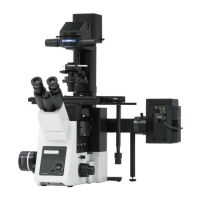
Introduces the IX2-DSU/BX-DSU Disk Scanning Biological Microscope and its instruction manual.
Covers essential safety information, precautions, and handling procedures for the microscope system.
Explains manual conventions and provides guidance on unpacking and storage.
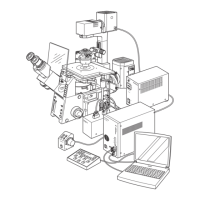
Details the system's principle, features, and configuration for BX and IX series microscopes.
Lists detailed specifications for the BX and IX series models.
Outlines the steps for fluorescent observation via visual and camera methods.
Covers general precautions, mirror selection, lens combinations, and specific operational tasks.
Explains various visual and camera observation techniques for different microscope types.
Provides solutions for common problems encountered with the microscope system.
Details system block diagrams and the installation of various components and accessories.
 General
| Disk Type | Nipkow disk |
|---|---|
| Optical System | UIS2 Optical System |
| Illumination | Fluorescence and transmitted light |
| Camera Compatibility | Standard C-mount |
| Application | Live cell imaging |
| Compatibility | Compatible with IX2 series microscopes |
| Objective Turret | N/A (Utilizes microscope's objective turret) |
| Observation Method | Confocal |
| Stage | N/A (Utilizes microscope's stage) |
| Condenser | N/A (Utilizes microscope's condenser) |
| Light Source | N/A (Utilizes microscope's light source) |
| Camera Port | C-mount |
| Dimensions | Dependent on configuration |