EasyManua.ls Logo

Olympus BX43 - User Manual

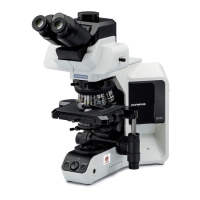
Olympus BX43
48 pages
Print Icon
To Next Page IconTo Next Page
Loading...
INSTRUCTIONS
BX43
SYSTEM MICROSCOPE
This instruction manual is for the Olympus System Microscope Model BX43.
To ensure the safety, obtain optimum performance and to familiarize yourself fully with the use
of this microscope, we recommend that you study this manual thoroughly before operating the
microscope.
Retain this instruction manual in an easily accessible place near the work desk for future reference.
A X 7 8 5 1

Table of Contents

Questions and Answers

  • A
    andrewsmithAug 17, 2025
    How to fix Olympus Microscope bulb that does not light?
    • L
      Luke DickersonAug 17, 2025
      If the bulb in your Olympus Microscope isn't lighting, there are several potential reasons. First, ensure the main switch and the TL4 switch (if applicable) are set to the ā€œIā€ (ON) position. Check that the power cord is securely plugged into the power outlet and that all connectors are properly connected. Also, verify that the bulb is correctly attached and hasn't burned out, replacing it if necessary.
  • V
    vramirezAug 19, 2025
    How to clean dirt or dust visible in the field of view of Olympus BX43 Microscope?
    • C
      cruzgregoryAug 20, 2025
      If you see dirt or dust in the field of view of your Olympus Microscope, the eyepieces may be dirty. Clean them thoroughly.
  • D
    Danielle LewisAug 22, 2025
    Why is the field of view dark on my Olympus Microscope?
    • M
      Mary GrantAug 22, 2025
      If the field of view in your Olympus Microscope appears dark, several factors could be the cause. Begin by resetting the LIM setting. Ensure that the aperture and field iris diaphragms are sufficiently open. Check that the light path selector knob is set to the correct position (either or ). Verify that the condenser is properly centered and adjusted to the correct height. Finally, make sure that the ND filters are disengaged.
  • B
    Bryan AdamsAug 25, 2025
    How to improve visibility and contrast on my Olympus Microscope?
    • C
      Cheryl CainAug 26, 2025
      If you're experiencing poor visibility, image quality, contrast, indistinct details, or glare with your Olympus Microscope, consider these potential causes: Ensure you are using UIS2/UIS series objectives. Adjust the condenser height correctly and open the aperture iris diaphragm sufficiently. Verify the revolving nosepiece is properly attached. Adjust the correction collar on correction collar-equipped objectives while focusing to find the best position. Clean the front lens of the objective and the specimen. Use Olympus-designated immersion oil if using an oil immersion objective, ensuring it's free of bubbles.
  • R
    ryansparksAug 27, 2025
    What to do if field of view is obscured on Olympus Microscope?
    • K
      Kevin RamosAug 27, 2025
      If the field of view in your Olympus Microscope is obscured or not evenly illuminated, check the following: Ensure the light path selector knob is set to a definite click position and that the objective is correctly engaged. Verify the revolving nosepiece and condenser are properly attached. Use a condenser appropriate for the objective being used. Center the condenser and open the field iris diaphragm until it circumscribes the field. Also, ensure the bulb is correctly mounted.
  • L
    Lauren ArellanoAug 30, 2025
    What to do if image cannot be focused on Olympus BX43?
    • M
      michaeltuckerAug 31, 2025
      If the image cannot be focused, the objective drifts down, or the fine adjustment knob slips on your Olympus Microscope, the tension adjustment ring may be too loose. Try tightening it.
  • B
    Brenda RitterSep 2, 2025
    Why brightness cannot be varied on Olympus Microscope?
    • C
      Chloe WhiteSep 2, 2025
      If the brightness of your Olympus Microscope cannot be varied, first ensure that the LIM function is switched OFF. If you are using the TL4, use its brightness adjustment knob. Also, check that the condenser is properly centered and adjusted to the correct height.
  • U
    ufisherSep 5, 2025
    Why is one side of the image blurred on my Olympus BX43?
    • E
      Emma BrownSep 5, 2025
      If one side of the image appears blurred in your Olympus Microscope, check that the objective is correctly engaged in the light path and that the stage is correctly mounted. Ensure the revolving nosepiece is properly attached and that the specimen is mounted correctly.
  • D
    Deanna ZavalaSep 8, 2025
    Why does the image appear to waver on my Olympus Microscope?
    • D
      Derek JohnsonSep 8, 2025
      If the image in your Olympus Microscope appears to waver, ensure that the revolving nosepiece is properly attached and that the objective is correctly engaged in the light path. Also, check that the condenser is properly centered.
  • M
    michael65Sep 12, 2025
    Why does the Olympus BX43 Microscope bulb blow immediately?
    • J
      Jamie AndrewsSep 12, 2025
      If the bulb in your Olympus Microscope blows immediately, the bulb may not be the designated one. Replace it with a designated bulb.

Summary

IMPORTANT

Safety Precautions

General safety advice and precautions for microscope operation and handling.

Getting Ready

Safety Symbols Explained

Explanation of safety symbols found on the microscope for safe usage.

Handling, Maintenance, and Storage

Guidelines for proper handling, maintenance, storage, and intended use.

MODULE NOMENCLATURE

CONTROLS

FLOW OF OBSERVATION

SIMPLIFIED OBSERVATION PROCEDURE

Basic Operation Steps

Step-by-step guide for basic microscope operation before specimen observation.

Image Quality Adjustments

Procedures to improve observed image quality through various adjustments.

USING THE CONTROLS

Base Illumination Controls

Adjusting illumination brightness and setting the Light Intensity Manager (LIM).

Filter Usage Guide

Procedures for inserting and using filters with halogen bulb operation.

Focusing Block and Adjustments

Details on focusing controls, adjustment procedures, and pre-focusing lever.

Stage Operation and Specimen Handling

Instructions for placing specimens, using auxiliary holders, and stage adjustments.

Observation Tube Adjustments

Adjusting diopter, eye shades, micrometer, and tilt for comfortable viewing.

Condenser Compatibility

Information on compatibility between objectives and different condenser types.

Immersion Objective Usage

Proper usage of immersion objectives.

Correction Collar Objectives

Adjustment procedures for objectives with correction collars.

CAMERA RECORDING

System Diagram

Overview of components required for microscope camera recording setup.

Camera Adapter Magnification Selection

Guidance on selecting camera adapter magnification based on image sensor size.

TROUBLESHOOTING GUIDE

SPECIFICATIONS

OPTICAL CHARACTERISTICS (UIS2 Series)

ASSEMBLY

Assembly Diagram

Visual guide illustrating the sequence of microscope module assembly.

Detailed Assembly Procedures

Step-by-step instructions for assembling various microscope components and accessories.

Olympus BX43 Specifications

General IconGeneral
TypeUpright Microscope
IlluminationLED
FocusCoaxial coarse and fine focusing knobs
Magnification40x to 1000x
Power SupplyAC 100-240V, 50/60 Hz
Objective Lenses4x, 10x, 20x, 40x, 100x
Eyepiece10x
StageRectangular Stage
Observation MethodsBrightfield, Darkfield, Phase Contrast, Fluorescence
Optical SystemInfinity-corrected optical system
Eyepiece TubeBinocular or Trinocular
NosepieceRevolving Nosepiece
CondenserAbbe condenser NA 1.25 (swing-out)

Related product manuals