EasyManua.ls Logo

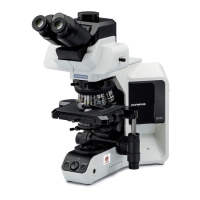
Olympus BX46 - User Manual

Olympus BX46
44 pages
Print Icon
To Next Page IconTo Next Page
Loading...
INSTRUCTIONS
BX46
CLINICAL MICROSCOPE
This instruction manual is for the Olympus Clinical Microscope Model BX46.
To ensure the safety, obtain optimum performance and to familiarize yourself fully with the use
of this microscope, we recommend that you study this manual thoroughly before operating the
microscope.
Retain this instruction manual in an easily accessible place near the work desk for future reference.
A X 7 8 5 3

Questions and Answers

  • A
    Andrew CampbellAug 18, 2025
    How to fix Olympus BX46 bulb not lighting?
    • M
      Martin ThomasAug 18, 2025
      If the bulb of your Olympus Microscope does not light, ensure the main switch is set to the “I” (ON) position. Also, check that the power cord is securely plugged into the power outlet and all connectors are properly connected. Verify the bulb is correctly attached and not burned out; replace it if necessary. If you are using a TL4, confirm its main switch is also set to “I” (ON).
  • A
    Alison WardAug 20, 2025
    Why is the field of view dark in my Olympus BX46?
    • T
      Tiffany HigginsAug 20, 2025
      If the field of view in your Olympus Microscope is dark, there could be several reasons. First, ensure that the LIM setting is appropriate. Check that the aperture and field iris diaphragms are opened wide enough. Make sure the light path selector knob is set to the correct position. Also, verify that the condenser is properly centered and its height is correctly adjusted. Finally, disengage any ND filters that may be in use.
  • L
    lowejamesAug 23, 2025
    What to do if Olympus BX46 Microscope image is not clear?
    • C
      Cheryl TaylorAug 23, 2025
      If the visibility in your Olympus Microscope is poor, the image is not clear, contrast is poor, details are indistinct, or the image glares, ensure that you are using UIS2/UIS series objectives specifically designed for this microscope. Adjust the condenser height correctly and open the aperture iris diaphragm sufficiently. Clean the front lens of the objective and use immersion oil if you have an oil immersion objective, ensuring the oil is free of bubbles and is an Olympus-designated immersion oil. Also, make sure the specimen is clean.
  • P
    pjamesAug 26, 2025
    Why is the field of view obscured on my Olympus BX46?
    • K
      Kelly BauerAug 26, 2025
      If the field of view in your Olympus Microscope is obscured or not evenly illuminated, check that the light path selector knob is set to the desired click position and that the objective is correctly engaged. Ensure the revolving nosepiece clicks properly into place. If using a 4X or higher-power objective, swing out the condenser top lens. Use an objective within the condenser’s illumination range. Center the condenser and open the field iris diaphragm to an optimum size. Finally, make sure the bulb is mounted correctly by pushing the pins of the halogen bulb all the way to the stop position.
  • C
    Caroline HarrisAug 28, 2025
    How to remove dirt from the field of view in Olympus BX46 Microscope?
    • S
      sbakerAug 28, 2025
      If you see dirt or dust in the field of view of your Olympus Microscope, it is likely on the eyepieces. Clean them thoroughly.
  • J
    jessicasmithAug 30, 2025
    Why Olympus BX46 Microscope image cannot be focused?
    • M
      misty61Aug 30, 2025
      If the image cannot be focused on your Olympus Microscope, or if the objective drifts down by itself, or the fine adjustment knob slips, the tension adjustment ring may be too loose. Try tightening the ring.
  • K
    Kevin JohnsonSep 2, 2025
    Why is one side of my Olympus BX46 Microscope image blurred?
    • M
      Miguel BrownSep 2, 2025
      If one side of the image in your Olympus Microscope appears blurred, ensure the objective is correctly engaged in the light path by making sure the revolving nosepiece clicks into place correctly. Also, check that the stage is correctly mounted; re-attach it if necessary. Finally, verify that the specimen is mounted correctly and not upside down.
  • S
    Shannon GarciaSep 4, 2025
    Why does the image appear to waver on my Olympus Microscope?
    • R
      Rhonda BlakeSep 4, 2025
      If the image in your Olympus Microscope appears to waver, ensure the objective is correctly engaged in the light path by confirming that the revolving nosepiece clicks into place correctly. Additionally, check that the condenser is properly centered.
  • W
    walkerjasonSep 6, 2025
    Why is the coarse adjustment knob hard to turn on my Olympus BX46 Microscope?
    • S
      Shaun ParkerSep 6, 2025
      If you find the coarse adjustment knob on your Olympus Microscope hard to turn, try loosening the tension adjustment ring. Also, make sure the pre-focusing lever is unlocked if you are trying to raise the stage without using the coarse adjustment knob.
  • S
    Samantha FuentesSep 9, 2025
    What to do if Olympus Microscope bulb is blown immediately?
    • M
      Megan PerezSep 9, 2025
      If the bulb in your Olympus Microscope is blown immediately after replacement, it may not be the designated bulb. Replace it with the correct, designated bulb.

Summary

IMPORTANT SAFETY PRECAUTIONS

Operation Safety Notes

Covers safety for LED and Halogen lamp operations, emphasizing cooling and avoiding direct light exposure.

1 Getting Ready

2 Maintenance and Storage

2 CONTROLS

3 FLOW OF OBSERVATION

4 SIMPLIFIED OBSERVATION PROCEDURE

4-2 Microscope Adjustments

Details adjustments to improve observed image quality, including interpupillary distance and diopter.

5 USING THE CONTROLS

5-2 Focusing Block: Controls and Adjustment

Describes focusing block controls, including focusing, tension adjustment, fine adjustment knob replacement, and pre-focusing lever functions.

5-3 Stage Operation: Specimen Placement

Information on stage operation, including placing specimens using slide holders.

5-3 Stage Operation: Knob Tension and Rotation

Details how to adjust stage movement tension for X/Y axis knobs and how to rotate the stage.

5-4 Observation Tube: Diopter and Eye Shade Adjustment

Explains how to adjust the observation tube for comfortable viewing, including diopter rings and eye shades.

6 CAMERA RECORDING

7 TROUBLESHOOTING GUIDE

8 SPECIFICATIONS

10 ASSEMBLY

Olympus BX46 Specifications

General IconGeneral
BrandOlympus
ModelBX46
CategoryMicroscope
LanguageEnglish

Related product manuals