EasyManua.ls Logo

Olympus IX51 - User Manual

Olympus IX51
76 pages
Print Icon
To Next Page IconTo Next Page
Loading...
INSTRUCTIONS
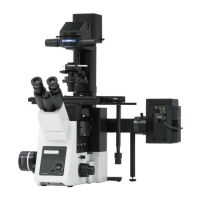
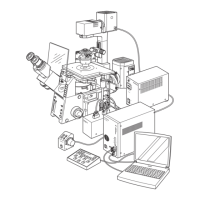
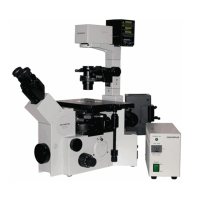
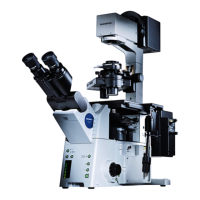
IX71/IX51
INVERTED RESEARCH MICROSCOPE/
INVERTED BASIC MICROSCOPE
A X 7 3 1 9
This instruction manual is for the Olympus Inverted Microscopes Models IX71 and IX51. To
ensure the safety, obtain optimum performance and to familiarize yourself fully with the use
of the microscope, we recommend that you study this manual thoroughly before operating
the microscope. Retain this instruction manual in an easily accessible place near the work
desk for future reference.

Table of Contents

Questions and Answers

  • N
    Nathan LopezAug 17, 2025
    How to remove dirt or dust visible in the field of view of my Olympus IX51 Microscope?
    • K
      Karen NguyenAug 17, 2025
      If you see dirt or dust in the field of view of your Olympus Microscope, thoroughly clean the specimen. Also, adjust the condenser height until the field iris diaphragm image is formed in the specimen plane, as the condenser may not be correctly positioned, causing the frosted filter or filter to be focused.
  • M
    mackchristopherAug 19, 2025
    How to fix Olympus IX51 when the bulb does not light?
    • D
      Denise PalmerAug 20, 2025
      If the Olympus Microscope bulb isn't lighting, first, ensure the power cord of the power supply unit is properly plugged into a power outlet. Next, check that the main switch of the power supply unit is set to ā€œIā€ (ON). Also, verify that the Lamp ON/OFF switch on the IX71 frame or the TH4-HS hand switch is ON. If none of these steps work, the bulb may be burnt out and needs replacement.
  • B
    brownlindaAug 26, 2025
    Why is the image blurred on my Olympus IX51?
    • C
      Chad BaldwinAug 26, 2025
      If the image appears blurred on your Olympus Microscope, make sure that the revolving nosepiece clicks into place correctly, ensuring the objective is properly engaged in the light path. Also, ensure the specimen is correctly placed on the stage and secured with the specimen holder to prevent tilting.
  • E
    emily18Aug 31, 2025
    Why is the field of view obscured on my Olympus Microscope?
    • M
      Marilyn YorkAug 31, 2025
      If the field of view is obscured or not evenly illuminated on your Olympus Microscope, ensure the light path selector button is set to a click position according to the purpose. Use a condenser that matches the objective. Center the field iris diaphragm correctly and open it sufficiently. Engage the light path selector knob all the way in or at a click stop according to the observation method.
  • L
    leemelendezSep 2, 2025
    How to stop image glares on my Olympus IX51 Microscope?
    • J
      jamesgutierrezSep 2, 2025
      If the image glares on your Olympus Microscope, lower the condenser to the proper position. Additionally, open the aperture iris diaphragm.
  • S
    Sarah HallSep 5, 2025
    What to do if coarse/fine adjustment knobs will not rotate easily on my Olympus IX51 Microscope?
    • T
      Thomas MyersSep 5, 2025
      If the coarse/fine adjustment knobs on your Olympus Microscope do not rotate easily, first, release the transport lock. If that doesn't work, loosen the rotation tension adjustment ring optimally. Finally, unlock the pre-focusing lever.
  • M
    Mr. Sean Rivera IISep 8, 2025
    How to match field of view of each eye on my Olympus IX51?
    • T
      Theresa ThomasSep 8, 2025
      If the field of view doesn't match between eyes on your Olympus Microscope, adjust the interpupillary distance. If the problem persists, adjust the diopter.
  • D
    Daniel RileySep 12, 2025
    Why does the revolving nosepiece lower by its own weight on my Olympus IX51 Microscope?
    • I
      Isaiah AndersonSep 12, 2025
      If the revolving nosepiece lowers by its own weight or defocusing occurs due to slipping of fine adjustment on your Olympus Microscope, tighten the rotation tension adjustment ring optimally.
  • G
    garcianathanielSep 13, 2025
    Why coarse focus adjustment cannot move the objective above a certain level on my Olympus Microscope?
    • A
      angela92Sep 13, 2025
      If the coarse focus adjustment cannot move the objective above a certain level on your Olympus Microscope, unlock the pre-focusing lever.
  • M
    Michael DavisNov 21, 2025
    Why is the visibility of observed image poor on my Olympus IX51?
    • A
      Allen MooreNov 22, 2025
      If the visibility of the observed image is poor on your Olympus Microscope, it could be due to several reasons. Check that the objective in use is designed for UIS2/UIS series; if not, replace it. If your objective has a correction collar, rotate it while focusing to find the best position. Ensure the front lens of the objective is clean. If using an oil immersion objective, make sure to use immersion oil without bubbles. Verify that you are using a slide or cover glass of appropriate thickness. Clean all glass components, including the condenser, objective, eyepieces, and culture vessels, to remove any dirt or dust. If performing phase contrast microscopy, ensure the ring slit and phase plate are centered. For DIC observation, replace the plastic culture vessel with a glass vessel if cont...

Summary

Safety Precautions

General Safety Guidelines

Comprehensive safety instructions for handling and operating the microscope.

Getting Ready

Initial Setup and Handling

Guidance on handling the microscope with care and proper setup.

Maintenance and Storage

Cleaning and Storage Procedures

Instructions for cleaning lenses, objectives, and storing the microscope.

Caution

Understanding Cautionary Symbols and Warnings

Explanation of symbols used in the manual and general cautions.

Intended Use

Scope of Application

Defines the intended purpose and applications for the microscope.

Module Nomenclature

Transmitted Light Brightfield Observation Procedure

Step-by-Step Observation Process

Detailed procedure for performing brightfield observation.

Using the Controls

Power Supply Unit and Microscope Frame

Operation of power supply units and microscope frame controls.

Focusing Block Operations

Adjusting focus knobs, detaching fine adjustment, and using pre-focusing lever.

Stage Operations

Placing specimen, moving stage, and adjusting knob tension.

Observation Tube Operations

Adjusting interpupillary distance, diopter, eye shades, and using micrometer disks.

Observation Tube Light Path and Tilt Adjustment

Selecting light paths, using CT turret, and adjusting tube tilt.

Illumination Column IX2-ILL100 Operations

Tilting column, mounting filters, and adjusting diaphragms.

Illumination Column IX2-ILL30 Operations

Using aperture diaphragm and removing condenser lens.

Condenser Operations

Centering condenser, adjusting aperture diaphragm, and flipping holder.

Objective Handling and Usage

Using oil-proof caps, correction collars, and immersion objectives.

Other Observation Methods

Phase Contrast Observation (IX2-ILL100)

Procedure for phase contrast observation with IX2-ILL100 column.

Phase Contrast Observation (IX2-ILL30)

Procedure for phase contrast observation with IX2-ILL30 column.

Differential Interference Contrast Observation

Procedure for DIC observation with IX2-ILL100 column.

Simplified Polarized Light Observation

Procedure for simplified polarized light observation.

Reflected Light Fluorescence Observation

Reference to a separate manual for fluorescence observation.

Photomicrography and TV Observation

Photomicrography

Procedures and guidelines for capturing images using the microscope.

TV Observation

Methods and procedures for TV observation.

Troubleshooting Guide

Optical System Troubleshooting

Resolving issues with optical components, illumination, and image quality.

Mechanical and Adjustment Troubleshooting

Addressing problems with focusing, objectives, and stage movement.

Specifications

Component Specifications Overview

Technical details for microscope frames, optics, and accessories.

Assembly

Assembly Diagram and Procedures

Diagram and steps for assembling the microscope and its modules.

Connecting Cables and Frame Clamping

Instructions for connecting cables and mounting frame clamping plates.

Proper Selection of the Power Supply Cord

Power Cord Selection Guidelines

Specifications and certification information for selecting power supply cords.

Lamp Housing Inspection Sheet

Periodic Lamp Housing Inspection Checklist

Checklist for periodic inspection of the lamp housing for safety and function.

Olympus IX51 Specifications

General IconGeneral
BrandOlympus
ModelIX51
CategoryMicroscope
LanguageEnglish

Related product manuals