12
2
3
4
1
Recording
The recorder provides five folders, A, B, C, D and E, and each message recorded in a folder
is saved as a Digital Speech Standard (DSS) file. These five folders can be selectively used to
distinguish the kind of recording; for example, A might be used to store private information, while
B might be dedicated to holding business information (☞ P.32). Up to 199 messages can be
recorded per folder. Four recording modes are available: new, append, overwrite, and insert.
New Recording
Create a new file to record in.
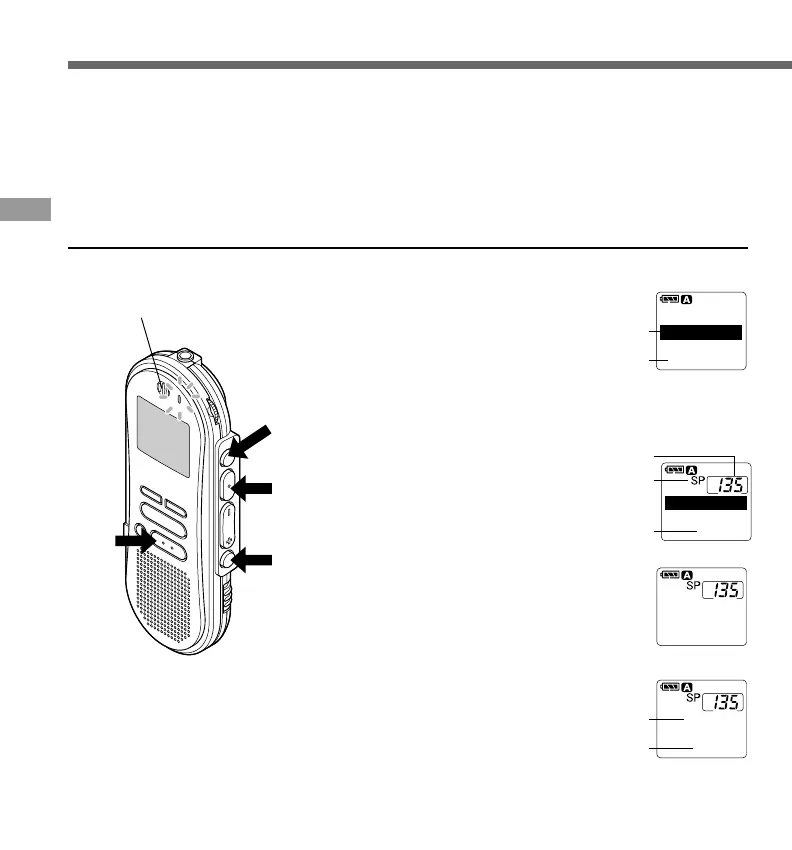
1
Press the FOLDER/MENU button
to choose a folder.
The folder name is displayed for
approximately 2 seconds.
a Folder name
b Total number of recorded files in the
folder
2
Press the NEW button to create a
new file.
c New file number
d Current recording mode
e Remaining recording time
3
Press the REC/SET button to start
recording.
The record/play indicator lamp glows red.
Aim the microphone at the sound source.
f Current recording time
g Remaining recording time
4
Press the STOP button to stop
recording.
If you want to append additional recordings to the same
file, press the REC/SET button once again.
{
Recording
Microphone
TOTALTOTAL 134134
FOLDERFOLDER A
a
b
()
5858
M
1818
S
NEWNEW FILEFILE
[REMAIN][REMAIN]
c
d
e
RECORD
00
M
00
S
()
5858
M
1818
S
0000
M
0202
S
[REMAIN][REMAIN]
f
g



 To Next Page