40
3
Locking Files (Lock)
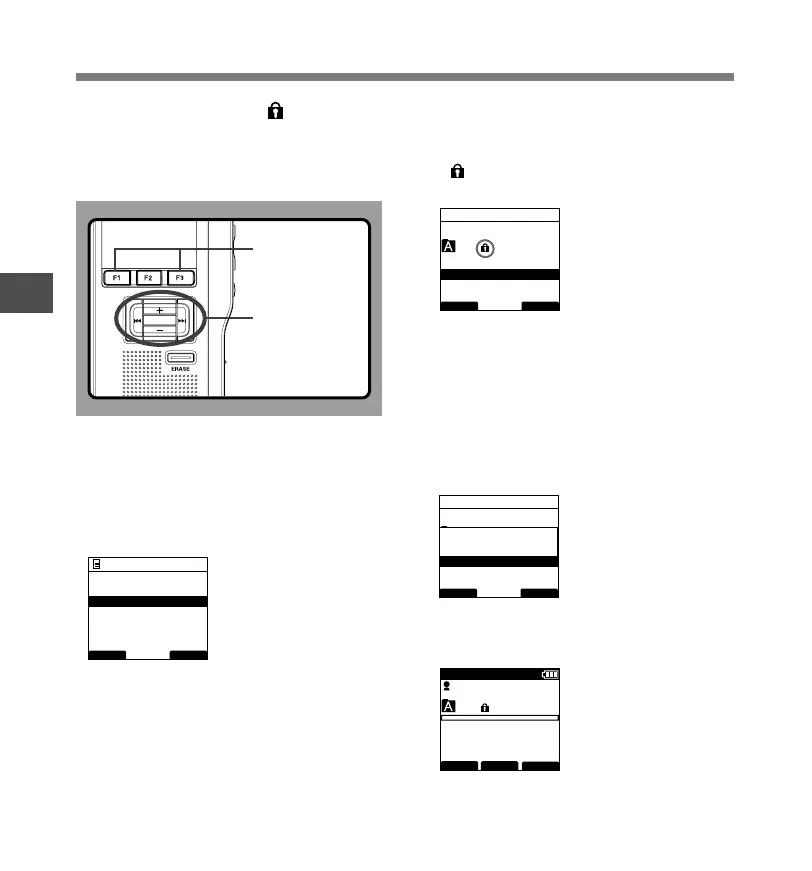
When a file is set to [Lock], will appear on
the display, allowing you to prevent important
files from accidental erase. Furthermore, the
file will not be erased even when all files within
a folder are erased.
1
Select the file you want to Lock.
2
Select [Lock] at the [File Menu] screen, then
press the PLAY/OK or 9 button.
Refer to P.33 regarding each menu item settings.
Locking Files
3
Press the + or
–
button to select [On]
or [Off].
On...Locks the file and prevents it from
being erased.
appears on the display.
Off...Unlocks the file and allows it to be erased.
4
Press the PLAY/OK button to complete the
setup screen.
[File Lock On] or [File Lock Off] will light up on
the display, and it will return to the [File Menu]
screen.
If you press the 0 or F1
(
BACK
)
button the
setting will be cancelled and it will return to the
[File Menu].
Pressing the F3(EXIT) button will cancel the
contents being set and take you out of the MENU.
5
Press the F3
(
EXIT
)
or 0 button to
complete the setting.
PLAY/OK
F1, F3 button
PLAY/OK,
+, –,
9, 0
button
BACK EXIT
File Menu
Pending
Priority
Lock
Work Type
Information
029 / 030
BACK EXIT
Lock
OnC
Off
029 / 030
BACK EXIT
Lock
OnC
Off
File Lock
On
029 / 030
FOLDER
PRIOR
MENU
DS3400
E
QP CONF
New File
02 M 10 s
3 H 0 8 M 0 5 s



 To Next Page